How to Convert PDFs to Other Formats
JOPDF Converter allows you to convert your PDFs to any formats or transform Word, Excel, PowerPoint, JPG, JPEG, PNG, HEIC, BMP and more formats to high-quality PDF documents.
Step 1. Open JOPDF Converter
There are two methods to open the JOPDF PDF Converter.
- Method 1: On the start page, click Batch Process under Popular Tools. In the popup windows, select the conversion tool you need.
- Method 2: Open a PDF file with JOPDF, go to the Convert tab at the top, and select the conversion tool you want to use.
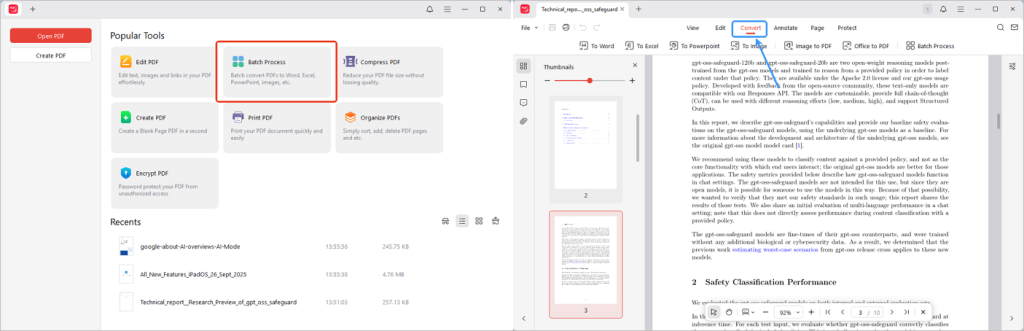
Note: The conversion plugin is required to ensure conversions work properly. Just follows the on-screen guide to install JOPDF converter plugin. Once the plugin is installed, JOPDF will no longer ask you to install it, and you can use the PDF conversion tools smoothly online and offline.
Step 2. Add Files and Choose Output
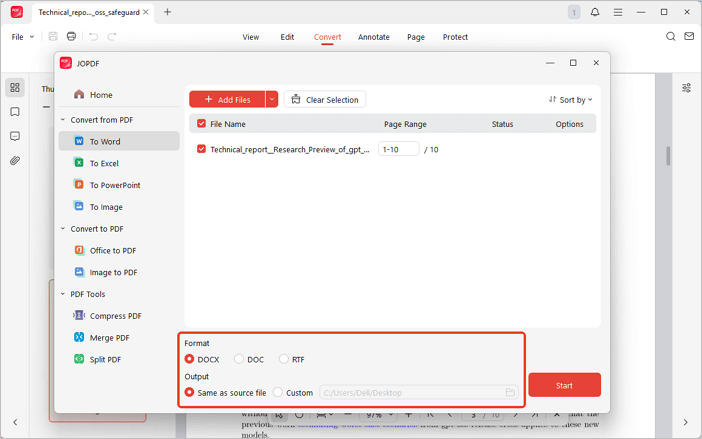
Click Add Files button to open PDFs or simply drag and drop them into the converter window. Then, choose your output format and select the folder where you want to save the converted files.
Step 3. Start the Conversion
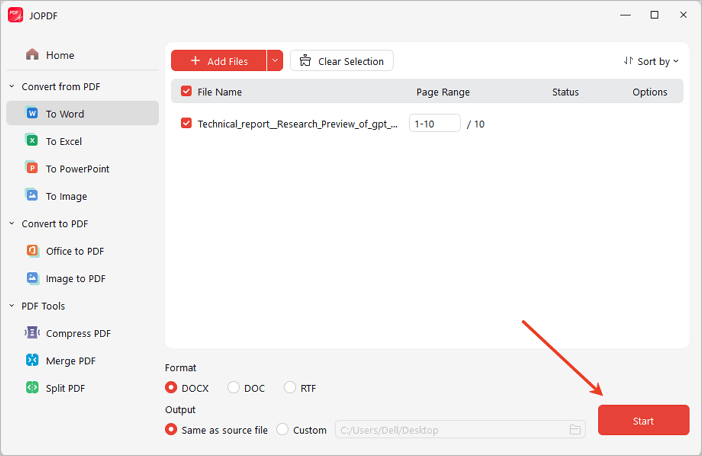
Once all settings is done, hit the Start button to begin the conversion. Within moments, you PDF document will be converted to your desired format.
How to Convert Images to PDF with JOPDF
JOPDF PDF Converter makes it easy to convert JPG, PNG, JPEG, BMP, HEIC and other image formats to PDF. Follow this quick tutorial to create high-quality PDFs from your images.
Step 1: Add Images to JOPDF Converter
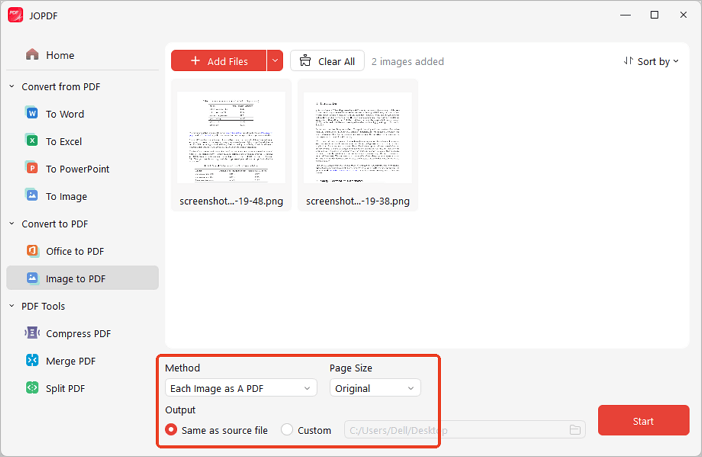
Open JOPDF PDF Converter and go to Image to PDF under the PDF Converter tools. Add your images (JPG, JPEG, PNG, BMP, HEIC, etc.) to the list. If needed, drag and drop the image to reorder them before converting.
Step 2: Choose Your Output Settings
JOPDF offers two output methods:
- All Images as A PDF: Combine all images into one PDF.
- Each Image as A PDF: Export each image as a separate PDF file.
Choose your preferred option. You can also set the page size and other settings based on your needs.
Step 3. Start Converting Images to PDF
When everything is ready, click Start. JOPDF will convert your images into PDF format.

 Can't find the solution of your problem?