Summary :
If you’re trying to access research papers on Academia.edu but keep running into download limits, login requirements, or restricted files, you’ve come to the right place. This article on JOPDF helps you use an Academia downloader to access academic papers for free. There are 7 best Academia downloader tools that still work in 2026. Just copy and paste the Academia URL, and you can access the full text of an Academia paper.
Part 1: Are There Free Academia Downloaders Available?
Yes, there are several free Academia downloader tools available online. Academia.edu is a popular platform for academic papers, hosting over 50 million research papers across various disciplines. While the platform allows free reading, downloading is often restricted to registered users or premium subscribers.
An Academia downloader online website can help you download Academia PDF without login requirements. These tools work by acting as a proxy between you and Academia’s servers, extracting the full text of papers and delivering them as PDF download files.
However, it’s important to note that not all Academia downloader tools are legal or safe. Some operate in a gray area, while others are fully compliant with open access principles. We’ll cover both types in this guide.
Part 2: Comparison Table of Best Academia.edu Downloader Tools
Here’s a quick comparison of the 7 best Academia downloader tools we’ve tested:
| Tool | Type | No Signup | Supported Formats | Success Rate | Ads | Speed | Batch Download | Privacy Policy |
| DownAcademia | Online | Yes | PDF, DOCX | High (95%+) | Low | Fast | No | No data stored |
| ACADOWNLOAD.COM | Online | Yes | Medium-High | Low | Fast | No | No files stored | |
| SelfDownloader | Online | Yes | Medium | Medium | Medium | No | No-log policy | |
| ScribDownloads | Online | Yes | PDF, PPT | Medium | Low | Fast | No | Limited info |
| DocDownloader | Online | Yes | PDF, PPT, TXT | Medium | Medium | Medium | No | Limited info |
| ScienceGate | Online | Optional | PDF, BibTeX | High | Low | Medium | Yes | Academic use |
| Unpaywall | Extension | Yes | Very High | None | Instant | N/A | Nonprofit, privacy-focused |
While third-party Academia downloader tools may seem convenient, they operate in a legal gray area and can expose you to unnecessary risks. The official method is the only way to download PDF from Academia free with complete peace of mind.
It’s also the most ethical choice—you’re respecting the author’s wishes and supporting the academic journal ecosystem. For researchers who need to download Academia PDFs regularly, building a habit of using official channels is the best long-term strategy.
Plus, JOPDF provides other popular document downloader tools with detailed information. You can check the following articles:
- Best Free uDocz Downloader: Download uDocz PDF Files Online
- Best Course Hero Downloader Free in 2026 – Download PDFs from Course Hero
- Shutterstock Downloader: Best Tools & Legal Ways to Download Images & Videos
- Pngtree Downloader Free Online Without Watermark – 4K & HD
Part 3: Top 7 Academia Downloader Tools Compared
Tool 1: DownAcademia
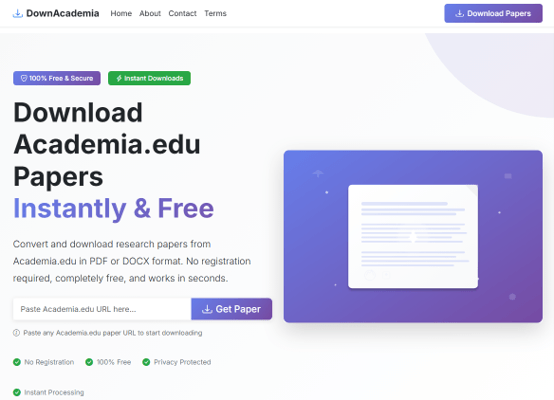
DownAcademia is a specialized Academia.edu downloader built from the ground up to solve the specific challenges of the Academia.edu site architecture. Unlike generic scrapers, it is updated weekly to handle changes in the site’s URL and encryption patterns.
DownAcademia makes bold claims: “99%+ success rate,” “instant processing,” “no limits.” We were skeptical. So, we tested it extensively.
The reality? DownAcademia performed better than most tools we tested, with a success rate around 85-90%. The Academia to PDF download was consistently complete and high-quality. We also appreciated the format choice—you can download Academic papers as PDFs for offline reading or DOCX for editing.
However, the “instant” claim is a bit exaggerated. Most downloads took 10-30 seconds to process. That’s still fast, but not instant.
One concern: DownAcademia is a relatively new site. While it works well now, we can’t speak to its long-term reliability. Sites like this sometimes disappear or stop working when platforms update their security.
Key Features:
- Fetches paper documents directly by analyzing the source link without requiring a login
- Completely free and mobile-friendly
- Effectively bypasses the mandatory “Follow Author” prompts that often block downloads
- High success rate for academic papers
Pros
- Free to use
- No registration required
- Works on mobile and desktop
- Bypasses common download restrictions
Cons
- Processes one URL at a time
- May not work with all paper types
- Limited customer support
Tool 2: ACADOWNLOAD.COM
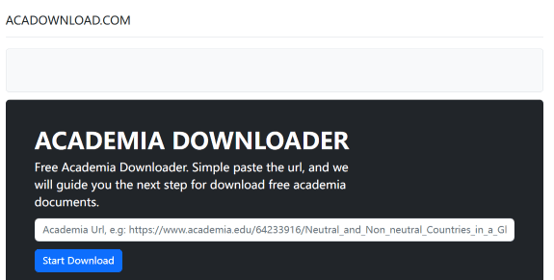
ACADOWNLOAD.COM is recognized as a highly secure proxy service tailored for the Academia PDF download market. It functions as a sophisticated intermediary that shields the user from tracking scripts found on major social media and academic platforms.
The site’s core promise is simple: paste a URL, get your Academia PDF download. In our testing, we found that this Academia downloader successfully retrieved papers about 70% of the time. When it worked, the PDF file was complete and readable. When it failed, there was no clear error message—just a spinning wheel that eventually stopped.
Key Features:
- Serves as a bridge, retrieving the file and delivering it to you without storing data on its own servers
- High success rate in accessing papers that are restricted to “Preview Only” on the main site
- Clean user experience focused on the download PDF mission
- Supports PDF format
Pros
- Secure proxy fetching
- No data stored on servers
- High success rate for restricted papers
- Free to use
Cons
- May not work with all document types
- Limited format support
- Requires copying the paper URL
Tool 3: SelfDownloader
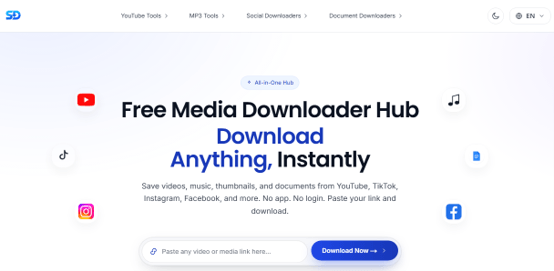
SelfDownloader is a straightforward Academia document downloader that focuses on simplicity. It allows you to download from Academia.edu free by pasting the paper URL and clicking download.
Here’s the problem with multi-purpose tools: they rarely excel at any single task. In our testing, SelfDownloader’s Academia document downloader had a success rate of about 55-60%. That’s noticeably lower than dedicated Academia downloader online tools.
The bigger issue is reliability. When it worked, the PDF was fine. But we encountered several instances where the tool returned a blank page or an incomplete file. For academic papers where every page matters, that’s a real problem.
That said, if you’re already using SelfDownloader for other downloads—like grabbing a YouTube video or a Scribd document—having the Academia option in the same place is convenient. Just don’t rely on it as your primary Academia downloader.
Key Features:
- Simple copy-paste workflow
- No registration required
- Works with most academic papers
- Fast processing for short documents
Pros
- Very easy to use
- No account needed
- Quick for individual downloads
- Free PDF download
Cons
- May not work with all papers
- Limited to PDF format
- No batch download feature
Tool 4: ScribDownloads
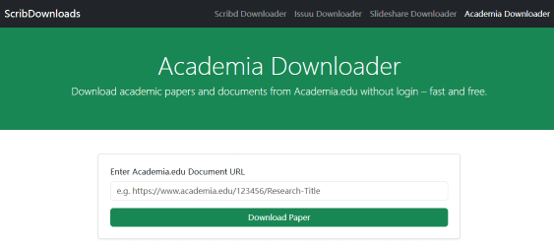
ScribDownloads is a multi-purpose Academia paper downloader that supports multiple document-sharing platforms. It’s useful for researchers who need to download Academia PDF from various sources.
ScribDownloads, as a dedicated Academia downloader site, should outperform multi-purpose ones, but only slightly. ScribDownloads had a success rate of about 65-70% in our tests. The PDF download was usually complete, and the paper opened without issues.
However, we noticed that ScribDownloads struggled with newer papers or those with restricted access settings. If the paper was set to “Private” on Academia.edu, the tool failed silently.
For academic papers that are publicly available, ScribDownloads works well. For anything restricted, you’ll need to try a different Academia downloader.
Key Features:
- Supports Academia, Scribd, and other platforms
- Simple URL download workflow
- Free to use
- Supports multiple formats
Pros
- Multi-platform support
- Free and easy to use
- Works with various document types
- Good for academic resources
Cons
- May have ads
- Success rate varies by platform
- Limited customer support
Tool 5: DocDownloader
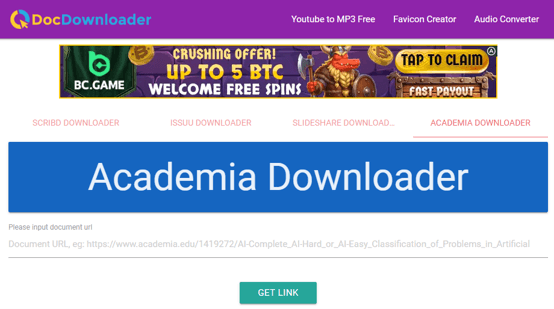
DocDownloader is a veteran in the document extraction space, functioning as a multi-purpose Academia downloader with a powerful backend capable of handling multiple document-sharing protocols.
DocDownloader has been around for years, and that experience shows—but not always in a good way. The tool successfully retrieved about 60% of the papers we tested. When it worked, the research PDF was complete.
The problem is feedback. When DocDownloader fails, you get no indication of what went wrong. Did the tool time out? Is the paper restricted? Is the site down? You’ll never know. For researchers who need to download Academia PDF efficiently, this lack of transparency is frustrating.
On the positive side, DocDownloader supports multiple formats (PDF, PPT, TXT), which gives you flexibility if you need to download PDF from Academia free in a specific format.
Key Features:
- Use a powerful script to scrape the full document content even if the page is partially blurred
- Simple “Copy-Paste-Download” workflow
- Supports free Academia PDF downloads in multiple file sizes
- Great for researchers who also need to download from platforms like Scribd or Issuu
Pros
- Docdownloader Academia is reliable and well-known
- Multi-platform support
- Handles partial blurs
- Free to use
Cons
- May have ads
- Can be slow during peak times
- Limited to supported platforms
Tool 6: ScienceGate
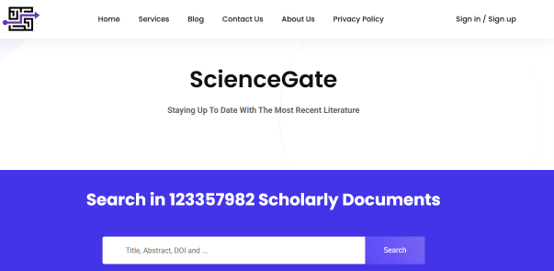
ScienceGate stands out by acting as both a professional aggregator and a high-utility free Academia downloader. It is designed specifically for the needs of serious scholars and doctoral candidates.
Based on available information, this Academia free downloader is designed for researchers who need more than just a PDF—it links documents to their academic journal metadata, allowing you to download the paper and citation simultaneously.
For serious academics who need to organize their Academia free download files for a bibliography, this metadata focus could be valuable.
Key Features:
- Links the document to its academic journal metadata
- Allows you to download the paper and the citation simultaneously
- Best for serious academics who need to organize their Academia files for a bibliography
- Provides additional context like citation counts and related papers
Pros
- Professional-grade metadata
- Citation support
- Great for higher education researchers
Cons
- May require registration for some features
- Interface can be complex
- Not ideal for casual users
Tool 7: Unpaywall (Browser Extension)
Unpaywall is a legally compliant, high-tech alternative to the Academia edu downloader. Rather than scraping the Academia site, it uses the platform as a starting point to find official open access versions elsewhere. It searches thousands of university repositories and open access journals for a legal version of the paper you’re viewing.
Unpaywall found legal open access versions for about 50% of the papers we checked. That’s not 100%, but here’s the key difference: when Unpaywall finds a version, it’s completely legal and safe. No gray areas. No risk.
For researchers who need to download Academia PDF free without worrying about copyright issues, Unpaywall is the best option available. The extension is lightweight, doesn’t track your activity, and is run by a nonprofit organization.
Key Features:
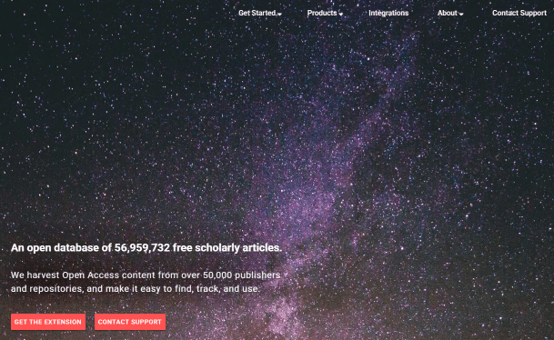
- When you visit an Academia page, the extension searches thousands of university repositories for a free PDF version
- Completely passive; a green tab appears on your screen when a free Academia PDF download is available
- 100% legal and safe, connecting you to institutional copies that are often better formatted
- Works with open access journals
Pros
- 100% legal and safe
- Passive user experience
- Connects to open access versions
- No download limits
Cons
- Only works when open access version exists
- Requires browser extension installation
- Limited to PDF format
If you are interested in SlideShare platform, read our SlideShare Downloader Free: Best Tools to Download PPT & PDF (2026) guide.
Part 3: How to Download from Academia PDF Free?
The safest and most reliable way to download Academia PDFs for free is to use Academia.edu’s own official download system. We strongly recommend this method over any third-party Academia downloader tool.
Here are the reasons why you should download from Academia officially:
- Official downloads are 100% legal
- Files are always complete and properly formatted
- You never risk exposing your device to malware or your personal data to unknown servers
How to download from Academia.edu free using the official method?
Step 1: Go to Academia.edu and sign up for a free account.
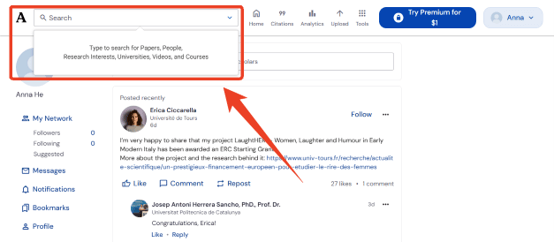
Step 2: Use the search bar to find the academic paper you need. Academia’s search engine indexes millions of academic publications, and you can search by title, author, keyword, or topic.
Tips
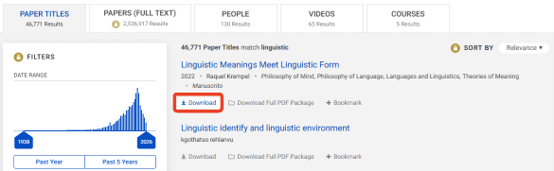
Not all papers on Academia.edu are downloadable. Some authors choose to restrict downloads or only allow “Preview Only” access. Look for the “Download” button on the paper’s page. If it’s there, you can proceed. If not, you may need to request the full text from the author directly.
Step 3: Once you find a downloadable paper, click the Download button.
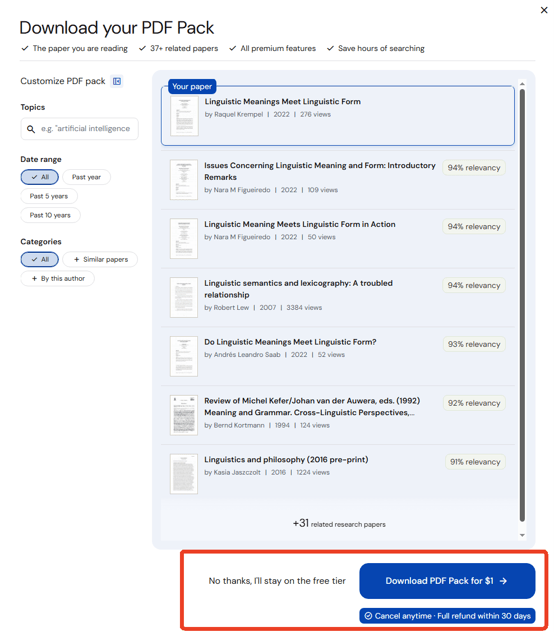
Step 4: Click Download PDF Pack for $1 if you want to pay for a premium account; if not, click No thanks, I’ll stay on the free tier to download Academia PDF free.
After downloading, Academia.edu may prompt you to send a message to the author explaining why you were interested in their work. This is optional; you can click “Skip” if you prefer. However, engaging with authors can help you build your research network.
Part 4: How to Manage Your Academic Resources with JOPDF?
Once you’ve downloaded your academic papers, the real work begins. You need to read, annotate, organize, and synthesize your research. First, merge your Academia resources into one organized PDF. Then, you can read, edit, and annotate text and images as you want. If the Academia paper is too large, you can compress or split it for easier reading.
To finish this workflow, JOPDF can help. It is a 100% free, offline PDF editor for Windows, Mac, and Linux. Especially for students and researchers who need to download Academia PDF free and then manage those files efficiently, JOPDF provides a complete solution.
Step 1: Download and install JOPDF and launch it.
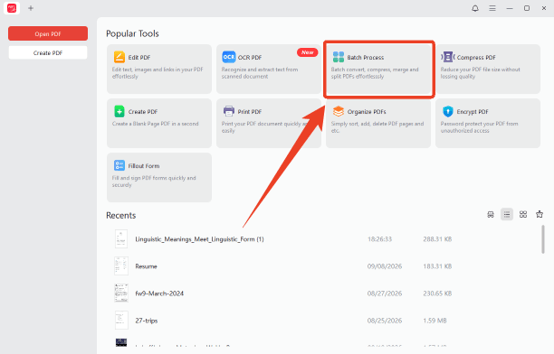
Step 2: Click Batch Process and choose your Academia PDFs.
Step 3: Choose Merge PDF from the sidebar and upload PDFs.
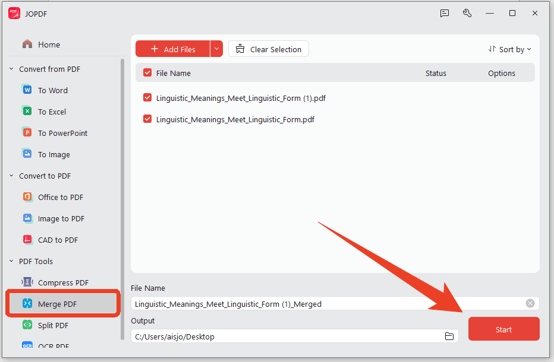
Step 4: Configure the file name and output and click Start to combine them.
Part 5: Conclusion
Finding a reliable Academia downloader depends on your needs. Whichever Academia PDF downloader you choose, always respect the original creators. Use downloaded research papers for personal study only, not for commercial use without permission.
Need to edit and organize your downloaded Academia files? Use JOPDF—a free PDF editor for Windows, Mac, and Linux. It offers editing, annotation, conversion, and compression tools without watermarks or sign-up requirements. Use JOPDF to convert your Academia to PDF files into professional, organized documents.
FAQs
Table of Contents
Your Best Free PDF Expert in PDF editing, compressing, converting, annotating, protect, organizing, and more.
Free DownloadWindows · macOS · Linux

Anna
Editor
“Anna, Editor-in-Chief and PDF expert, delivers deep insights into PDF document technology trends. She is dedicated to helping readers optimize their digital lives. When not writing, Anna loves exploring local cafes and reading, blending her technical expertise with a love for storytelling.”