
Summary :
MEGA offers 20GB of free storage, but once you use up the free-tier transfer quota, downloads pause, speeds drop, and you’re left waiting for a reset window. By using a MEGA downloader without limit, you can keep the download moving when the official client stops. We reviewed four tools that claim to bypass the MEGA download limit – Here’s what works, what doesn’t, and what you should know about a MEGA downloader in this JOPDF guide.
Why Does MEGA Limit Free Downloads?
MEGA’s free accounts come with a transfer quota that resets on a rolling window. When you exceed it, downloads stop, and you’ll see a “Transfer quota exceeded” error. Reddit users describe hitting this limit after as little as 17 minutes of downloading, then waiting hours for the quota to reset.
Some users mentioned the official MEGAsync client, but it’s not a download accelerator. It respects the quota and pauses transfers when the limit is reached. If you want to bypass MEGA transfer quota download limits, some MEGA downloader tools can do that, but you should know a few things before you break the MEGA download limit free access.
Apart from MEGA, there are other free download methods for some popular platforms like the following:
- Best Course Hero Downloader Free in 2026 – Download PDFs from Course Hero
- Free Academia Downloader Online – Download Academia.edu PDF Free
- Best Free uDocz Downloader: Download uDocz PDF Files Online
MEGA Downloader Free Tools Compared
Here is a brief comparison table showing different aspects of the MEGA downloader free tools:
| Tool | Type | Platform | Quota Bypass | Folder Support | Open Source | Best For |
| MegaBasterd | Desktop | Win/Mac/Linux | Yes (proxy) | Yes | Yes | Cross-platform, open-source |
| megatools | CLI | Linux/macOS/Windows | No | Yes | Yes | Automation, servers |
| Giga Grabber | Desktop | Win/Mac/Linux | Via proxy | Yes | Yes | Speed-focused users |
| MegaDownloader | Desktop | Windows | Yes (circuit breaker) | Yes | Revival project | Windows users, folder downloads |
Tips
It’s worth noting that truly reliable MEGA tools are desktop- or command-line based. A MEGA downloader without limit online tool is hard to find. Browser-based converters struggle with MEGA’s encrypted links, and no online MEGA downloader can permanently bypass server-side quotas.
Tool 1: MegaBasterd (Best Open-Source MEGA Downloader)
MegaBasterd is an open-source, cross-platform MEGA downloader built with Java. It has over 6,000 stars on GitHub and is actively maintained, with version 8.61 released in September 2026. The interface is… let’s call it functional. The developer himself calls it “ugly.” But it works.
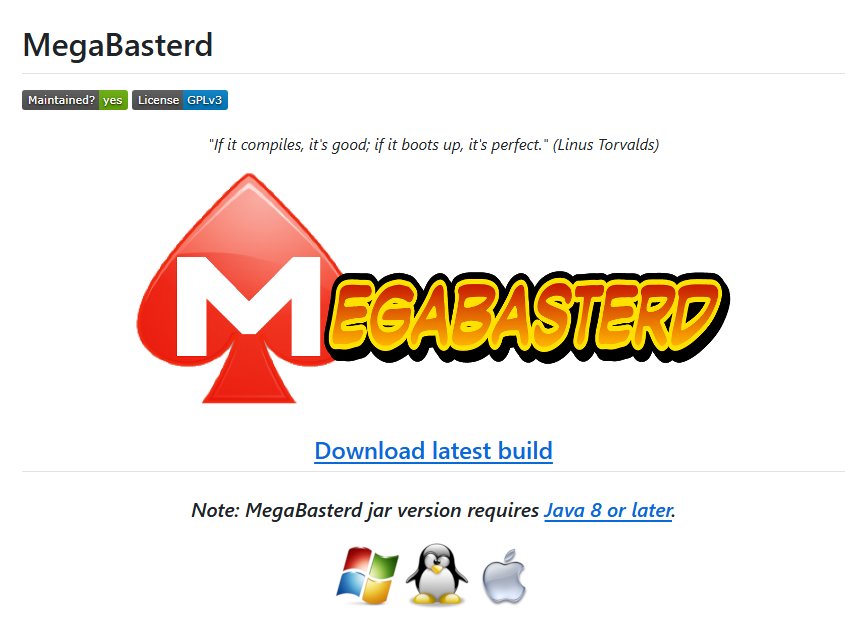
MegaBasterd handles MEGA downloads, uploads, and streaming. Its key feature for free users is the MEGA quota bypass support. This MEGA link downloader can use proxies or its SmartProxy feature to route traffic in ways that avoid MEGA’s IP-based quota tracking.
It also supports Megacrypter links, which are encrypted links used by some sharing communities. This makes it a true MEGA downloader bypass tool when configured correctly.
One thing to watch:
Recent versions changed how the proxy system works. SmartProxy only kicks in after MEGA returns a quota error, unless you manually enable “FORCE SMART PROXY” in settings. Also, the proxy list needs regular updating; old proxies will stall your downloads.
How to Use the Free MEGA Downloader?
Step 1: Download the JAR file or the installer for your platform. Note that Java 8 or later is required.
Step 2: Copy and paste the MEGA link and select the download destination.
Step 3: Click Start to make MEGA download unlimited.
Important Warning: The README states explicitly: “You are not authorized to use MegaBasterd in any way that violates MEGA’s terms of use.” The tool can bypass MEGA download limits, but doing so carries the same risks as any other workaround.
Important Warning
The README states explicitly: “You are not authorized to use MegaBasterd in any way that violates MEGA’s terms of use.” The tool can bypass MEGA download limits, but doing so carries the same risks as any other workaround.
Pros
- Cross-platform (Windows, Mac, Linux)
- Open source and actively maintained
- MEGA quota bypass via proxy support
- Handles both MEGA files and folders
- Supports streaming
Cons
- Requires Java, which some users find inconvenient
- Interface is functional but dated
- Proxy bypass violates MEGA’s terms
- Proxy list requires manual updates
Tool 2: megatools (Linux Command-Line MEGA Downloader)
megatools is a collection of command-line MEGA downloader programs for accessing MEGA from a desktop or server. It’s not a single application but a suite of tools.
If you’re comfortable with a terminal, it’s one of the most reliable MEGA folder downloader tools when you need to grab an entire shared folder. If you’re not, skip to the next tool.
With different commands displayed on its GitHub introduction page, you can upload or download MEGA files individually, even download files from a “public” MEGA link, which doesn’t require any login. It’s also a MEGA video downloader with streaming support.
Tips
megatools doesn’t bypass the MEGA download quotas automatically. It respects MEGA’s limits. You can configure a proxy manually, but there’s no SmartProxy-style automation here.
Pros
- Free, open-source, cross-platform
- MEGA folder download with selective file picking
- Streaming support
- Scriptable for batch jobs
Cons
- No GUI – terminal only
- No automatic quota bypass
- Requires command-line comfort
Tool 3: Giga Grabber (Fastest Rust-Based MEGA Downloader)
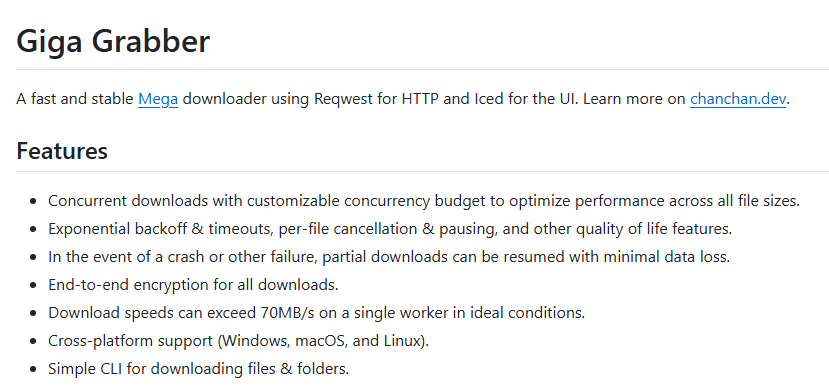
Giga Grabber is a Rust-based MEGA downloader designed for speed. It uses concurrent downloads and multi-threading to maximize bandwidth, with users reporting speeds exceeding 70MB/s in ideal conditions. It’s also a MEGA video downloader to get what you want quickly.
Important Note:
The developer explicitly states: “Using proxies or a VPN to bypass Mega’s download limit is a violation of their Terms of Service.” Giga Grabber can use proxies, but doing so carries the same risks as any other bypass method. This is a MEGA downloader no-limit tool only in the sense that it maximizes speed within the quota you have – not that it removes the quota permanently.
Pros
- Very fast (Rust-based, multi-threaded)
- Cross-platform (Windows, Mac, Linux)
- Resume support
- Open source
- End-to-end encryption for all downloads
Cons
- GUI requires OpenGL
- Proxy bypass carries legal risk
- Less established than MegaBasterd
Tool 4: MegaDownloader (Windows Classic)
MegaDownloader is a Windows-only MEGA file downloader that has been around for years. The original project was abandoned, but a Revival project has restored compatibility with MEGA’s new link formats. It remains a popular choice among Windows users looking for a MEGA downloader for PC. You can find and get this MEGA downloader for Windows on a reliable site, like Softonic. After that, you can add links to the tool for quick MEGA file downloads.

How to Add Links to MEGA Downloader? Just copy and paste a MEGA link, and MegaDownloader detects it automatically via clipboard monitoring. You can also click “Add Link” to paste manually or drag the link into the main window.
Pros
- Lightweight and portable (no installation required)
- Folder recursion with preserved structure
- Quota circuit breaker (waits instead of bypassing)
- Free and ad-free
- Simple MEGA link downloader functionality
Cons
- Windows only
- Requires VLC for streaming playback
- Revival project is community-maintained, not official
Why Is My MEGA Downloader Slow?
It’s a common question when people use the MEGA downloader. If your MEGA link downloader is slow, the cause is usually one of four things:
- Quota throttling: MEGA is deliberately limiting your speed because you’ve exceeded the free transfer allowance.
- Single-threaded downloading: Tools that don’t use multi-threading will always be slower than those that do.
- Server load: MEGA’s servers can be congested, especially during peak hours.
- ISP throttling: Some ISPs throttle file-sharing traffic.
How to Increase MEGA Downloader Speed?
- Use a multi-threaded tool (MegaBasterd, Giga Grabber).
- Configure more concurrent connections.
- Wait for the quota window to reset.
- Avoid aggressive proxy rotation unless you’re prepared for the legal implications.
Is It Safe and Legal to Use MEGA Downloaders?
Is a MEGA downloader legal? Using a third-party MEGA link downloader to bypass MEGA’s transfer quota violates MEGA’s Terms of Service. Whether that translates to legal consequences depends on your jurisdiction and whether you’re downloading copyrighted content.
Downloading MEGA files you have the right to access is generally fine; bypassing limits to download copyrighted material you haven’t paid for is a different matter.
Safety recommendations: Download from official GitHub repositories, not third-party download sites. Prefer open-source tools whose code can be reviewed. Never enter your MEGA credentials into a third-party tool unless you understand how it handles them.
How to Edit and Manage MEGA Files?
After you download from MEGA, you may need to edit and manage the MEGA files. For PDFs, you can try JOPDF, which is a free desktop PDF editor that handles merging, compressing, converting, and OCR.
Here are some JOPDF features that can help you manage MEGA files:
- MEGA downloaded textbooks or reports often run into hundreds of MB, and JOPDF opens them smoothly, with no stuttering when you scroll or jump pages.
- For MEGA-downloaded PDFs, JOPDF can help you edit text and images directly, and mark up any notes.
- If a MEGA folder gives you several chapters or attachments, JOPDF lets you combine them into one complete document in a single drag-and-drop step.
- MEGA-downloaded scans are often too large to email – JOPDF shrinks them while keeping the text sharp and readable.
- MEGA-downloaded scanned PDFs can’t be copied or searched, while JOPDF’s OCR turns them into selectable, editable text.
- If your MEGA download has blank pages or wrong orientation, JOPDF lets you delete, rotate, or insert pages directly.
Conclusion
Four MEGA downloader without limit options, each with a clear trade-off.
- MegaBasterd is the best all-rounder – free, open-source, cross-platform.
- Giga Grabber is the fastest, but its proxy bypass carries legal risk.
- MegaDownloader is the simplest Windows choice.
- megatools is best for Linux and macOS users who need automation.
For most people: use a multi-threaded tool to make the most of your quota, wait for resets when needed, and consider Premium if you download often.
Now, download JOPDF free and manage your downloaded PDF files without limits.
FAQs
Table of Contents

Your Best Free PDF Expert in PDF editing, compressing, converting, annotating, protect, organizing, and more.
Free DownloadWindows · macOS · Linux

Anna
Editor
“Anna, Editor-in-Chief and PDF expert, delivers deep insights into PDF document technology trends. She is dedicated to helping readers optimize their digital lives. When not writing, Anna loves exploring local cafes and reading, blending her technical expertise with a love for storytelling.”
![Full Guide on How to OCR a PDF in Adobe Acrobat [Newest]](https://b.jopdf.com/wp-content/uploads/2026/10/how-to-ocr-a-pdf-in-adobe.png)
