Pngtree is one of the largest platforms for PNG images, vectors, backgrounds, and templates. However, free users face daily Pngtree download limits (usually 2-5 per day) and watermarks on their downloads. To download Pngtree images without watermark, you can try Pngtree Premium or choose a Pngtree downloader free tool without watermark. In this guide on JOPDF, we cover both methods and compare the best Pngtree downloader tools that still work in 2026.
Summary :
Key Takeaways
- Pngtree restricts free downloads – Free users get only 2-5 downloads per day with watermarks. Premium removes these limits.
- Different Pngtree downloaders for different needs – Use Nohat.cc for visual browsing, GetFilePic.com for interior design assets, and FetchPik.com for technical URL-based downloads.
- Browser extensions offer one-click convenience – They add download buttons directly to Pngtree pages, making saving images faster.
- Free Pngtree alternatives exist – Pixabay and Unsplash offer unlimited, watermark-free images with commercial licenses.
5 Pngtree Downloader Free Tools That Work
Here are the best Pngtree downloader free tools we’ve tested. Each tool has different strengths and limitations, so choose the one that fits your needs.
Pngtree Downloader Tools Comparison Table
| Feature | Expert PHP | Experts Tool | Getfilepic | Nohat | Pngtree Chrome Extension |
| Type | Online Tool | Online Tool | Design Resource Library | Visual Discovery Engine | Browser Extension |
| Primary Function | URL-based downloader | URL-based downloader | Standalone design asset source | PNG discovery portal | One-click download button |
| Accepts Pngtree URLs | Yes | Yes | No | No | Yes |
| How It Works | Paste URL → Download | Paste URL → Download | Browse catalog → Download | Browse gallery → Download | Click extension icon → Download |
| Success Rate | ~60-70% | ~50-60% | N/A (own platform) | N/A (own platform) | ~70-80% |
| File Size Limits | None stated | None stated | Free: 3-20/day | None stated | None |
| Registration Required | No | No | Yes (for free downloads) | No | No (extension install only) |
| Ad Density | Moderate | Moderate | Low | Low | Very Low |
| Watermark Removal | No | No | N/A | N/A | No |
| HD/4K Quality | No (preview only) | No (preview only) | Yes (original quality) | Yes (varies) | No (preview only) |
| Platform Support | Web (any browser) | Web (any browser) | Web (any browser) | Web (any browser) | Chrome/Chromium browsers |
| Best For | Quick single downloads | Occasional downloads | Decorative design assets | Visual discovery | Regular Pngtree users |
Tips
Please note: these tools are unstable, often disappear without warning, and come with security risks. We do not endorse their use — this information is provided for educational purposes only.
Tips
Apart from the Pngtree, JOPDF also provides downloading methods for other image stock platforms, such as Shutterstock downloader and GettyImages downloader 4K.
#1. Exepert PHP
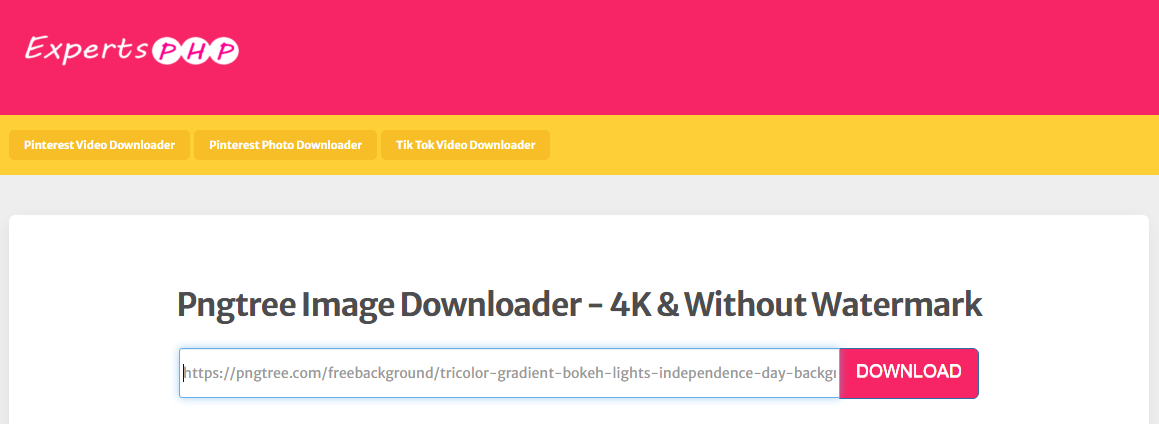
Expert PHP is a free online Pngtree downloader that has circulated in various online communities. The tool works by accepting a Pngtree image URL and attempting to extract the high-resolution version from Pngtree’s content delivery network. The tool claims to bypass Pngtree’s watermark overlay, though results vary depending on the specific image and Pngtree’s current server configuration.
Pros
-
Simple URL-based interface
-
No registration required
-
Free to use
Cons
-
Frequently offline or non-functional
-
May expose your IP address to third parties
-
No batch processing support
-
May return low-resolution previews instead of HD images
-
Can be slow during peak times
How to download from Pngtree free?
- Copy the URL of the Pngtree image you want
- Paste the link into Expert PHP’s input field
- Click “Download” and save the image
#2. Experts Tool
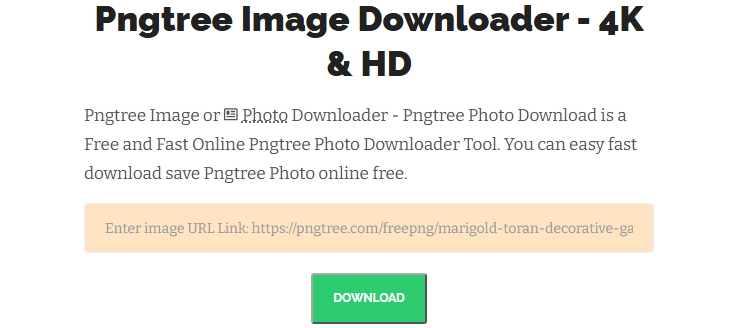
Experts Tool is another popular Pngtree downloader online that offers a simple interface for downloading images from Pngtree. Different from other Pngtree downloader free tools, it supports multiple video and image stock platforms, not just Pngtree.
The interface is cluttered with colors, making it difficult to pinpoint a specific downloader. Besides, there is also no search tool for quick searches, which increases the time required. However, you can quickly find it by searching for “Experts Tool” and “Pngtree Downloader” in your browser. On that Pngtree link downloader tool’s page, you can paste the Pngtree image link directly to download it.
Pros
-
Multi-platform support
-
No registration required
-
Supports multiple image formats
Cons
-
Success rate can be inconsistent
-
May have ads
-
Limited to photos (no vector support)
-
Reliability issues during peak usage
-
Unclear privacy policy
#3. Getfilepic
More than a Pngtree images downloader, GetFilePic.com positions itself as a curated collection of decorative painting and design templates, with a strong focus on interior design assets. While it offers a large collection of PNG images and design templates, it operates as an independent platform with its own credit system.

Its key advantage is its niche specialization, offering 300,000+ design templates that are updated daily. The interface is categorized by theme (e.g., “Buddhist Paintings,” “Landscape,” “Abstract”) and format (e.g., “Painting Set of 3,” “Single Painting”), allowing for precise filtering. The site emphasizes a clean, professional UI with a strong user community.
If you’re searching for free design resources and are open to using Pngtree downloader alternatives, Getfilepic is worth exploring, especially for interior design and decorative projects.
What Getfilepic offers:
- Resource types: Interior design assets, wall art, decorative paintings, background patterns, and wall decals
- Large collection: Over 300,000 design templates updated daily
- Free tier: Users can download 3-20 files per day depending on registration tier
As a Pngtree images downloader, it scrapes the direct image URL from Pngtree’s page source. Users report mixed results — some Pngtree images download at full resolution without watermarks, while others fail entirely or return the preview thumbnail instead of the original file.
Pros
-
Clean, categorized interface for browsing
-
Daily free downloads with registration
-
Large collection of design assets
-
Suitable for interior designers and decorators
Cons
-
Does not accept Pngtree URLs
-
Free tier has daily limits
-
Requires account for full access
#4. Nohat
Nohat markets itself as a Pngtree free image downloader with a focus on providing “clean” downloads. Actually, when you click into the page, you’ll find it more than a Pngtree link downloader, it’s a dedicated visual search and discovery portal for PNG images sourced from Pngtree and other platforms.

Its interface is structured like a gallery feed, allowing users to scroll through an infinite stream of visual assets. The site also displays image thumbnails with clear labels indicating the source platform, ideal for inspiration gathering.
The site also integrates a robust privacy policy and DMCA compliance framework. If you wamt a Pngtree downloader free online without watermark, Nohat.cc is a good option for designers seeking varied PNG assets.
#5. Pngtree Downloader Chrome Extension
For users who prefer browser integration, there are Chrome extensions marketed as Pngtree downloader tools. These extensions add download buttons to Pngtree pages or provide right-click context menu options for saving images.
A Pngtree photo downloader extension typically works by detecting the image element on the current page and extracting its source URL. Some extensions also claim to bypass watermark overlays by accessing Pngtree’s API endpoints directly.
Pros
-
Integrated into browsing experience
-
One-click access without copying URLs
-
No need to visit external websites
Cons
-
Requires broad browser permissions
-
Chrome Web Store may remove them without warning
-
Potential data collection by extension developers
-
Security risks from unvetted code
Official Ways to Download from Pngtree for Free
Pngtree downloader is not the only way to download Pngtree images free. Pngtree offers several official methods for downloads, provided you’re willing to work within the platform’s rules.
Method 1: Daily Free Pngtree Downloads
Pngtree maintains a section of completely free assets that anyone can download without spending credits or premium days. Every Pngtree account, including free accounts, receives a limited number of free downloads each day. This is the simplest way to Pngtree download content legally. Free downloads typically include:
- Lower resolution versions of images
- Images with Pngtree’s watermark overlay
- Access to free designated content
If you only need a few images per day and don’t mind watermarks, this method works perfectly.
Step 1: Just go to the Pngtree images library and choose Free from the filter list.
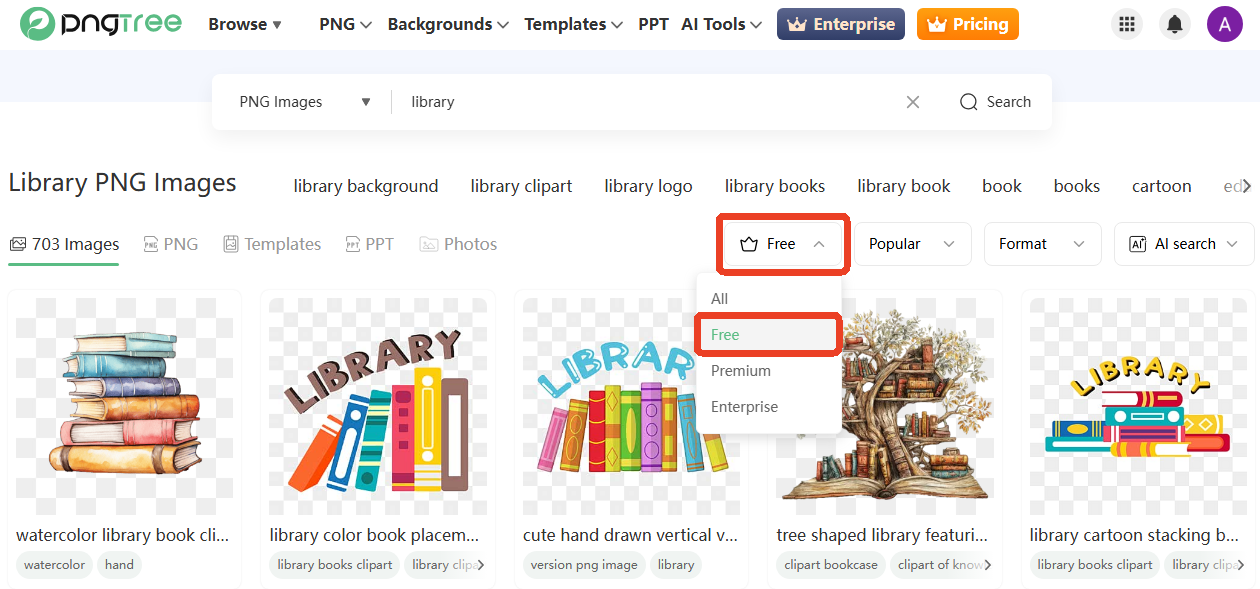
Step 2: Click the download icon and save the image to your device.
Also See: 5 Proven Methods to Remove Watermark from PDF in 2026
Method 2: Earn Free Premium Days
Pngtree also allows image downloads without watermark through their free premium day promotions. You can earn these by:
- Daily check-ins on the platform
- Inviting friends to join Pngtree
- Participating in platform events and contests
- Completing surveys or promotional offers
During your free premium period, you can get your Pngtree free download content at full resolution without watermarks. Of course, you can also directly purchase a subscription. The premium plan offers:
- Unlimited downloads
- Full-resolution files without watermarks
- Commercial usage rights
- Priority customer support
Free Pngtree Download Alternatives
Still looking for a Pngtree downloader free online without watermark? You may think about switching to another stock image platforms. There are many Pngtree alternatives that provide more high-quality, watermark-free image options.
- Freepik: A vast library of over 10 million free icons and stickers in PNG and SVG formats, making it a solid Pngtree alternative for designers who need vector assets.
- Unsplash: A generous community of photographers offering over 7 million high-resolution, free-to-use images for any project, all without requiring attribution, an excellent Pngtree image downloader alternative for high-quality photography.
- Pexels: A completely free stock photo and video platform that provides high-quality visuals for designers, bloggers, and creators without any cost.
- Pixabay: As a free Pngtree alternative, it provides massive, royalty-free library with millions of images, videos, music, and sound effects under the Creative Commons CC0 license, suitable for users who need Pngtree images for commercial use with no attribution required.
- Flaticon: A massive library of over 9 million vector icons available in multiple formats, though careful attention is needed to determine which are truly free and which require a subscription or attribution.
- Canva Free Library: An integrated design ecosystem offering millions of free stock photos, clipart, and graphics that can be used directly within Canva’s powerful design tools.
These platforms are excellent for Pngtree download alternatives. They offer legal, high-quality content without the risks associated with unauthorized downloaders. Many of them also provide commercial licenses, making them suitable for client work and business projects.
Is Using a Pngtree Downloader Legal?
Is it legal to use Pngtree downloader to grab content from the platform? Actually, the move sits in a gray area. Whether it’s legitimate depends on what you use for. We should mention that Pngtree’s terms of service generally prohibit downloading content without proper authorization and using a Pngtree free downloader to obtain premium content without paying definitely violates these terms.
It’s legal to download Pngtree images when you:
- Downloading your own uploaded content
- Using images for personal inspiration and mood boards
- Downloading free-tier images with proper attribution
It’s problematic to download Pngtree images when you:
- Downloading premium content without payment
- Using downloaded images for commercial purposes without a license
- Bypassing Pngtree’s download limits to redistribute content
All in all, the safest approach is to use Pngtree’s official download methods or purchase a premium subscription for commercial use. Many Pngtree downloader tools operate in a legal gray area and may violate Pngtree’s terms of service.
How to Handle Downloaded Pngtree Files with JOPDF
Once you’ve downloaded images from Pngtree, you’ll need a way to organize and edit them. JOPDF is a free PDF editor for Windows, Mac, and Linux that can help you manage your Pngtree image collections. For example,
- If you need to compile multiple downloaded images into a single document, JOPDF’s image-to-PDF conversion and batch merge features handle this effortlessly. You can create mood boards, design portfolios, or image collections from your downloaded Pngtree files.
- High-resolution images can quickly eat up storage space and slow down email attachments. JOPDF’s compression tool reduces file size while maintaining visual quality.
- If your downloaded files contain text, such as typography designs or infographic templates, JOPDF’s OCR feature extracts that text for editing or reuse.
- If you need to edit and annotate a Pngtree image file, you can add text, notes, or highlights to a downloaded image.
Step 1: Donwload and install JOPDF from the official website and launch it.
Step 2: Click Batch Process > Image to PDF and add your Pngtree images.
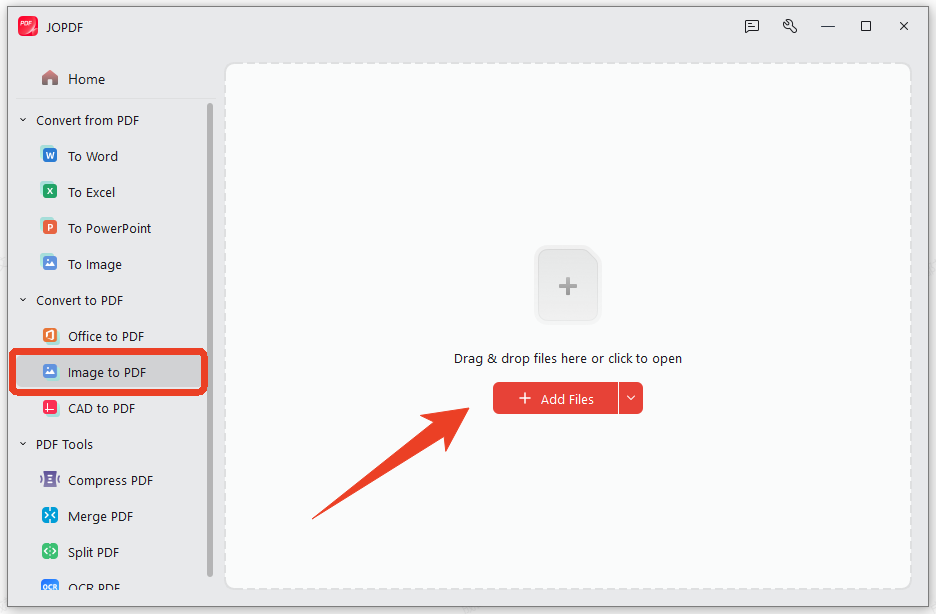
Step 3: Choose All Images as One PDF as Method and set your page size.
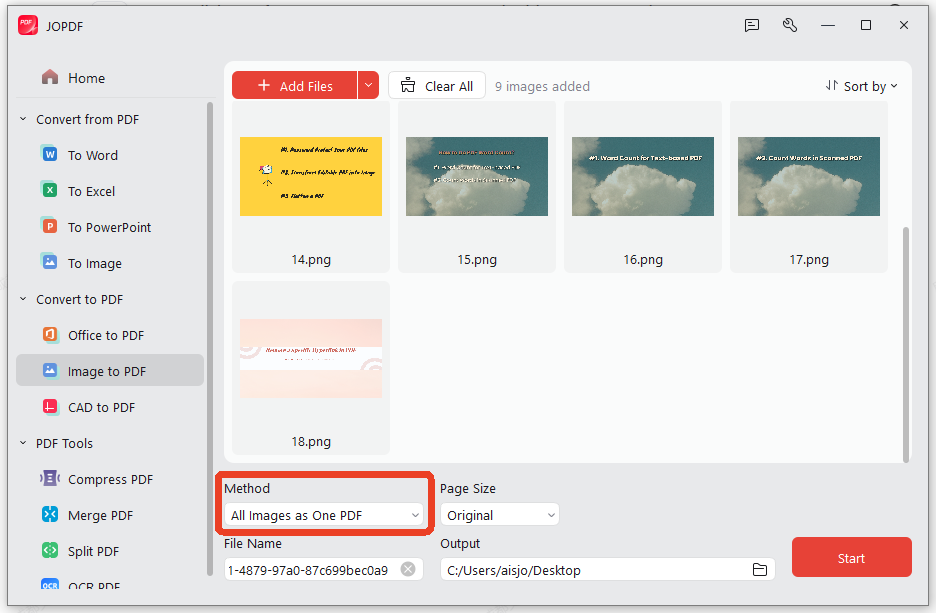
Step 4: Click Start to convert your images into a single PDF.
Conclusion
All the above methods have clarified how to download Pngtree images free without watermark. You can choose a reliable Pngtree downloader depends on your needs. If you want a Pngtree download for commercial work, the official Premium subscription is the only legal option.
Whichever Pngtree png downloader you choose, always respect the original creators. Use downloaded images for personal inspiration, mood boards, or reference, not for commercial use without permission. And if you need to organize multiple images, JOPDF is a great free tool to combine them into PDF portfolios.
FAQs
No free Pngtree downloader can reliably remove watermarks because watermarks are applied server-side by Pngtree. Premium subscriptions are the only way to get watermark-free images.
Only with a Pngtree premium Premium subscription. Free Pngtree downloads include watermarks and cannot be used commercially.
Free downloads are limited (2-5 per day), have watermarks, and no commercial rights. Premium downloads are unlimited, watermark-free, and include commercial licenses.
Most are safe, but some may contain ads or track user data. Always use trusted extensions and avoid entering personal information.
Table of Contents

Your Best Free PDF Expert in PDF editing, compressing, converting, annotating, protect, organizing, and more.
Free DownloadWindows · macOS · Linux

Anna
Editor
“Anna, Editor-in-Chief and PDF expert, delivers deep insights into PDF document technology trends. She is dedicated to helping readers optimize their digital lives. When not writing, Anna loves exploring local cafes and reading, blending her technical expertise with a love for storytelling.”