Introduction :
Scribd is a popular platform for discovering and reading documents, including research papers, study notes, business reports, presentations, and educational materials. However, not every document on Scribd comes with a download option. If you want to download Scribd PDFs for offline reading, studying, or personal reference, you’re in the right place. In this JOPDF guide, we’ll explain how to download PDFs from Scribd legally.
How to Download PDFs from Scribd Officially
The easiest and safest way to download a document from Scribd is to use its built-in download feature. But whether you can download a particular document depends on its availability and the permissions selected by its uploader. Let’s learn how to save Scribd documents as PDF files in this section.
What Formats Can You Download from Scribd
Scribd supports multiple file formats, but the available download formats depend on the individual document. According to Scribd’s Help Center, common downloadable formats include PDF and Microsoft Word documents (including DOC and DOCX).
Steps to Download Scribd to PDF
Whether you’re using a Windows PC, Mac, or mobile browser, the basic downloading process is similar. Below are the steps to download Scribd to PDF:
Step 1. Open your web browser and visit the official Scribd website. Then sign in to your Scribd account.
Step 2. In the top search bar, search for the document or book you want to download. Find the target one and click it to open its reading page.
Step 3. Click the Download button to display the available download options. Click the PDF option if available. Alternatively, select TXT or other formats if that format is available.

Step 4. Finally, click Download document to start downloading.
Tips
On a mobile device, you can follow the same basic steps to download Scribd documents using Chrome, Safari, or another mobile browser. On an iPhone or iPad, you may need to tap the Share icon and select Save to Files after the document opens.
However, not all documents on Scribd are free to download. Most downloads need a subscription. If you are a new user, you can start a 30-day free trial. Alternatively, if you don’t have a subscription, uploading your own documents, presentations, research papers, or other documents may grant limited download access.
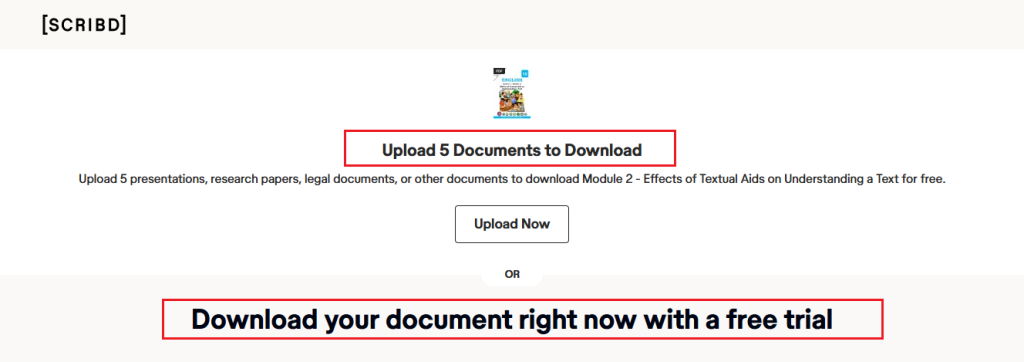
What If Scribd Only Offers a Word Document
Sometimes, Scribd may provide a Word document instead of a PDF. In this case, you don’t need to look for another third-party Scribd PDF downloader. You can simply download the available Word file and convert it into a PDF using a PDF converter. For example, JOPDF supports converting Word documents into PDF files. It also offers tools for editing, annotating, and organizing your downloaded PDFs. We’ll explain how to do this in Section 4.
Best Scribd PDF Downloader Tools
When searching for a Scribd PDF downloader, you may encounter numerous websites and browser extensions claiming to download Scribd documents by entering a document URL. However, not every tool is reliable or legitimate. Some websites make misleading promises about downloading restricted documents, while others may expose you to suspicious advertisements, malware, or privacy risks.
A Scribd PDF downloader generally refers to a website, application, or browser extension designed to save documents from Scribd or convert accessible documents into PDF format. Below is a list of third-party Scribd PDF downloader tools.
- DocDownloader.com
- Scribd VDownloaders
- VPDFS.com
- DownloadScribd.com
- Scribd.Downloader (scribsave.net)
Important Note
We don’t advise you to use third-party Scribd PDF downloaders to download protected Scribd documents. It is better to use Scribd’s official way to save documents legally and safely.
How to Evaluate a Scribd Downloader
If you’re considering a third-party service for documents you own or are authorized to download, evaluate it carefully.
| valuation factor | What to check |
| Legitimacy | Does the service respect copyright and access restrictions? |
| Supported formats | Can it process PDF, DOCX, TXT, or other relevant formats? |
| Ease of use | Is the interface straightforward and easy to navigate? |
| Privacy | Does it request unnecessary Scribd login credentials? |
| Security | Does it contain suspicious advertisements or redirects? |
| Output quality | Does it preserve the original document’s text, images, and formatting? |
Meanwhile, you should avoid websites that ask you to enter your Scribd password, install unknown software, or disable browser security settings.
Are Free Scribd Downloaders Safe?
Not necessarily. Some third-party downloader websites may expose you to security and privacy risks. Here are some warning signs to watch for:
- Fake download buttons
- Malicious downloads
- Credential theft
- Privacy risks
- Copyright concerns
For these reasons, Scribd’s built-in download feature is generally the better option. If you need a third-party tool, use one only for documents you own or are authorized to download, and verify the provider before sharing files or personal information.
How to Download Scribd PDFs for Free Legally
How to download Scribd PDFs for free? There are several legitimate ways to access documents without purchasing an individual subscription.
#1. Download Documents That Are Freely Available
Some Scribd documents can be downloaded without a paid subscription.
#2. Check Whether the Author Provides a Free Copy
If a document requires a subscription or cannot be downloaded, consider checking whether its author provides an authorized copy elsewhere. Below are some useful places to look:
- The author’s official website
- A university or institutional repository
- The publisher’s website
- An official research download website or professional organization
- An open-access publication platform
#3. Look for Public-Domain or Openly Licensed Documents
Another option is to search for equivalent materials that are freely accessible under public-domain or open licenses. Here are some useful resources:
- Project Gutenberg: A digital library offering thousands of free ebooks, primarily public-domain works.
- Internet Archive: A digital library containing books, documents, media, and other archived materials. Download availability varies by item.
- Google Scholar: Helps you find academic papers, including versions hosted by universities and institutional repositories.
- DOAJ: A directory of open-access journals and scholarly articles.
How to Convert and Manage Downloaded Scribd PDFs with JOPDF
After downloading a Scribd document, you may discover that it is in Word format rather than PDF. Alternatively, you may already have a PDF but need to edit its content, highlight important passages, extract specific pages, or organize it for future reference. In either case, a dedicated PDF converter and editor can make document management easier.
JOPDF is a free offline PDF editor and converter for Windows, Mac, and Linux. It supports converting Word, Excel, PowerPoint, CAD, and image files into PDF format. Hence, you can use it to convert downloaded Scribd files to PDF effectively. Additionally, JOPDF provides tools for editing, annotating, and organizing downloaded PDFs.
How to Convert Downloaded Scribd Documents to PDF with JOPDF
If you’ve downloaded a Word document from Scribd, you can use JOPDF to convert it into PDF format. Below are the exact steps:
Step 1. Click the button below to download and install JOPDF on your PC. Then launch this free Scribd to PDF converter.
Step 2. On the home screen, click Batch Process and select Office to PDF.
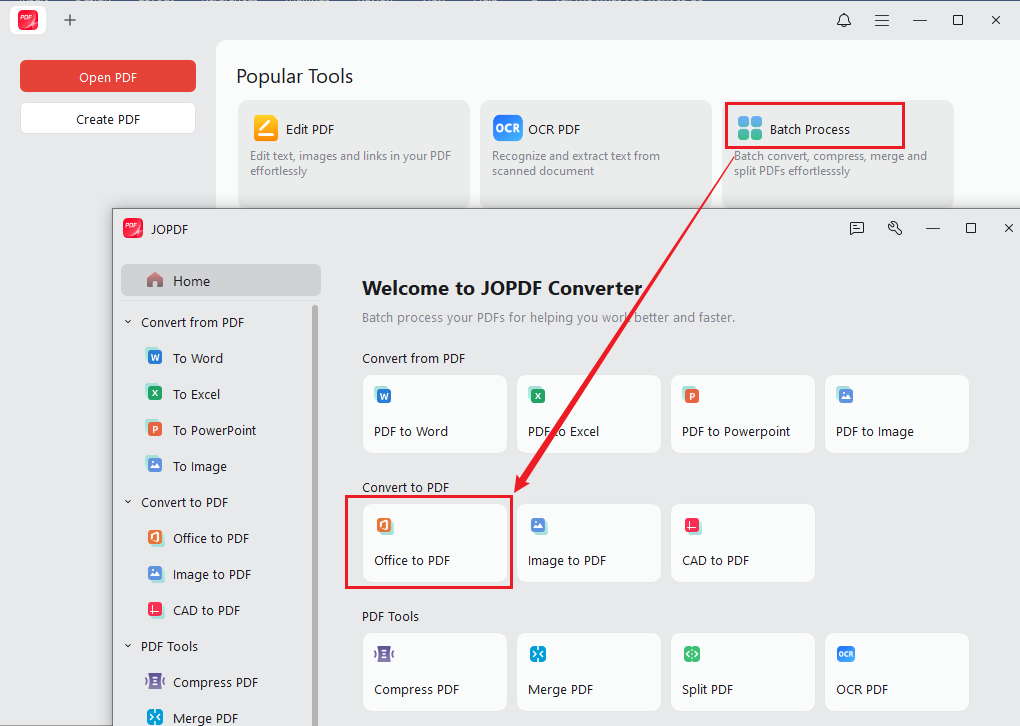
Step 3. Click Add Files to import your downloaded Scribd Word document. Then select an output location for your converted PDF.
Step 4. Finally, click Start to begin the conversion.
JOPDF also supports batch conversion, which is useful if you’ve downloaded multiple Word documents from Scribd and want to convert them into PDFs at once.
Manage Downloaded Scribd PDFs with JOPDF
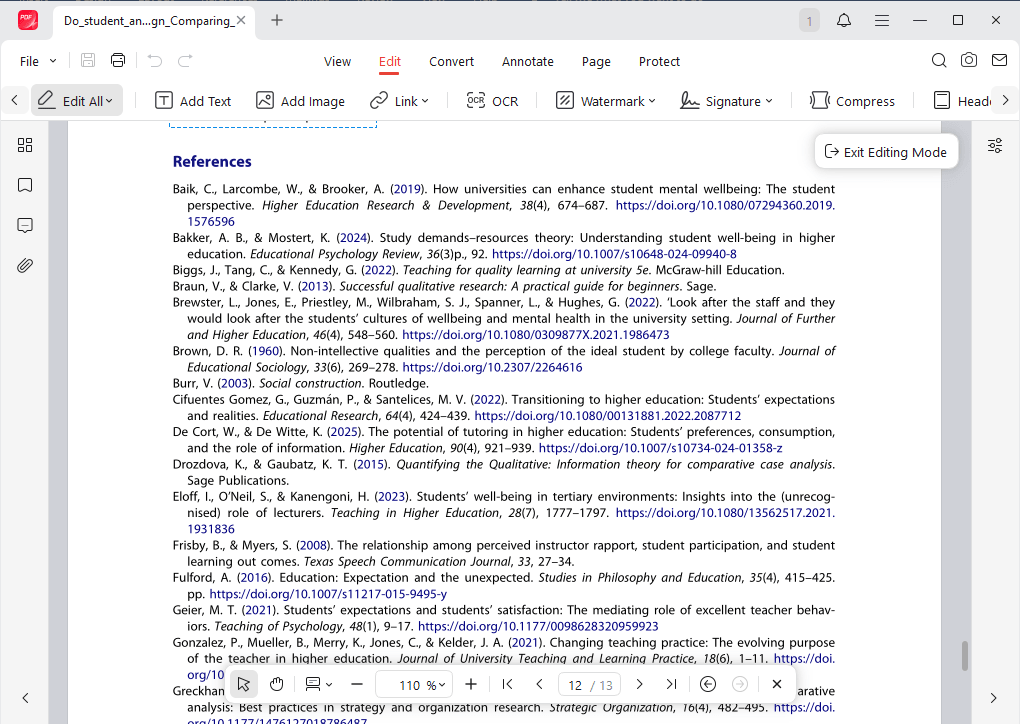
Besides converting Word documents to PDF, JOPDF provides several useful tools for working with your downloaded files. Below are some of the main features of JOPDF:
- Read PDFs: Open and view downloaded PDFs with several reading modes.
- Edit PDFs: Edit existing PDF text and images, add text boxes to a PDF, and insert images and links.
- Annotate PDFs: Highlight important passages, underline text, add comments, and insert notes for studying or research.
- Manage PDF pages: Insert, delete, rotate, extract, and rearrange PDF pages to create a more convenient PDF.
- Protect PDFs: Apply password protection to help secure your PDF files.
- OCR PDFs: Recognize text in scanned PDF documents and make them searchable or editable.
If you regularly download and manage PDF documents for studying, research, or work, JOPDF is worth considering.
Conclusion
To download Scribd PDFs, you can use Scribd’s official Download button to save available documents in PDF or Word format. If you download a Word document instead of a PDF, you don’t need to search for another Scribd PDF downloader. A dedicated converter such as JOPDF can help you convert the downloaded document into PDF format. It also provides useful tools for reading, editing, annotating, and organizing your saved PDFs. If a Scribd document cannot be downloaded, check its permissions, look for an authorized copy from the original author, or explore public-domain and open-access resources.
FAQs
Table of Contents
Your Best Free PDF Expert in PDF editing, compressing, converting, annotating, protect, organizing, and more.
Free DownloadWindows · macOS · Linux

Olivia
“Olivia is an editor at JOPDF, where she writes practical guides and insightful articles on managing PDFs—covering topics like editing, annotating, converting, and organizing files efficiently. Passionate about clear communication and digital productivity, Olivia enjoys spending her free time cooking, watching movies, and hiking to unwind and find inspiration for her writing.”