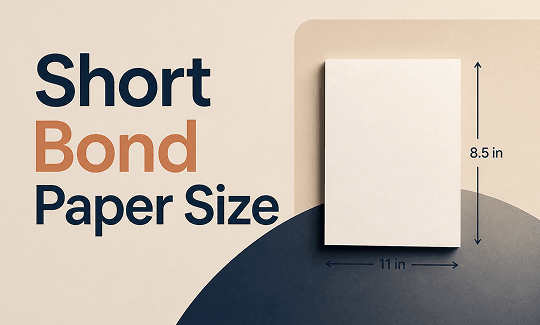
If you have ever needed to print a document in the Philippines or work with official forms, you have likely encountered long bond paper. What exactly is long bond paper size? This 8.5 x 13-inch size is a regional standard for school, office, and government documents. This guide on JOPDF covers its exact dimensions, how it compares to Letter, A4, and Legal paper, and how to set it up in Word and PDF editors.
Summary :
What Is Long Bond Paper Size?
What is long bond paper size? Long bond paper is an office paper size that measures 8.5 × 13 inches (21.59 × 33.02 cm). Its width matches US Letter, but its extra length provides more vertical space for forms, reports, and contracts.
Common Uses of Long Bond Paper
Long bond paper size is primarily used in the Philippines and parts of Asia for:
- Government documents and official forms
- School projects, research papers, and exams
- Legal contracts and business reports
- Technical drawings and diagrams
- Office correspondence and inventory forms
Advantages of Using Long Bond Paper
So, why people choose this long bond paper in official uses? Compared to other standard paper size, this long bond paper size landscape provides:
- More content space for lengthy reports or forms
- Reduced page count for multi-page documents
- Improved layout for tables, charts, and lists
- Professional appearance for official submissions
Long Bond Paper Size in Different Units
Here are the exact long bond paper size dimensions in every unit you’ll need for document setup, printer configuration, and digital design.
| Unit | Width | Height |
| Inches | 8.5″ | 13″ |
| Centimeters (cm) | 21.59 cm | 33.02 cm |
| Millimeters (mm) | 215.9 mm | 330.2 mm |
| Meters | 0.2159 m | 0.3302 m |
| Pixels (72 dpi – screen) | 612 px | 936 px |
| Pixels (150 dpi – standard) | 1275 px | 1950 px |
| Pixels (300 dpi – print) | 2550 px | 3900 px |
Let’s make it clear for you. Here is a one-by-one answer:
- Long bond paper size in cm: 21.59 cm x 33.02 cm.
- Long bond paper size in mm: 215.9 mm x 330.2 mm.
- Long bond paper size in inches: 8.5 x 13 inches.
- Long bond paper size in px: The pixel dimensions depend entirely on your resolution.
- Long bond paper size in meters: 0.2159 m x 0.3302 m.
Long Bond Paper vs. Other Standard Paper Sizes
Long bond paper is often confused with Letter, A4, and Legal sizes. Here are the key differences:
| Feature | Long Bond Paper | US Letter | A4 | US Legal |
| Size (in) | 8.5 × 13 | 8.5 × 11 | 8.27 × 11.69 | 8.5 × 14 |
| Size (cm) | 21.59 × 33.02 | 21.59 × 27.94 | 21.0 × 29.7 | 21.59 × 35.56 |
| Common Use | Philippines offices, schools, legal forms | US/Canada general office | International standard | US legal documents |
| Standardization | Regional (Philippines) | US Standard | ISO 216 Global | US Standard |
| Primary Regions | Philippines | Philippines, North America | Europe, Asia, ISO Standard | North America |
Key Distinctions:
- Not Legal Paper: Both are 8.5 inches wide, but Legal is 14 inches long – one inch taller than long bond.
- Not A4: A4 is narrower (210 mm) and shorter (297 mm).
- Not A5: A5 (5.83 × 8.27 inches) is much smaller than long bond paper and used for flyers and stationery.
Related Article: Ultimate Guide on How to Print Poster Size in PDF – 4 Ways
How to Set Long Bond Paper Size in Microsoft Word
Microsoft Word is where most students, professionals, and government offices prepare their long bond paper documents. Microsoft Word does not include “Long Bond” as a default preset. You must create a custom page size:
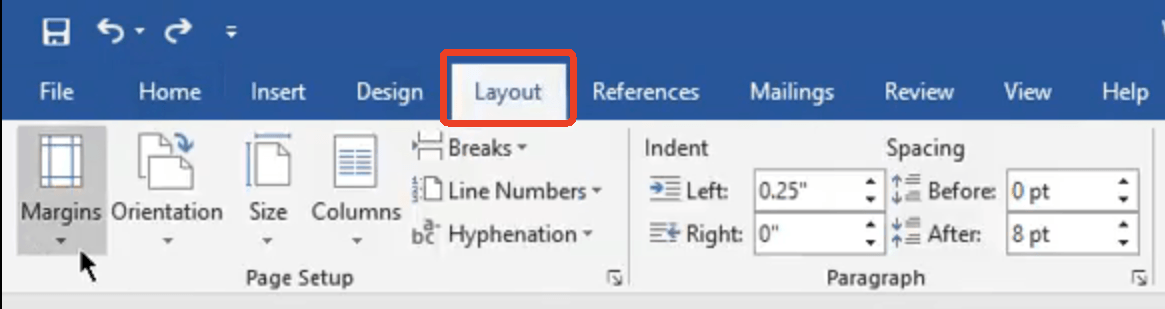
Step 1: Open Word and go to the Layout tab.
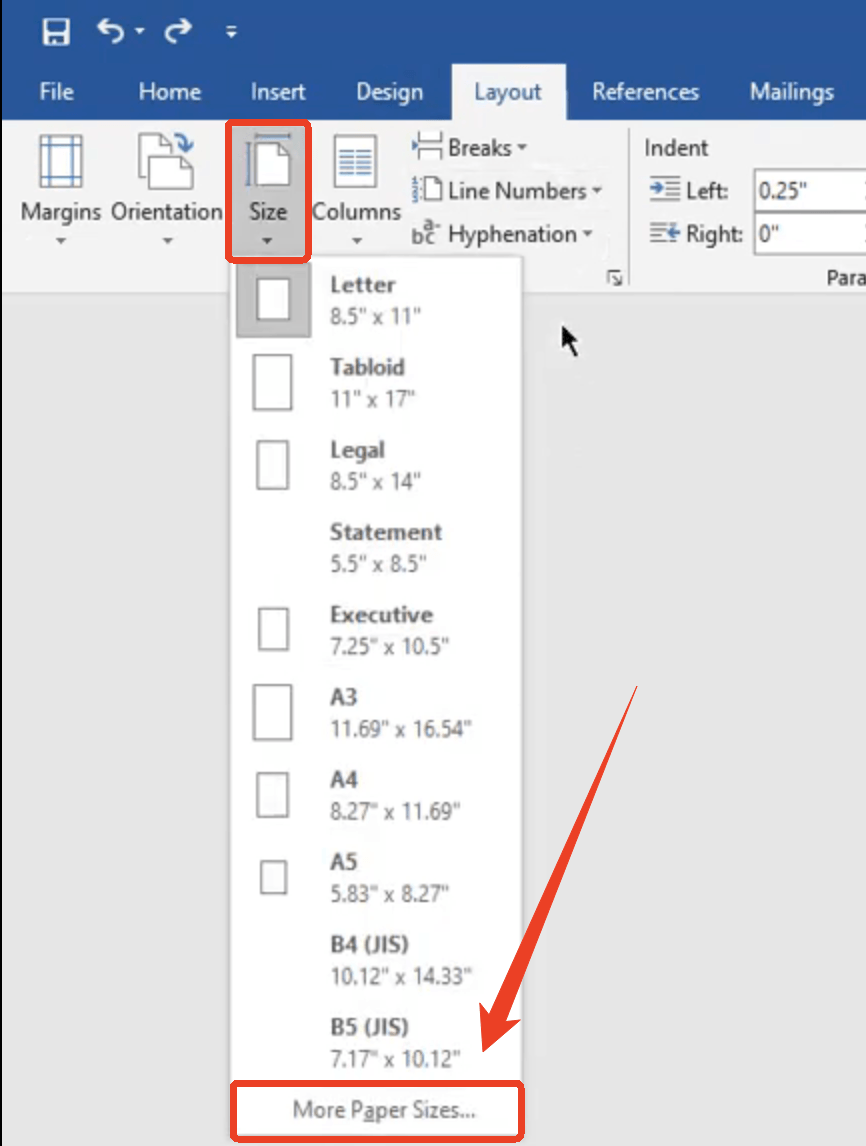
Step 2: Click Size > More Paper Sizes… at the bottom of the dropdown.
Step 3: In the Paper tab, select Custom Size from the dropdown.
Step 4: Enter the long bond paper size
- Width: 8.5 in (or 21.59 cm)
- Height: 13 in (or 33.02 cm)
Step 5: Click OK to apply.
Tips
If you are using the same size often, save it as a template. Note that “Manage Custom Sizes” is not available in all versions of Word. Simply set the dimensions directly under “Custom Size.”
JOPDF shows you more tips about Microsoft Word:
- How to Convert Word to JPG: 5 Free Methods for High-Quality Images (2026)
- How to Convert PDF to Word Without Formatting Errors (2026 Guide)
How to Set Long Bond Paper Size in Printer
Even when your document is correctly sized, printer settings must match the physical paper loaded in the tray. Here’s how to configure long bond paper size in printer settings.
Before you adjust the long bond paper size in printer, you need to check the printer compatibility:
- Verify your printer supports paper up to 13 inches in length
- Some printers require enabling long paper support mode in the system settings
Step 1: Open the Print dialog in your application and select your printer.
Step 2: Click Properties, Preferences, or Printer Settings and look for Paper Size or Media Settings.
Step 3: Select Custom and enter the long bond paper size.
- Width: 8.5 in (215.9 mm)
- Height: 13 in (330.2 mm)
Step 4: Save the custom size with a name like “Long Bond” and then use the manual feed tray for non-standard paper sizes.
Step 5: Now, you can adjust the print settings to print the long bond paper:
- Set Scale to 100% (not “Fit to Page”) to avoid unintended resizing
- Select the correct Media Type matching your paper stock
- Preview before printing to ensure the layout fits correctly
Tips:
Use JOPDF as a Virtual PDF Printer
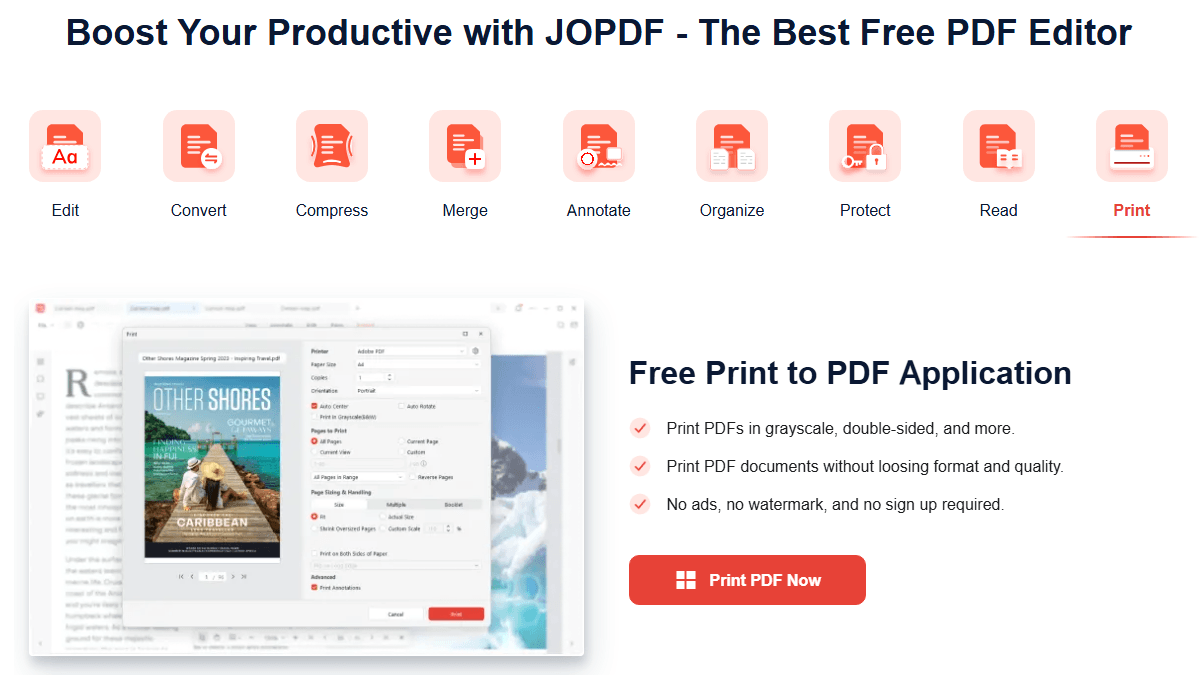
If your application does not support custom paper sizes, you can use JOPDF as a virtual printer. Install JOPDF and select it from the printer list. You can then create a PDF with long bond paper dimensions and print it later with the correct settings.
Also See: Microsoft Print to PDF Not Working? Find the Causes and Fixes!
How to Set Long Bond Paper Size in Canva
Canva is an online design tool that supports custom page sizes, making it easy to create designs for long bond paper. Setting the correct dimensions in Canva ensures your designs print perfectly.
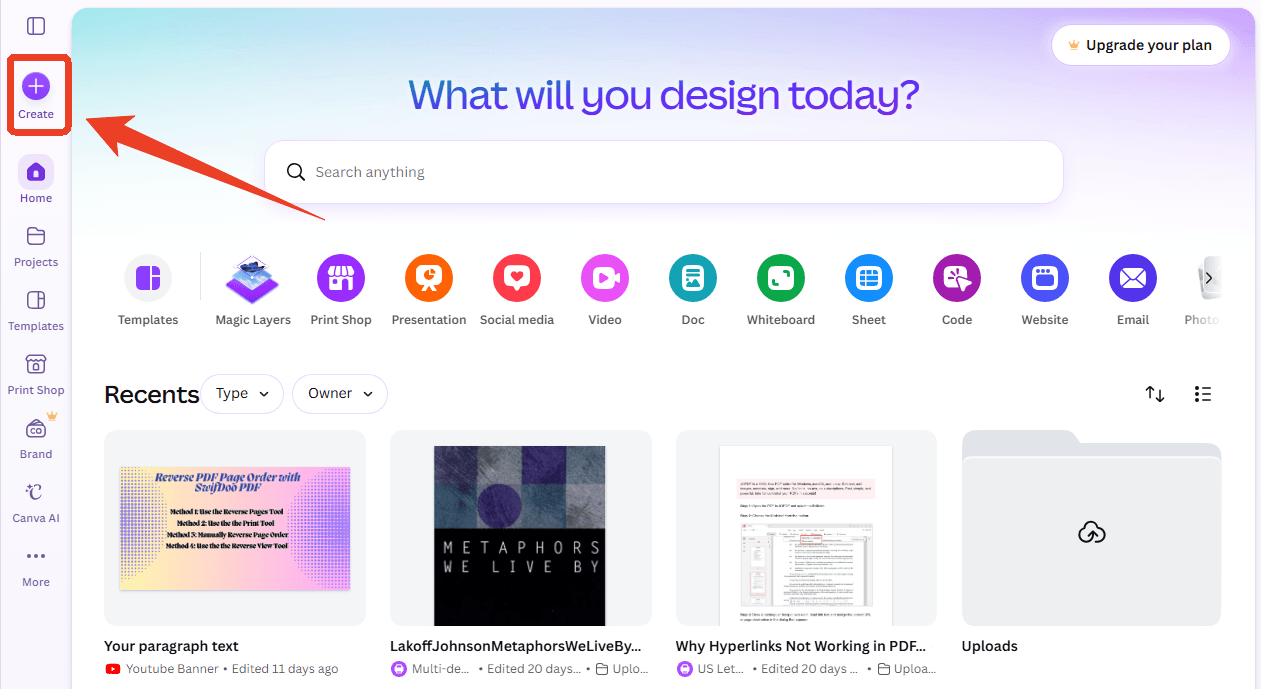
Step 1: Open Canva and click Create from the side bar.
Step 2: Choose Custome size and enter:
- Width: 8.5
- Height: 13
- Units: in
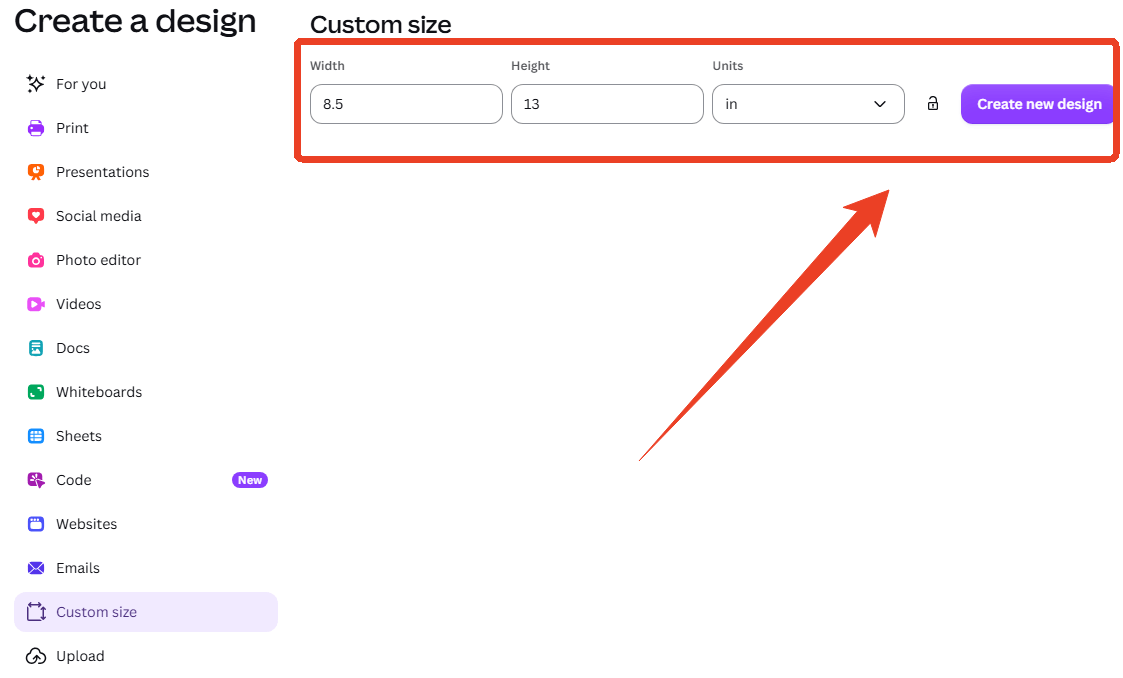
Step 3: Click Create new design.
Tips
Canva Docs offers preset options like A4 and Letter, but for long bond paper, you must use the Custom Size option and manually enter the dimensions.
How to Manage Long Bond Paper Size in PDF Editors
Another way to set a long bond paper size is to use PDF editor, which can help you resize the paper. For this task, we recommend JOPDF – a 100% free PDF editor for Windows and Mac.
JOPDF’s Key Features:
-
100% Free – No subscriptions, no watermarks, no sign-up required
-
Offline Processing – Your files stay on your device; no upload to servers
-
Cross-Platform – Works on Windows and macOS
How to resize a PDF to long bond paper size with JOPDF? You can use JOPDF to create a new PDF with long bond paper dimensions or adjust existing documents. To change a document to the correct size:
Step 1: Open your PDF in JOPDF and go to the Page tab.
Step 2: Click the Page Size tab and check the Custom option in the pop-up window.
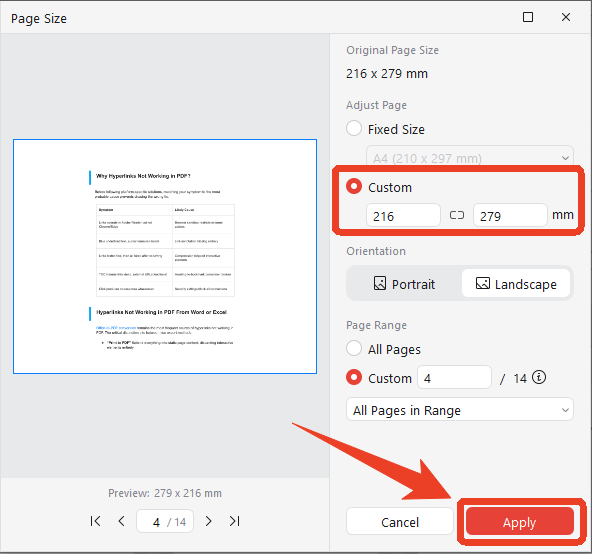
Step 3: Type the long bond paper size in mm and configure the other options. To set long bond paper size lamdscape, just choose Landscape under Orientation.
Step 4: Click Apply to create long bond paper.
Note on Page Resizing: Most PDF tools do not offer a dedicated “resize page” function built into the base editor. You may need to use the Print to PDF function and select a custom paper size in your printer settings, or use a dedicated page management tool. JOPDF provides comprehensive PDF editing, annotation, and conversion features to help you manage your documents before printing.
Conclusion
Long bond paper (8.5 × 13 inches) is a practical size for professionals, students, and offices in the Philippines and Asia. It offers more space than Letter without the bulk of Legal. For managing PDFs for long bond printing, tools like JOPDF provide a free, offline solution to ensure your documents are correctly formatted before printing.
FAQs
No. Legal is 8.5 × 14 inches – one inch longer.
Long bond paper size in meters is 0.2159 m x 0.3302 m. This unit is occasionally used in architectural, engineering, and large-format printing contexts.
Neither. When asking long bond paper size a4 or a5, the answer is that long bond paper is a different size entirely. A4 measures 210 x 297 mm. A5 measures 148 x 210 mm. Long bond paper measures 215.9 x 330.2 mm.
Yes, but only if the PDF page size and printer media settings match the sheet you load. Otherwise, the printer may scale, clip, or center the page unexpectedly.
In the Philippines, "folio" is sometimes used interchangeably with long bond paper (8.5 × 13 inches), though it can refer to different sizes in other regions. The size is also known as "German Legal Fanfold" in some printer specifications.
Table of Contents
Your Best Free PDF Expert in PDF editing, compressing, converting, annotating, protect, organizing, and more.
Free DownloadWindows · macOS · Linux

Anna
Editor
“Anna, Editor-in-Chief and PDF expert, delivers deep insights into PDF document technology trends. She is dedicated to helping readers optimize their digital lives. When not writing, Anna loves exploring local cafes and reading, blending her technical expertise with a love for storytelling.”