Introduction:
How to electronically sign a PDF for free? Fortunately, Technology has improved so much that anyone can do it. This comprehensive guide will show you three simple ways to sign your paperwork in seconds, saving you time and money.
Way 1. Use JOPDF to Electronically Sign a PDF [Recommended]
If you want the most professional and easiest tool, your best choice is to download a professional computer program. Our top recommendation is JOPDF.
JOPDF is a powerful alternative to Adobe Acrobat. It handles all your complicated document tasks without charging you expensive monthly subscription fees. This means you can keep your money while getting high-quality results.
One of its best and most popular features is the electronic signature tool. JOPDF offers three distinct, highly professional ways to create your perfect signature: draw your unique signature, type your name, or upload an image.
Here are the simple, step-by-step instructions to add signature to a PDF using JOPDF:
1. Download and install the program securely on your computer.
2. Open JOPDF and open the PDF document you need to sign.
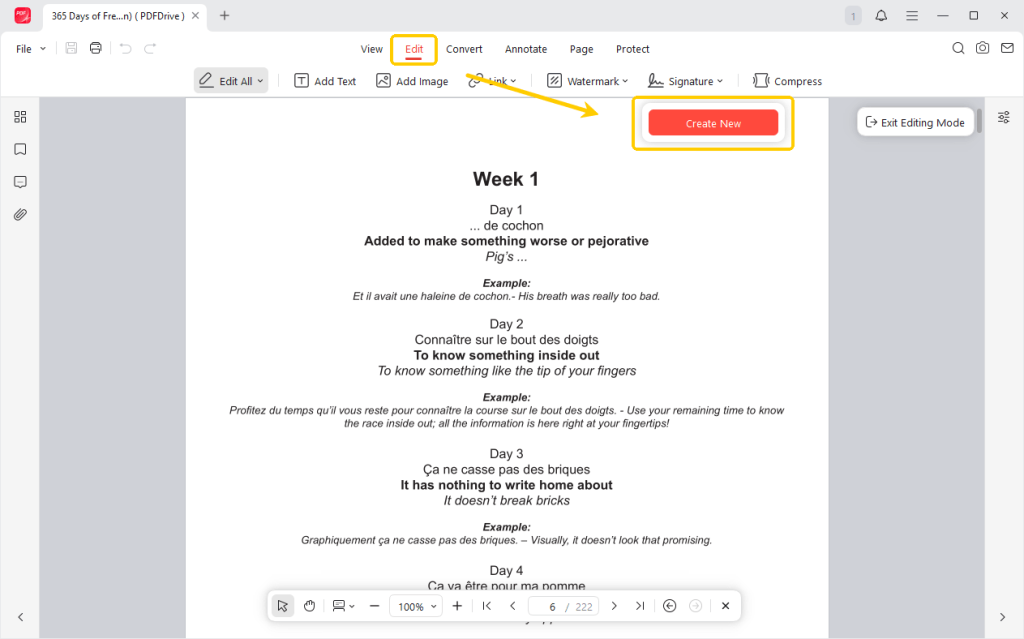
3. Look at the menu at the very top of your screen. Navigate to the Edit > Signature, and select Create Signature.
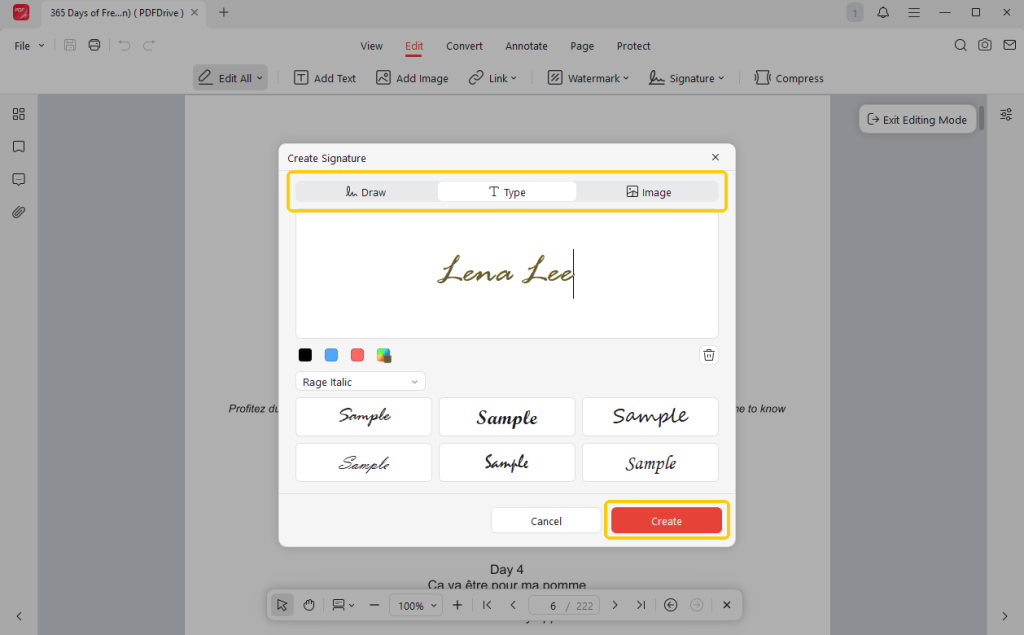
4. Now, select to draw, type, or upload an image of your signature. Take your time to make it look exactly how you want.
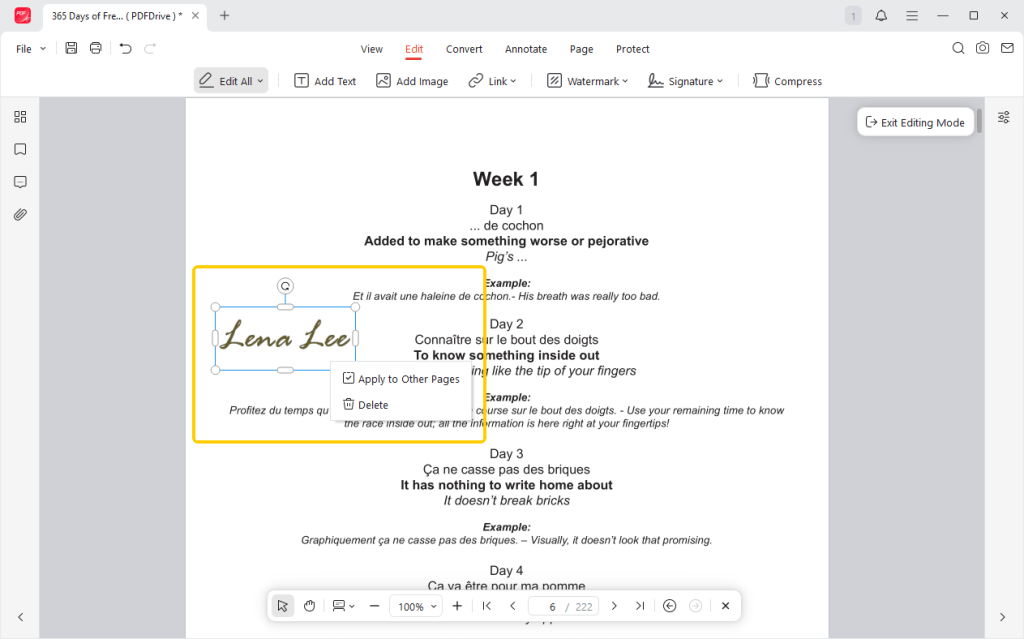
5. Once your signature is created, your mouse pointer will carry it. Simply click once to place it firmly. You can easily drag the corners to resize it if it is too big or too small for the line.
6. Finally, click the Save button. It is now ready to be emailed back!
JOPDF is not just a one-trick tool. Many people consider JOPDF the best free PDF editor because it gives you complete control over your PDF document.
It allows you to edit text, organize pages, and protect sensitive PDFs with secure passwords. All of these powerful tools are available for free.
We strongly encourage you to download and try JOPDF today for the safest document management experience. This is the absolute best way to electronically sign a PDF for free.
Way 2. Electronically Sign a PDF on Mac in Preview
As a Mac user, you already have a fantastic signature tool built right into your machine. The default program that opens PDFs on a Mac is called “Preview.” With this app, you can easily add signatures and do many other simple edits.
However, Preview cannot help you change, replace, or delete the existing text. If you want to easily edit PDF text on Mac, please try JOPDF.
Check to learn how to electronically sign a PDF on Mac:
1. Find your PDF file and double-click it. It should automatically open in the Preview app.
2. Look near the top right corner of the window. Click the Markup toolbar icon. This icon looks exactly like the tip of a marker pen.
3. A new row of tools will appear. Click the Signature icon, which looks like a small cursive signature, and select Create Signature.
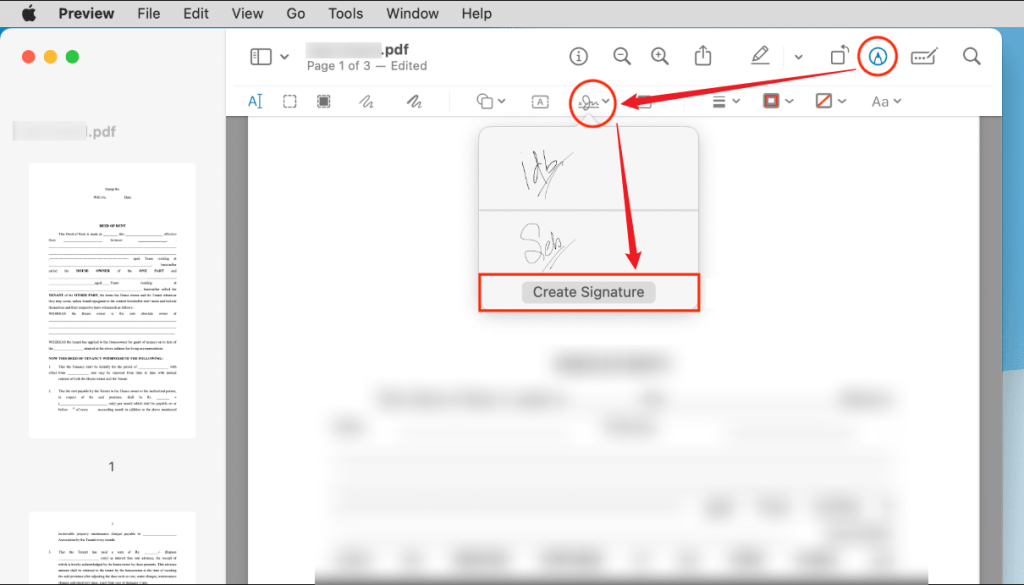
4. Preview gives you two very clever ways to capture your name when you need to know how to sign a PDF electronically:
- Trackpad: You can use your finger to trace your signature directly onto your Mac’s glass trackpad.
- Camera: You can sign your name on a paper. Then, hold that piece of paper up to your Mac’s webcam. The computer will magically scan your signature.
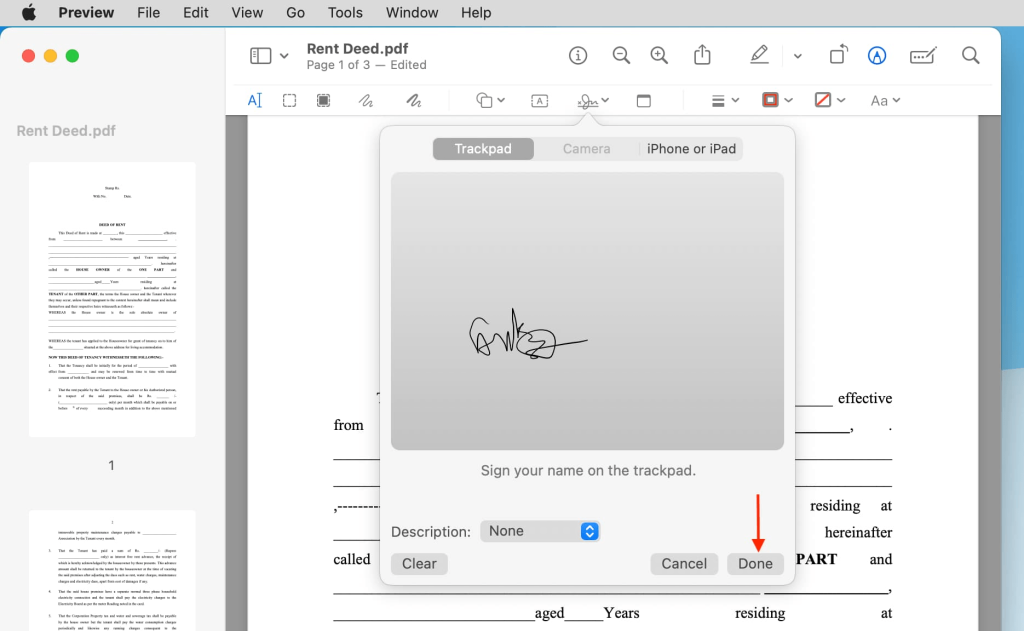
5. Once you have saved your signature, simply click the signature icon again to select it. Drag it onto the correct line on the PDF and save the file. It is very fast and incredibly easy to use.
Way 3. Use An Online PDF Signing Tool (Smallpdf)
Sometimes you are in a big rush. Maybe you are using a public library computer, or maybe you simply do not want to install any desktop software on your personal laptop.
In these specific cases, using an online web tool is very handy. If you want to know how to electronically sign a PDF for free using your internet browser, Smallpdf is a great option.
Smallpdf is a popular, user-friendly website that lets you sign paperwork quickly without creating an account. It works on almost any computer that has an internet connection.
The steps to use Smallpdf:
1. Open your web browser and go to the Smallpdf website. Navigate to their “eSign” tool.
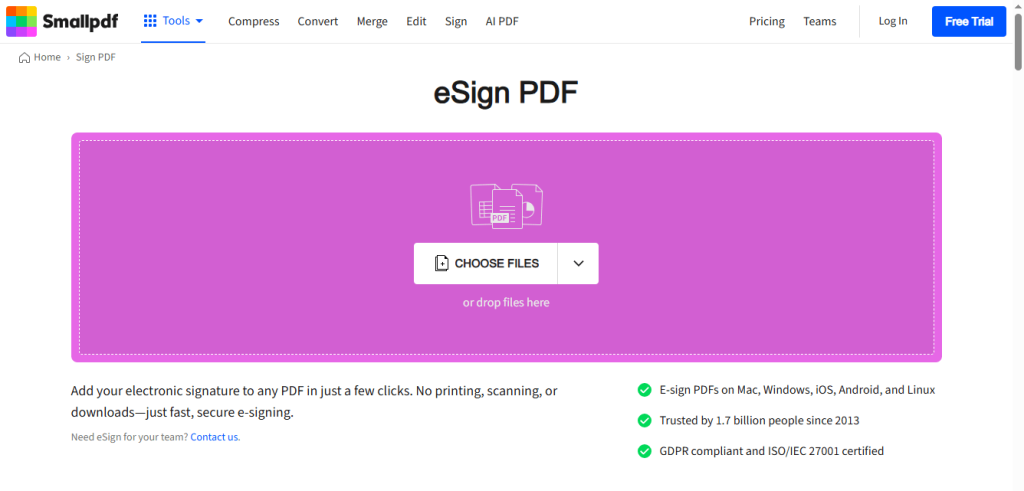
2. Drag your PDF file from your computer folder and drop it onto the webpage to upload it securely. Select Sign myself to continue.
3. Then, click the Signatures button to create your signature.
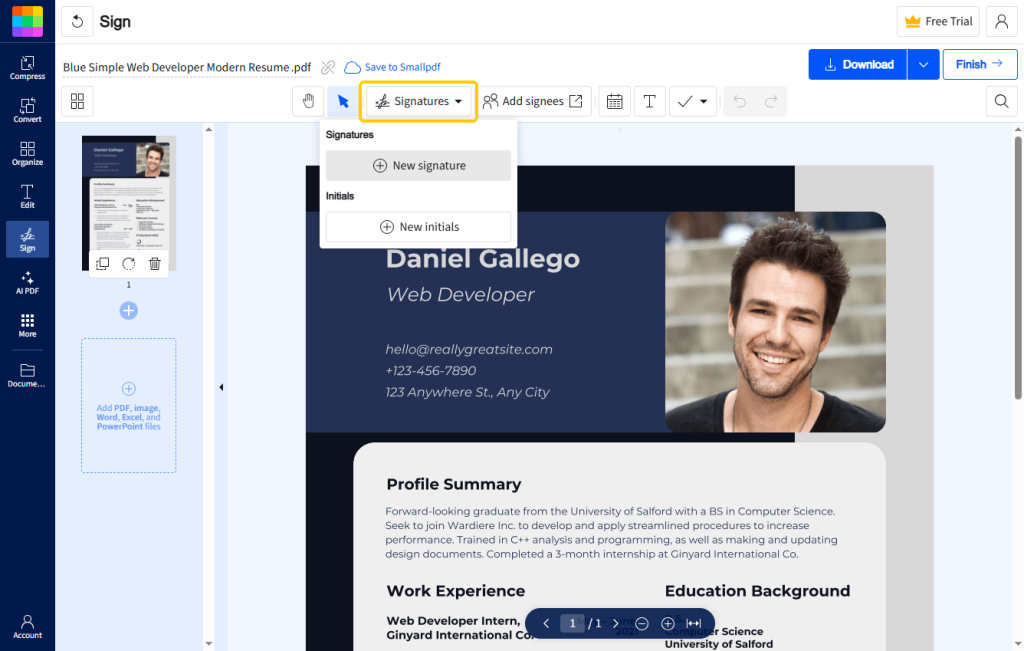
4. Just like other professional tools, the website will ask you to choose to draw, type, or upload an image of your signature.
5. Place the signature on the document. Click the Finish button and save your signed document.
A Very Important Warning: Online tools are very fast, but they require you to upload your documents to a third-party server on the internet. For secret files, using offline desktop software like JOPDF is always much safer because your files never leave your computer.
Conclusion
That’s all about how to electronically sign a PDF for free. You can choose the method that best suits your needs.
However, if you care about privacy, professional features, and ease of use, JOPDF is the ultimate free solution. It gives you the power to handle all your document needs safely and securely on your own computer!
FAQs
Table of Contents

Your Best Free PDF Expert in PDF editing, compressing, converting, annotating, protect, organizing, and more.
Free DownloadWindows · macOS · Linux

Queena
Editor
“As a staff editor for JOPDF, Queena excels at guiding users to the optimal tools and solutions. When she's not analyzing the latest PDF solutions, she enjoys spending her free time playing with her four cats.”
![Full Guide on How to OCR a PDF in Adobe Acrobat [Newest]](https://b.jopdf.com/wp-content/uploads/2026/10/how-to-ocr-a-pdf-in-adobe.png)