Introduction :
Heyzine is a popular online tool for getting interactive flipbooks from PDFs. Sometimes, instead of viewing interactive flipbooks, you need an offline, printable, or editable copy. How can you download or convert a Heyzine flipbook to PDF? In this JOPDF article, I will walk you through 4 proven methods to convert any Heyzine flipbooks to PDF in high quality.
Heyzine is an online digital publishing platform that enables users to convert PDFs to interactive flipbooks with page-turning animations. Most people use Heyzine for digital magazines, product catalogs, brochures, or presentations. Readers can view the content inside a browser-based flipbook reader. However, some of you may want to convert the flipbook to a standard PDF for offline reading, printing, annotation, or archiving. How to convert a Heyzine flipbook to PDF? Can you download Heyzine flipbook as PDF? Just keep reading!
Can You Download a Heyzine Flipbook as a PDF
Yes, you can download a Heyzine flipbook as a PDF if the publisher enables the download feature. However, some publishers intentionally disable downloads to protect copyrighted or premium content.
❓Is It Legal to Save a Heyzine Flipbook?
When you try to save or convert Heyzine flipbooks to PDF, you need to consider the legal implications. Is it legal to save a Heyzine flipbook? The answer depends on the content and permissions. Only convert flipbooks you own, created yourself, or have explicit permissions to download. You need to always respect copyright rules and the flipbook creator’s terms of use.
Method 1. Download the Original PDF from Heyzine
The recommended method to download a flipbook from Heyzine is to use its official download icon. When the creator of a flipbook enables the download feature, you can click the download icon to save the flipbook as a PDF with the original quality and formatting. Below are the steps for your reference:
Step 1. Open your browser and visit Heyzine. Then, open the Heyzine flipbook you want to download.
Step 2. Click the Download icon and wait for the PDF file to save to your device.
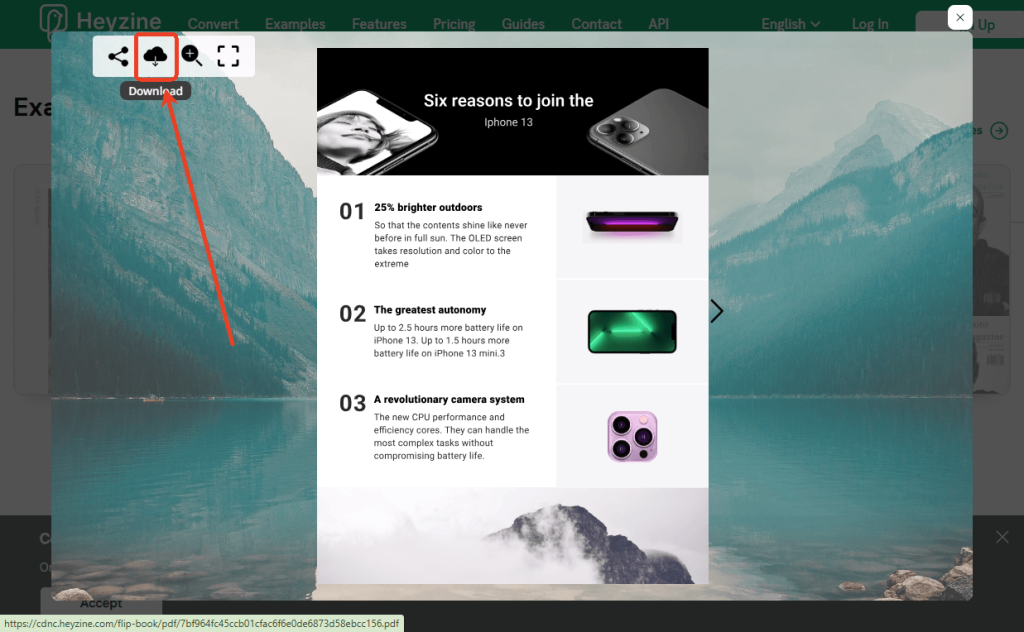
If there is no download icon, you need to try other workarounds to save Heyzine flipbooks. Meanwhile, keep in mind that you can only use these downloaded flipbooks for personal use.
Tips
JOPDF is a free, reliable PDF viewer for Windows, Mac, and Linux. You can use JOPDF to view downloaded flipbook PDFs with a good viewing experience. Additionally, JOPDF allows you to edit and annotate downloaded PDFs effectively.
Method 2. Direct PDF Link via Browser Tools
Though some flipbooks don’t have a direct download icon, they store the source PDF on their servers. You can extract the direct link. How to do that? Follow the guidance below:
Step 1. Open the target Heyzine flipbook in Chrome or another browser.
Step 2. Press Ctrl + U to view its page source.
Step 3. Press Ctrl + F to enable the search box. Then search for “.pdf” or “cdnc.heyzine.com”.
Step 4. Find the URL like: https://cdnc.heyzine.com/files/uploaded/…/[long-id].pdf
![Find the URL like: https://cdnc.heyzine.com/files/uploaded/.../[long-id].pdf](http://b.jopdf.com/wp-content/uploads/2026/05/heyzine-flipbook-to-pdf-2-1024x662.png)
Next, copy and paste the URL into a new tab. The PDF will be downloaded automatically.
In addition to using View Page Source, you can use DevTools to get the direct PDF link for the flipbook.
Step 1. After opening the flipbook in your browser, press F12 to open Developer Tools.
Step 2. Click Applications, expand the Session Storage list, and click on https://heyzine.com
Step 3. Under the Key list, find the key containing “hz_cache” or PDF paths. Finally, extract and open the full URL.
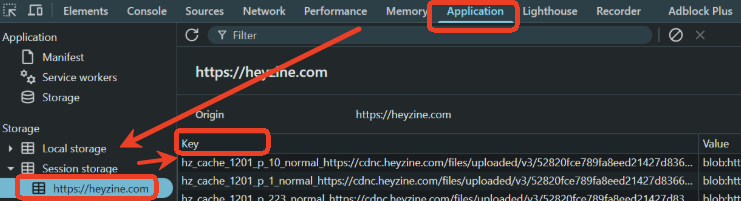
However, this method also doesn’t work for all flipbooks. If the flipbook doesn’t include the source PDF on its server, you can’t use this method to save a flipbook.
Method 3. Save Heyzine Flipbook to PDF via Chrome Extensions
If the two methods above don’t work, try a specialized extension to save a Heyzine flipbook as a PDF. You can use an extension that automatically scans pages and compiles them into a PDF. Below is how to save the Heyzine flipbook as a PDF using Chrome extensions.
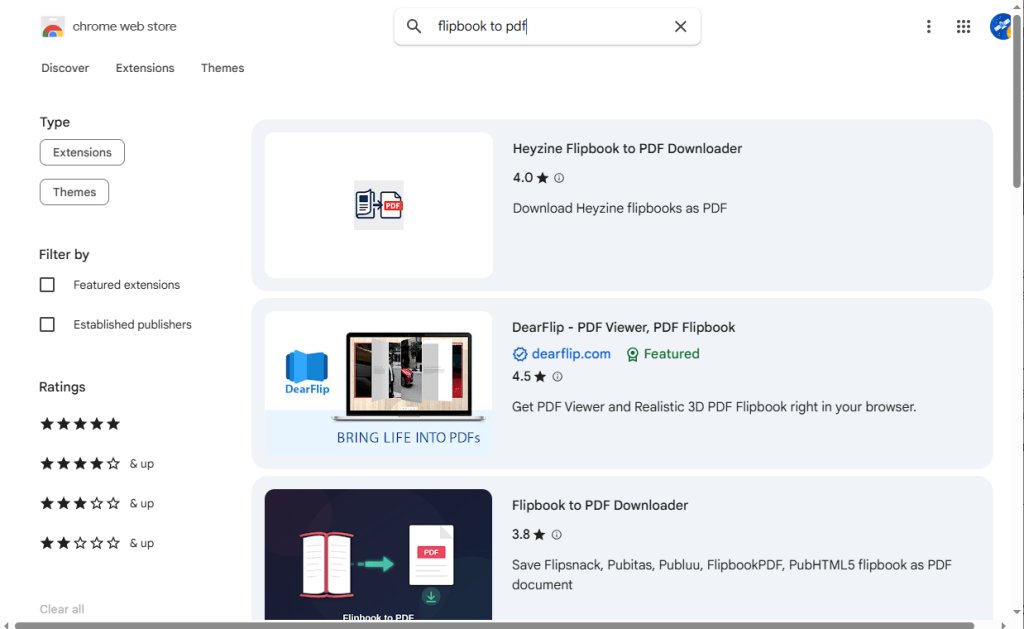
Step 1. Access the Chrome Web Store and use the search bar to search for “flipbook to PDF”.
Step 2. Then select a flipbook to PDF downloader tool as needed. For instance, you can choose Heyzine Flipbook to PDF Downloader. Follow the on-screen instructions to install this extension.
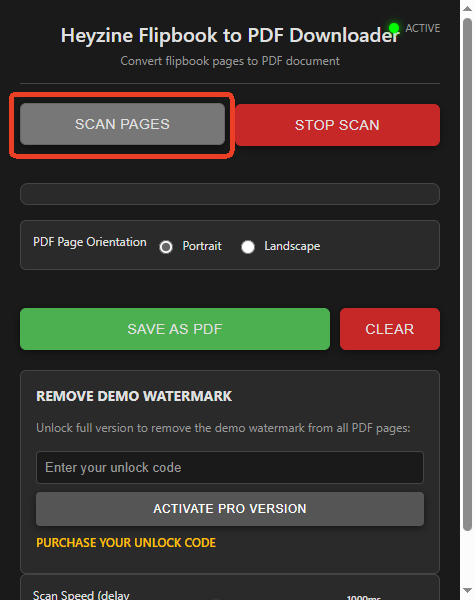
Step 3. Open your Heyzine flipbook and ensure all pages load. Next, click the extension icon and click SCAN PAGES. This extension will then automatically detect and capture pages. Once scanning is over, click SAVE AS PDF. Finally, download the file.
Method 4. Capture Pages and Combine Them into a PDF
If all download methods fail, manually capturing pages is another practical workaround. In this way, you can use the built-in screenshot tool to take screenshots of each page. Then use JOPDF to combine the screenshots into a single PDF. Here are the instructions for you.
Step 1. Open the flipbook and zoom to a comfortable level for readability.
Step 2. Take screenshots of each page. You can use Windows Snipping Tool, macOS Screenshot, or another screenshot application. Then save and rename the images in order, such as page-1, page-2, etc.
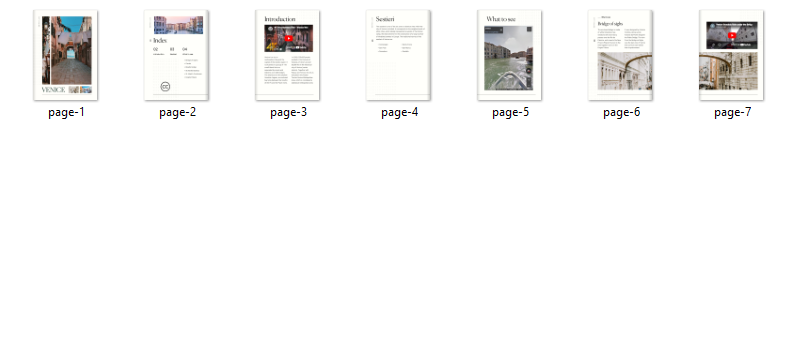
Step 3. Install JOPDF on your PC and launch it. Click Batch Process, select Image to PDF, and click Add Files to import all flipbook screenshots.
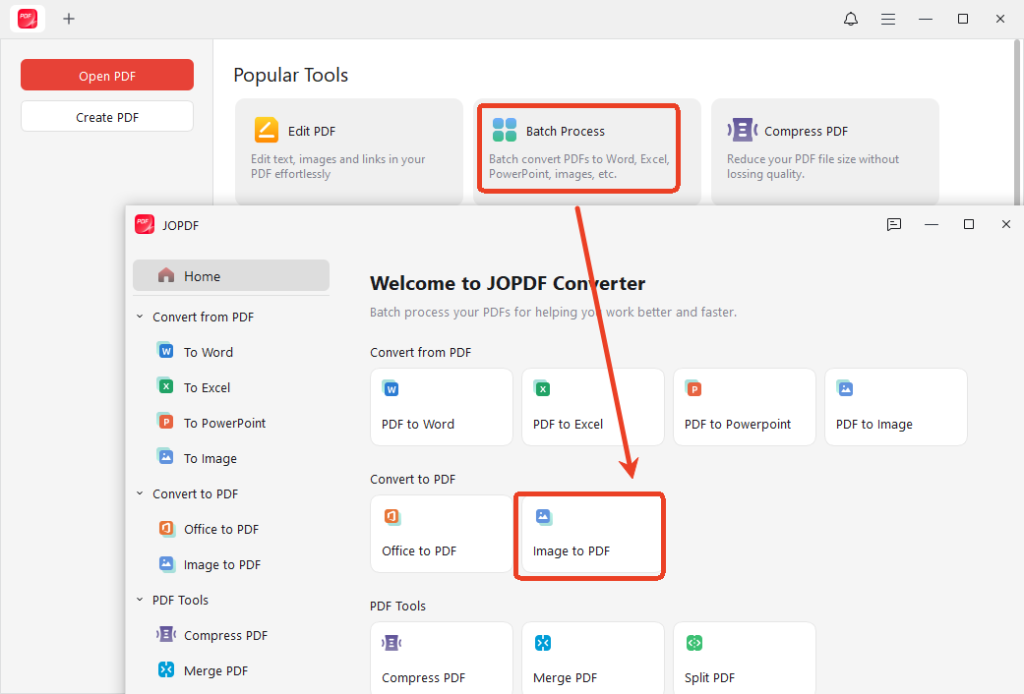
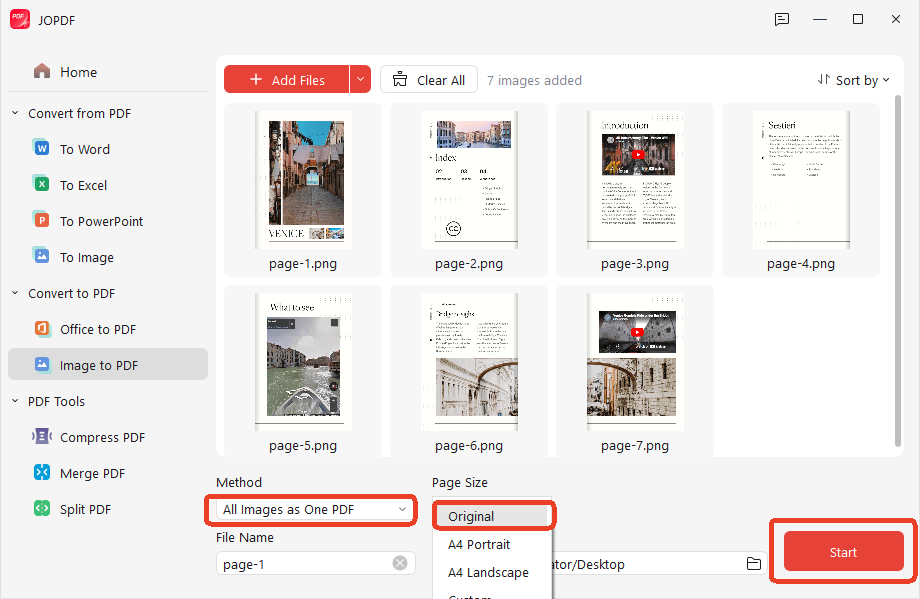
Then open the Method list and click the “All Images as a PDF” option. Meanwhile, select Original from the Page Size list. Next, click Start to enable the conversion process.
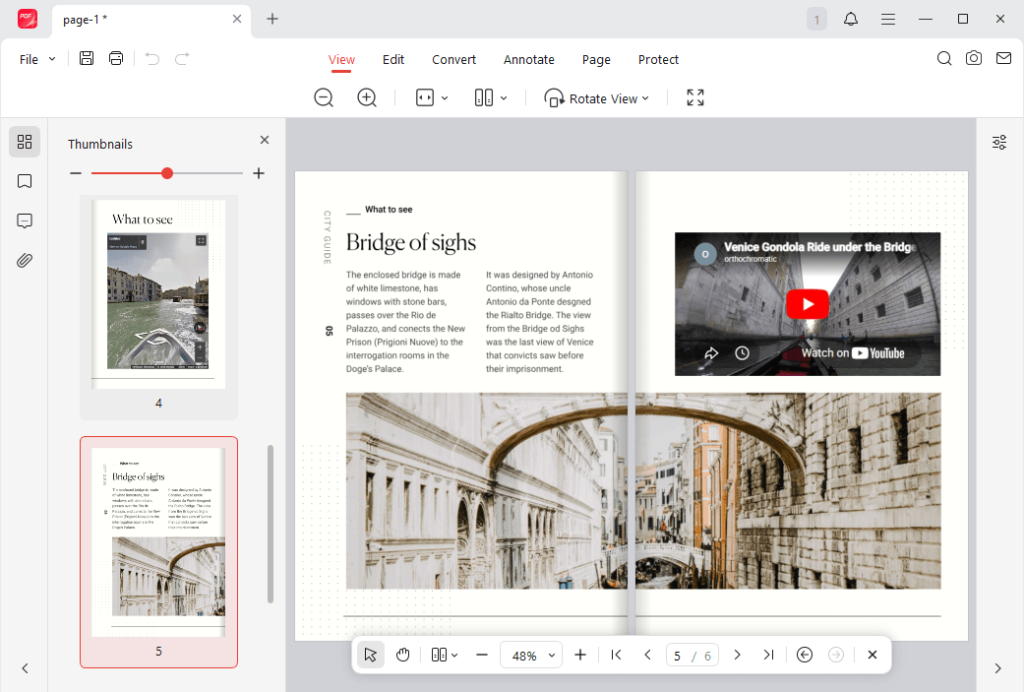
Once the conversion is over, the flipbook PDF will open in JOPDF. Here, you can view the PDF side by side or single page. Meanwhile, you can edit and annotate the PDF as needed.
Tips
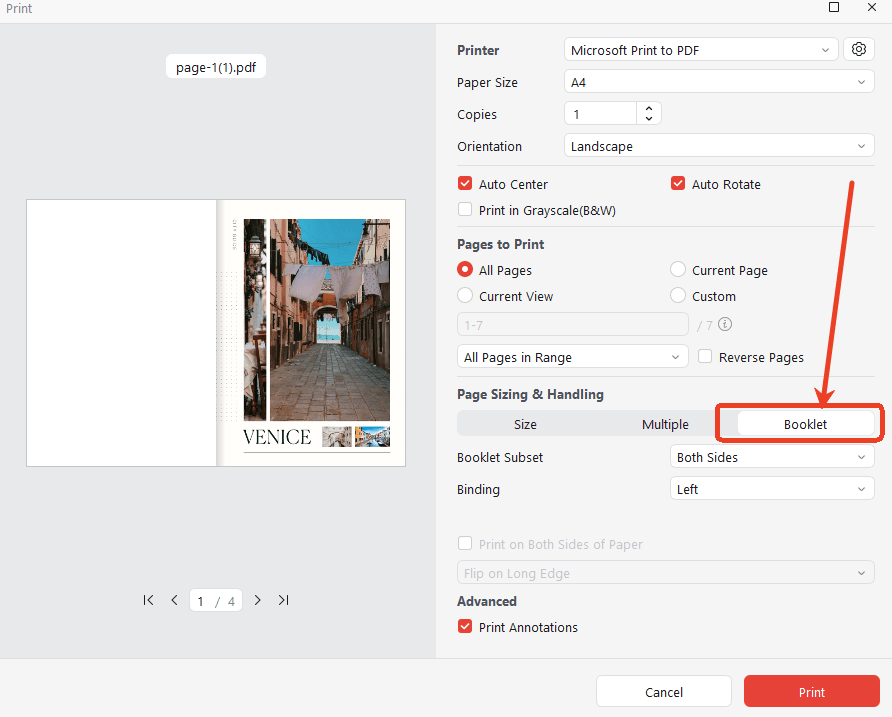
You can use JOPDF to print a PDF as a booklet. Click the Print icon to access the Print window and click the Booklet option under Page Sizing & Handling. Next, customize other print settings, like page orientation, color, and binding. Finally, click Print.
Quick Comparison Table: Best Methods for “Heyzine Flipbook to PDF”
No matter which method you choose to save the Heyzine flipbook as a PDF, you need to respect copyright laws. Here’s a quick comparison table to help you choose the right method.
| Method | Quality | Speed | Ease | Best For | Limitations |
| Official Download | Excellent | Fast | Easy | Flipbooks with a download icon | Not always available |
| Direct PDF Link | Excellent | Very Fast | Easy | Quick original access | Not always available |
| Chrome Extension | Very Good | Fast | Very Easy | Most users | Possible watermark (free) |
| Screenshots | Good | Slow | Very Easy | Protected books | Manual effort |
Conclusion
It can be easy and straightforward to convert a Heyzine flipbook to PDF when the publisher allows downloads. If downloads are disabled, you can try the direct PDF link, the Chrome extension, and screenshot-based workflows. Among them, the 100% effective method is to first use the screenshot tool and then use JOPDF to combine the screenshots into a PDF file.
FAQs
Table of Contents

Your Best Free PDF Expert in PDF editing, compressing, converting, annotating, protect, organizing, and more.
Free DownloadWindows · macOS · Linux

Olivia
“Olivia is an editor at JOPDF, where she writes practical guides and insightful articles on managing PDFs—covering topics like editing, annotating, converting, and organizing files efficiently. Passionate about clear communication and digital productivity, Olivia enjoys spending her free time cooking, watching movies, and hiking to unwind and find inspiration for her writing.”