
Introduction :
Google Books is one of the largest digital libraries. You can access millions of books such as novels, reference materials, and academic publications. Sometimes, you may want to read books offline or save them for research. In that case, you need to download Google Books as PDF files. Can you download PDFs from Google Books? In this JOPDF article, let’s find the answer and learn the legal ways to save free Google Books PDFs.
Can You Download Google Books as PDF
Yes, you can. But not every book on Google Books can be downloaded as a PDF. You can download some Google Books as PDF files. The available options depend on the book’s copyright status, publisher settings, and whether Google provides a full view or only a limited preview. Generally, understanding the book categories can help you determine whether a Google Books PDF download is available. Below is a table for your reference:
| Book Availability | Can You Download PDF? | Description |
| Public View/Public Domain | Yes | The complete book can usually be downloaded as a PDF |
| Free Google Books | Sometimes | Download availability depends on publisher settings |
| Limited Preview | Usually No | Only selected pages are available |
| Snippet View | No | Only small excerpts can be viewed |
Official Way to Download PDFs from Google Books
First, I’d like to introduce you to the free and legal way to save Google Books as PDF files via its built-in PDF download feature. Instead of working for every book, this method can only work for public domain books, free ebooks, and books with full view access. How do you save free Google Books PDFs via its built-in download feature? Below are the exact steps:
Step 1. Open your browser and visit the Google Books website. Then, search for the book you want to download. You can search using the book title, author, or ISBN.
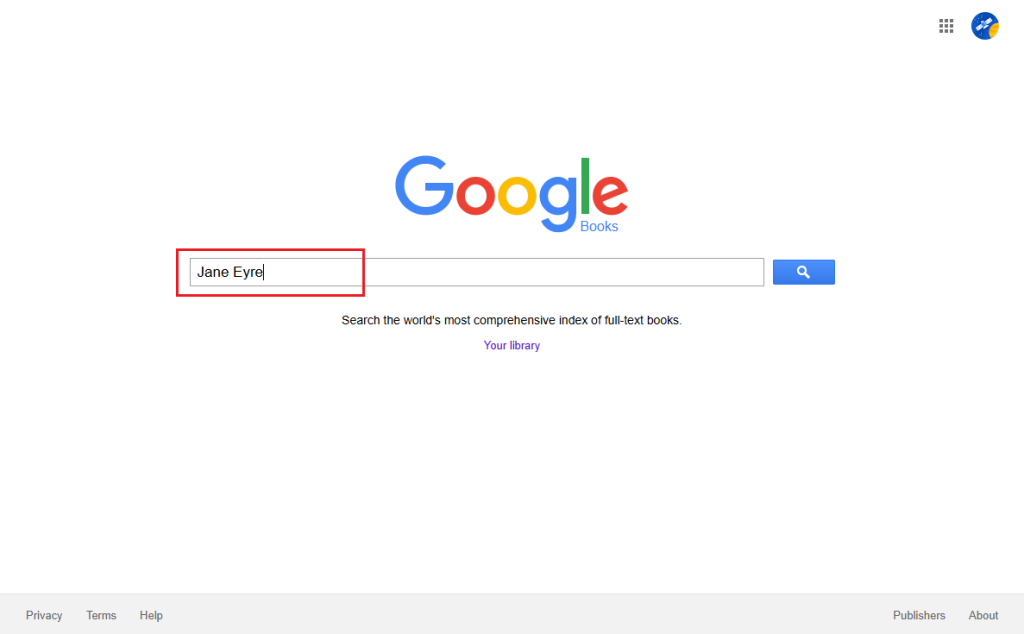
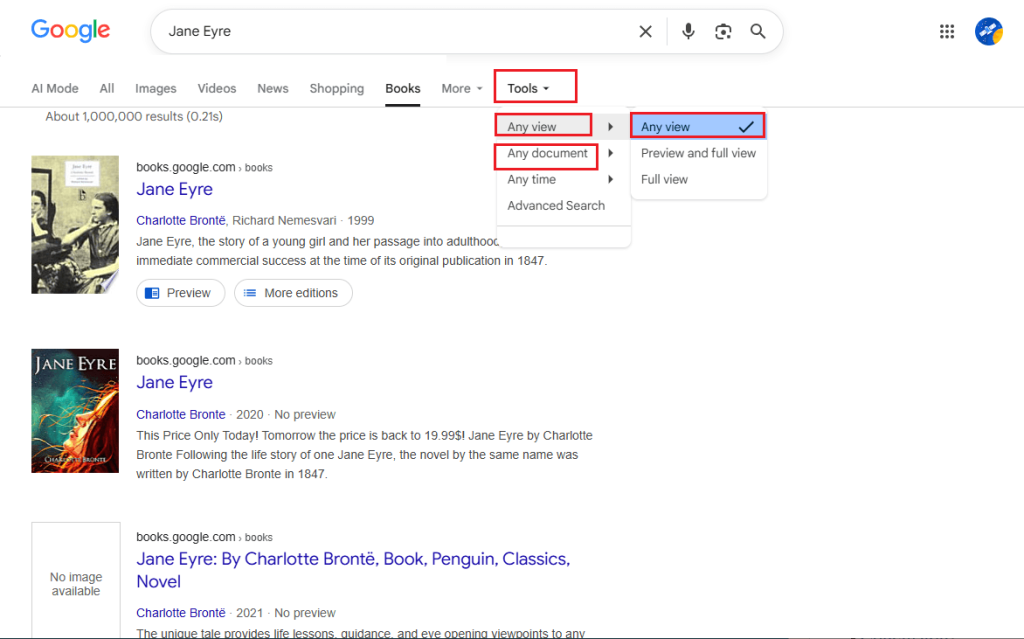
Step 2. Next, use a tool to filter out books that are allowed to be downloaded. Click Tools, go to Any view > Full view, and go to Any document > Books.
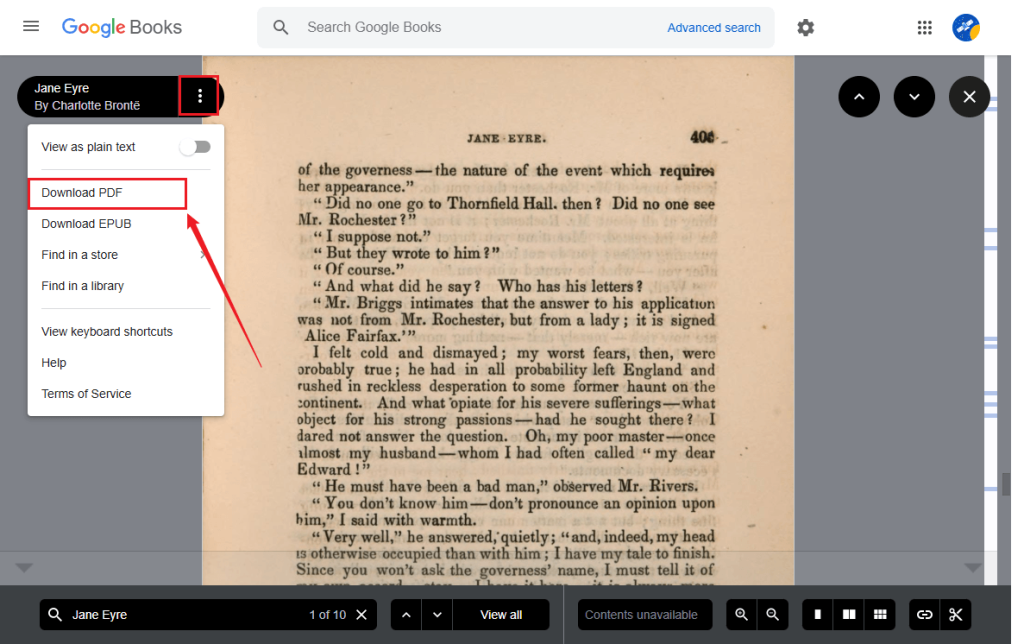
Step 3. Click on the book to open the preview. Then, click the three-dot icon on the top left and select the Download PDF option. Next, the book will open in the browser. Click the download icon to save the Google Books PDF locally.
If you need a PDF viewer or editor to read and organize the downloaded PDF file, you can try JOPDF. It is one of the best free offline PDF editors that can help you to view, edit, annotate, and organize downloaded PDF files across Windows, Mac, and Linux.
Download Google Books as PDF via Google Play Books
If you have purchased a book or added it to your Google Play Books library, you can often export it as a PDF directly from Google’s platform. This way is also an official way to download books. Meanwhile, it can bypass limitations of the main Google Books preview system. How to get a PDF for books you own through Google? Follow the steps below in Google Play Books.
Step 1. Open your browser, go to the Google Play Books website, and click Your library.
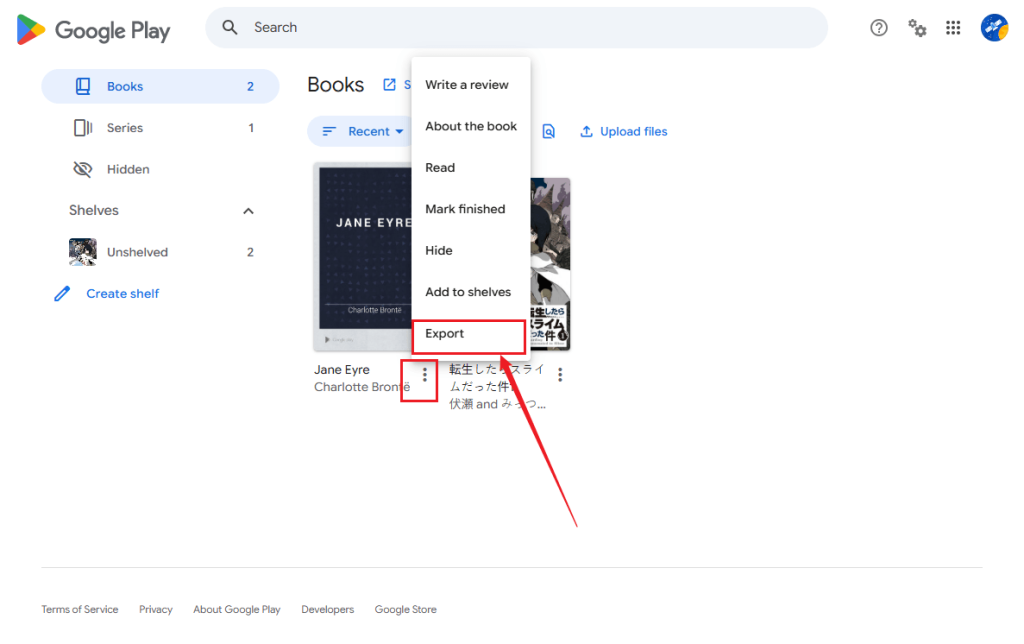
Step 2. Under the default Books section, locate your target book, click the three-dot icon, and select Export.
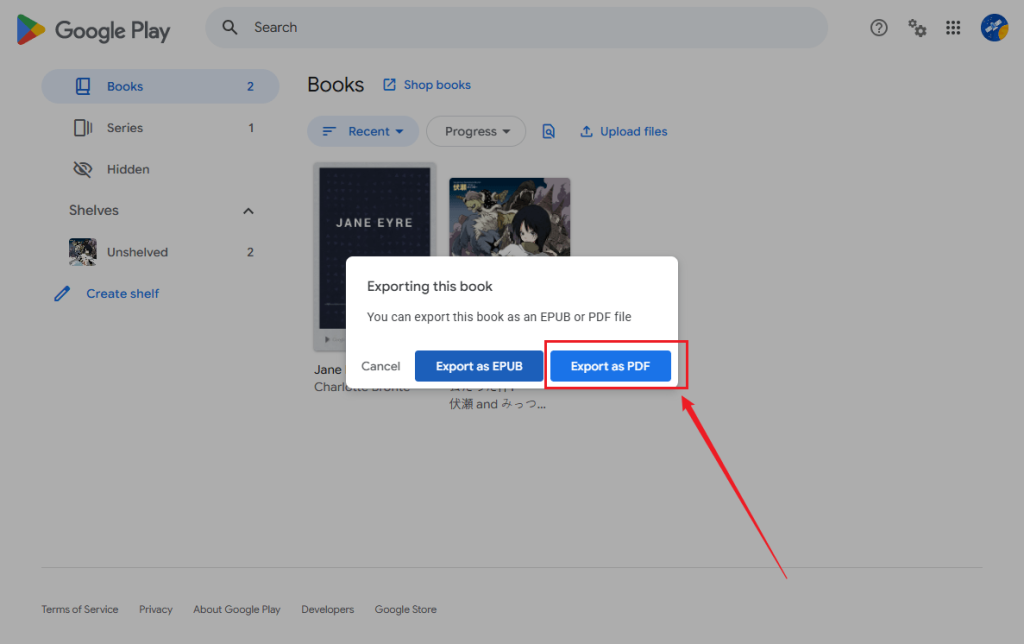
Step 3. Click the Export as PDF button, and then the file will open in your browser. Finally, click the Download icon to save the PDF book locally.
How to Convert Google Books to PDF
In some cases, Google Books may provide an ebook file format such as EPUB instead of a PDF. If you have legally downloaded an ebook file and need a PDF version for easier sharing or printing, you can convert it using an ebook converter. Here are some reliable converters for your choice:
- SwifDoo PDF
- Adobe Acrobat Pro
- Calibre
- SwifDoo PDF Online Converter
- CloudConvert
- FreeConvert
SwifDoo PDF is a cost-effective alternative to Adobe Acrobat that enables you to convert EPUB to PDF in a few clicks. Conversely, it supports converting PDF to EPUB. Meanwhile, it is a full-featured PDF editor for Windows. How to convert EPUB books to PDF using SwifDoo PDF? Below are the exact steps:
Step 1. Launch SwifDoo PDF and click the Convert tab in the top menu.
Step 2. Click the EPUB to PDF option and click Add Files to upload the downloaded EPUB book.
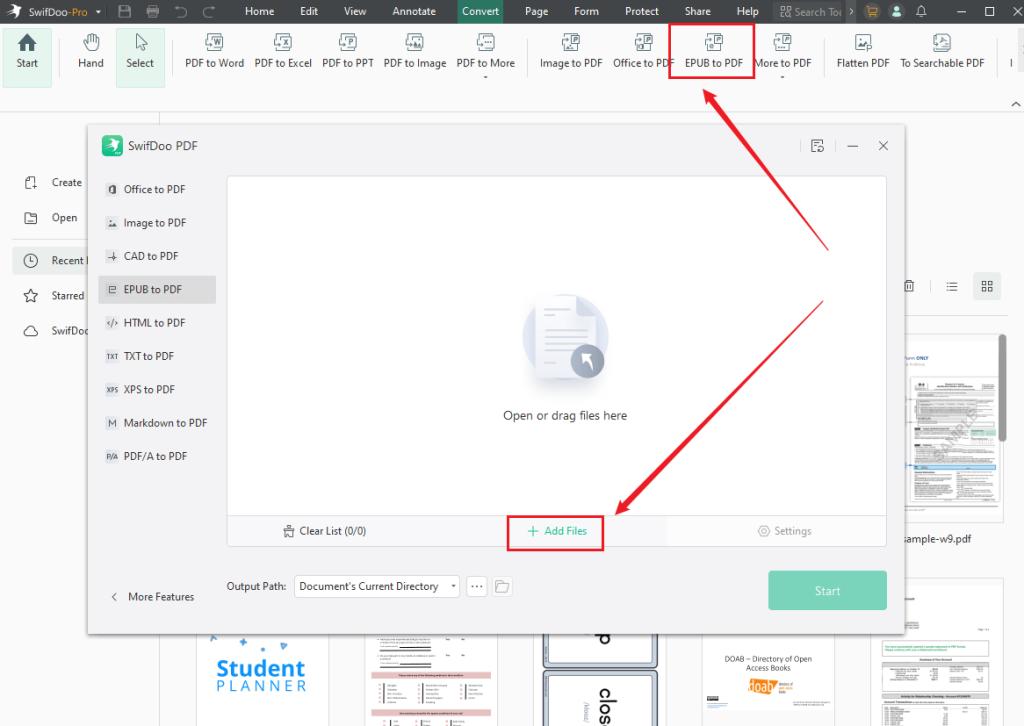
Step 3. Finally, click Start to start the EPUB to PDF conversion.
Bonus: Best Way to Read Downloaded Google Books with JOPDF
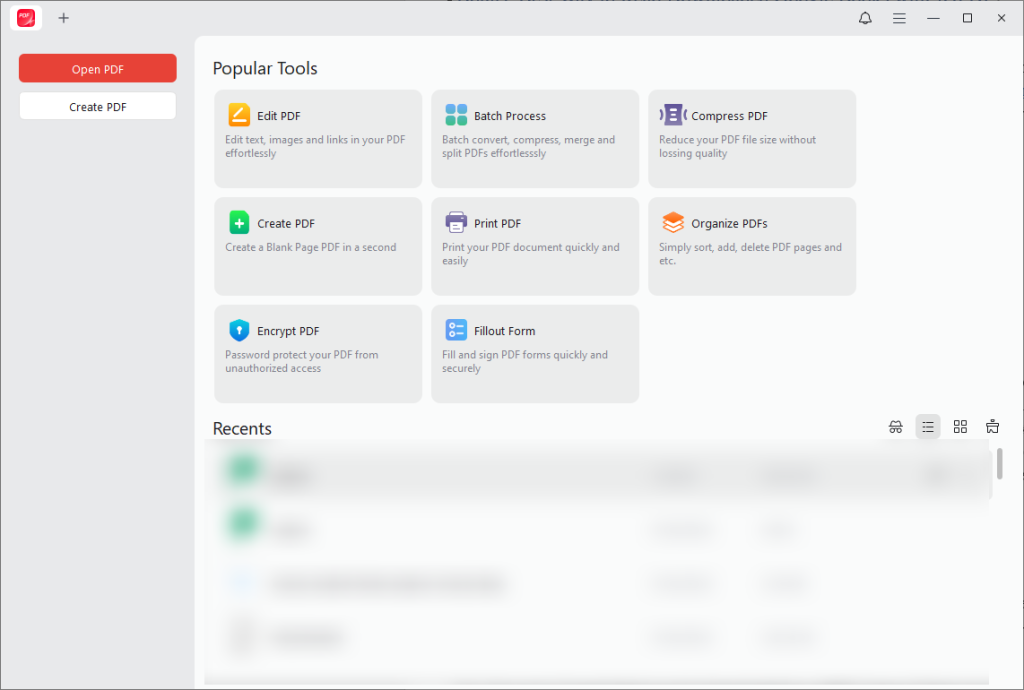
After saving Google Books as PDFs, you can use a reliable PDF reader to get a wonderful reading experience. JOPDF can perfectly meet your needs. It is one of the best PDF readers for Windows, Mac, and Linux. It offers various reading modes. Additionally, JOPDF is a full-featured PDF editor with a wide range of editing tools. With JOPDF, you can:
- Open and read PDFs smoothly across Windows, Mac, and Linux
- Highlight important passages for study or research
- Add notes and annotations directly on the pages
- Organize multiple books into a structured library
- Fill in and sign PDF files
- Navigate long documents using bookmarks and page thumbnails
- Work completely offline without uploading files to the cloud
Conclusion
You can access millions of digital books in Google Books. Can you download Google Books as PDF files? Is it legal to save Google Books as PDFs? It depends on the availability and copyright restrictions of each book. If the book is fully accessible, you can download a PDF directly from Google Books. In addition, you can use Google Play Books. If you get a Google Book in EPUB format, you can use an e-book converter to convert it to PDF. Then, you can use JOPDF to view downloaded PDF books with an excellent viewing experience.
FAQs
Table of Contents
Your Best Free PDF Expert in PDF editing, compressing, converting, annotating, protect, organizing, and more.
Free DownloadWindows · macOS · Linux

Olivia
“Olivia is an editor at JOPDF, where she writes practical guides and insightful articles on managing PDFs—covering topics like editing, annotating, converting, and organizing files efficiently. Passionate about clear communication and digital productivity, Olivia enjoys spending her free time cooking, watching movies, and hiking to unwind and find inspiration for her writing.”
![8 Best Manga Reading Sites to Read Manga Online [Full Review]](https://b.jopdf.com/wp-content/uploads/2026/09/best-manga-reading-sites.png)
