Introduction :
Small dialogue text, incorrect page order, wide margins, and awkward page layouts can make manga reading difficult, especially on smaller screens. A good manga PDF viewer can provide smooth page navigation, flexible zoom controls, suitable page layouts, and ideally a right-to-left reading mode for Japanese manga. In this JOPDF article, you’ll learn 8 of the best manga PDF readers for Windows, Mac, Android, and iOS.
Reading manga in PDF format is convenient because you can save entire volumes, preserve page layouts, and access your favorite stories offline. However, not every PDF reader provides a comfortable manga-reading experience. When choosing a good manga PDF viewer, I consider several factors, such as right-to-left reading, continuous scrolling, full-screen mode, or single-page and two-page views. In the following content, I have rounded up 8 wonderful PDF comic readers. Let’s dive in!
Quick Comparison of the 8 Manga PDF Readers for PC/Phone
In this article, I will introduce you to 8 good manga PDF viewers. They differ in PDF compatibility, supported platforms, page layouts, and manga-specific features. Below is the comparison table of their actual capabilities. You can have a quick look. For a detailed introduction, jump to the next section.
| Manga PDF Reader | Platforms | Can Open PDF? | Right-to-Left Reading | Two-Page View | Main Advantage |
| SumatraPDF | Windows | Yes | Yes, Manga Mode | Yes | Free manga reading with RTL support |
| YACReader | Windows, Mac, Linux, Android, iOS | Yes | Yes | Yes | Manga and comic collection management |
| Panels | iPhone, iPad, Mac | Yes | Configurable reading direction | Yes | Customizable Apple-device reading |
| CDisplayEx | Windows, Android | Yes | Manga-oriented reading | Yes | Dedicated comic and manga reader |
| ComicGlass | iPhone, iPad | Yes | Customizable navigation | Yes | Scanned manga and page splitting |
| Perfect Viewer | Android | Yes, with PDF plugin | Configurable reading controls | Yes | Flexible Android comic reading |
| Adobe Acrobat Reader | Windows, Mac, Android, iOS | Yes | No dedicated manga mode | Yes | General-purpose PDF viewing |
| JOPDF | Windows, Mac, Linux | Yes | No dedicated manga mode | No dedicated manga spread mode | Free offline PDF reading and management |
8 Best Manga PDF Readers for Different Devices
In this section, I will introduce you to 8 reliable manga PDF readers worth considering. Some are dedicated comic readers with specialized reading modes, while others are general-purpose PDF applications that can open manga PDFs and provide useful document tools.
#1. SumatraPDF – Best Free Manga PDF Reader for Windows
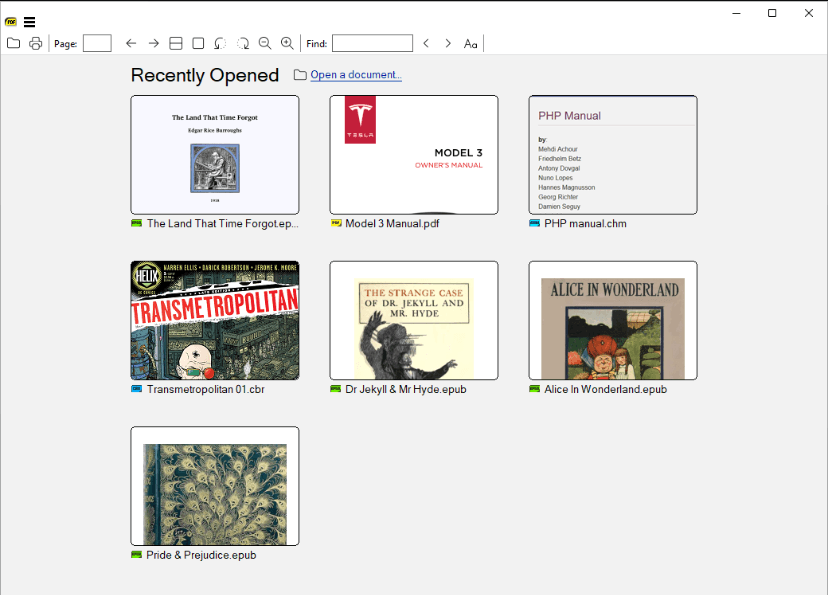
SumatraPDF is a lightweight, free PDF and ebook reader for Windows. It supports PDF, CBZ, CBR, CBT, EPUB, MOBI, and several other formats, making it a practical choice if you need a simple tool for reading comics and digital books.
Additionally, SumatraPDF includes a dedicated Manga Mode(right-to-left reading), two-page spreads, continuous scrolling, and good support for comic archives. The Manga Mode feature can arrange facing pages from right to left, following the traditional Japanese manga reading direction.
✨Key features:
- Supports PDF and comic formats such as CBZ and CBR.
- Provides single-page, facing-page, and book-view layouts.
- Offers a dedicated right-to-left Manga Mode.
- Supports continuous page scrolling.
- Includes zoom, page rotation, and margin-trimming options.
- Provides full-screen and presentation modes.
Pros
- Free and lightweight.
- Excellent manga-specific viewing options.
- Supports multiple document and comic formats.
Cons
- Only available for Windows desktop.
- Does not provide a comprehensive manga library management system.
🥇Best for: Windows users looking for a free, lightweight manga PDF reader with right-to-left reading and two-page viewing.
#2. JOPDF – Best Free Offline PDF Reader for Reading and Managing Manga PDFs
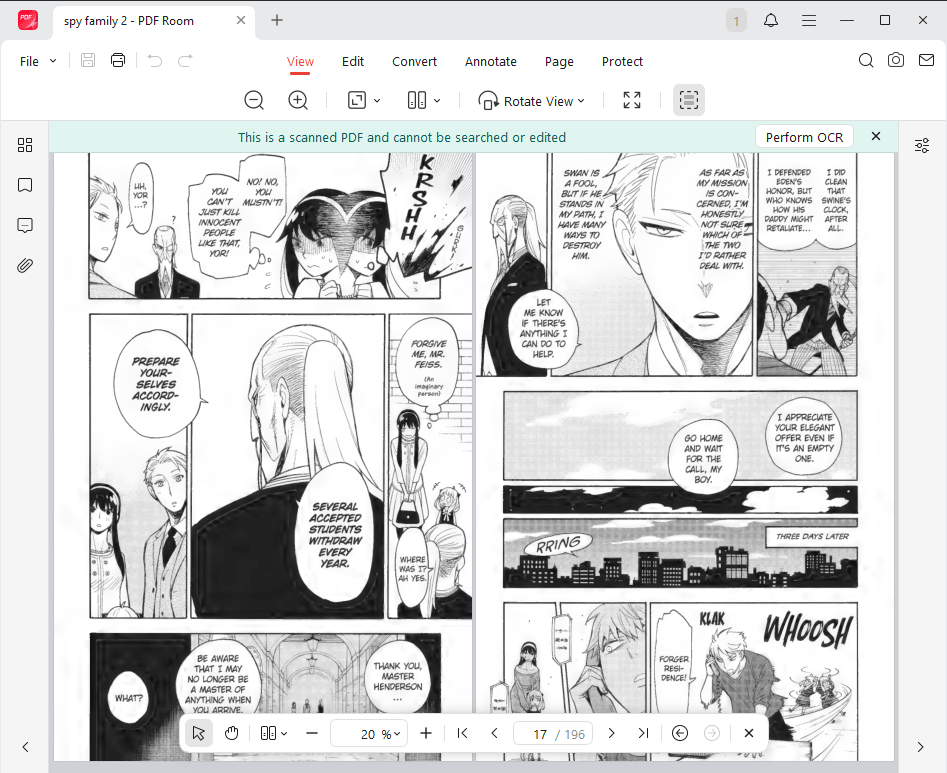
JOPDF is a free offline PDF editor and reader available for Windows, macOS, and Linux. Although it is not specifically designed for manga or comic reading, it provides the essential functionality to open and view manga PDFs. It offers several practical reading modes, such as two-page view and single-page scrolling. Meanwhile, it also supports viewing a manga PDF in full screen.
Beyond a PDF viewer, you can use JOPDF to annotate PDF pages, rotate pages, reorganize documents, and perform other PDF-related tasks within the single application. Furthermore, JOPDF is completely free to use, with no registration, subscriptions, or watermarks. If you want a free PDF reader with additional editing capabilities, JOPDF is worth considering.
✨Key features:
- Free PDF reading: Open and view manga PDFs without paying for a subscription.
- Offline access: Read and manage locally stored PDF files without requiring a continuous internet connection.
- Page management: Insert, remove, split, rotate, and reorganize PDF pages.
- PDF annotation: Highlight content, add notes, underline text, and draw on PDF pages.
- Zoom and navigation: Scroll through documents, zoom in and out, and jump between pages.
- Cross-platform compatibility: Available for Windows, macOS, and Linux.
Pros
- Completely free with no registration required.
- Supports offline PDF reading and management.
- Provides additional editing and annotation tools.
- Supports multiple desktop operating systems.
Cons
- Not specifically designed for manga or comic reading.
- Does not offer dedicated right-to-left manga mode or comic library management.
🥇Best for: Users who want a free offline manga PDF reader with additional tools for editing, annotating, and organizing PDF files.
#3. YACReader – Best Manga Reader for Organizing Collections
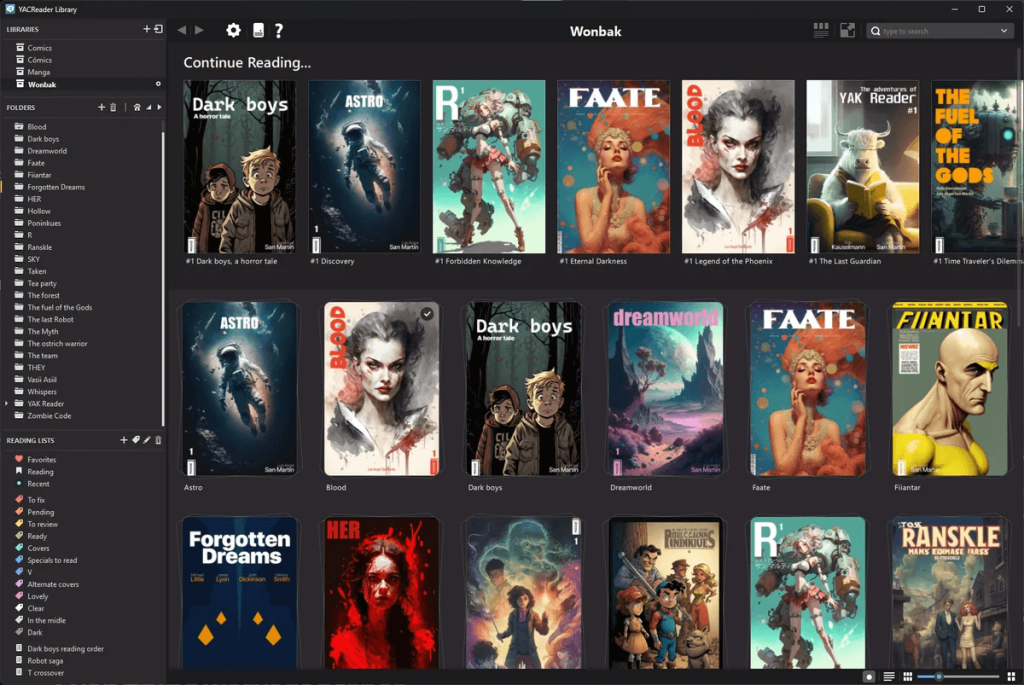
YACReader is a free, open-source comic book and manga reader. Meanwhile, it provides a full ecosystem for organizing and reading digital comics, combining a desktop reader, a library management application, and mobile apps to access comics across devices.
Unlike basic PDF viewers, YACReader provides several specialized manga-reading features, including right-to-left page ordering, double-page viewing, and continuous scrolling. Moreover, it supports PDF, CBR, CB7, RAR, and several image formats.
✨Key features:
- Supports PDF and multiple comic archive formats.
- Provides right-to-left manga reading.
- Offers single-page and double-page viewing.
- Includes continuous scrolling for webtoons.
- Supports bookmarks and reading progress tracking.
- Organizes collections with folders, labels, ratings, and custom covers.
- Offers synchronization between desktop and mobile libraries.
Pros
- Excellent collection organization features.
- Supports multiple manga and comic formats.
- Offers dedicated manga-reading controls.
- Supports Windows, macOS, Linux, iOS, and Android.
Cons
- Some advanced collection and synchronization features require additional setup.
🥇Best for: Manga enthusiasts who have large digital collections and want to organize, browse, and read their files across multiple devices.
#4. Panels – Best Manga PDF Viewer for Apple Devices
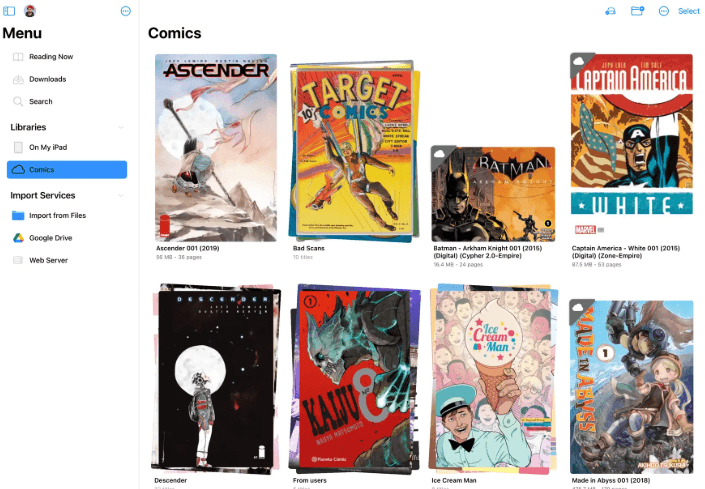
Panels is a DRM-free comic and manga reader designed exclusively for Apple devices (iPhone, iPad, and Mac). It supports PDF and several comic formats, such as CBR, CBZ, and CB7. What’s more, it provides multiple reading modes and presets and offers full manga support with right-to-left reading. Meanwhile, its interface focuses on making digital comic reading convenient, with customizable reading settings and library management features.
✨Key features:
- Supports PDF and various comic file formats.
- Provides a customizable comic-reading experience.
- Offers library organization.
- Supports importing files from compatible storage locations.
- Provides reading controls suitable for mobile screens.
- Supports Apple devices, including iPhone and iPad.
Pros
- Designed specifically for digital comic reading.
- Suitable for managing personal comic collections.
- Provides a dedicated reading interface.
Cons
- Primarily intended for Apple users.
- Some advanced features are only available in Panels Premium.
🥇Best for: iPhone and iPad users who want a dedicated application for reading and organizing manga and comic files.
#5. CDisplayEx – Best Comic and Manga Reader for PC
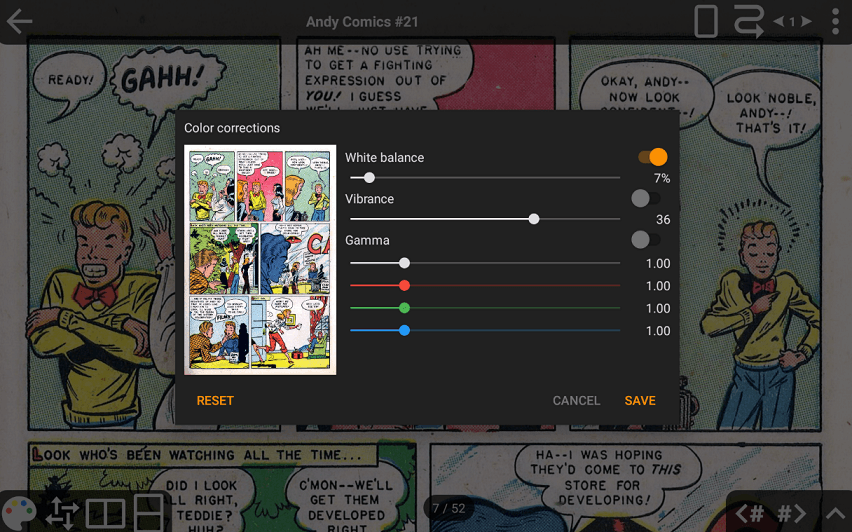
CDisplayEx is a comic book reader designed to provide a straightforward way to browse and read digital comics on Windows and Android devices. You can also enjoy a good comic reading experience with dedicated manga mode, advanced page-fitting and scaling options, color correction and image adjustments, and other comic-reading modes. In addition to reading PDF manga and comics, you can read books in CBR, CBZ, CBT, CB7, and other common image formats.
✨Key features:
- Designed for digital comic and manga reading.
- Supports common comic archive formats.
- Provides page navigation and zoom controls.
- Offers a straightforward reading interface.
- Includes library and file browsing functionality.
Pros
- Focuses on comic and manga reading.
- Provides a simple interface.
- Suitable for users who regularly read digital comics.
Cons
- Its desktop version is no longer actively developed.
🥇Best for: PC users who primarily read digital comics and want a dedicated comic-reading application.
#6. ComicGlass – Best Manga PDF Reader for Scanned Comics on iOS
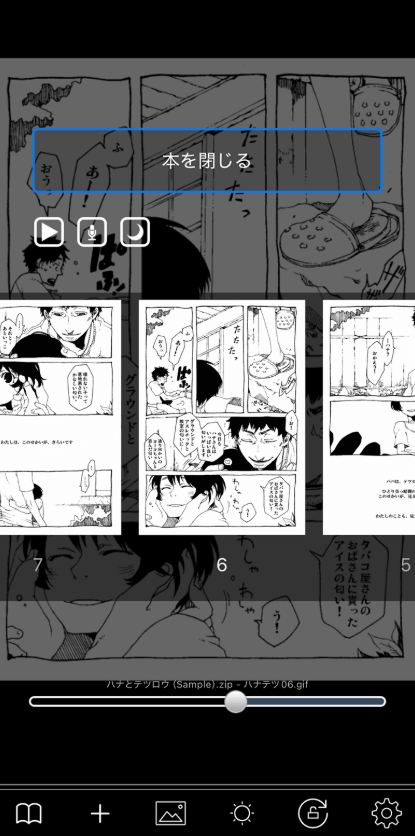
ComicGlass is a comic reader for iPhone and iPad that supports digital comic and document reading. Furthermore, it is optimized specifically for viewing scanned comics and image-based files rather than being a general PDF or ebook reader. More importantly, one of ComicGlass’s notable advantages is its customizable reading direction. It can configure page-turning behavior to match the traditional Japanese manga reading direction.
✨Key features:
- Supports PDF and compatible comic and image formats.
- Allows users to configure left-to-right or right-to-left page navigation.
- Offers vertical page scrolling.
- Provides customizable screen tap actions.
- Supports different page navigation controls.
- Includes options for adjusting the reading experience.
Pros
- Provides customizable manga page navigation.
- Suitable for scanned digital comics.
- Offers flexible reading controls.
Cons
- Primarily designed for Apple mobile devices.
🥇Best for: iPhone and iPad users who read scanned manga PDFs and want customizable page navigation.
#7. Perfect Viewer – Best Manga Reader for Android
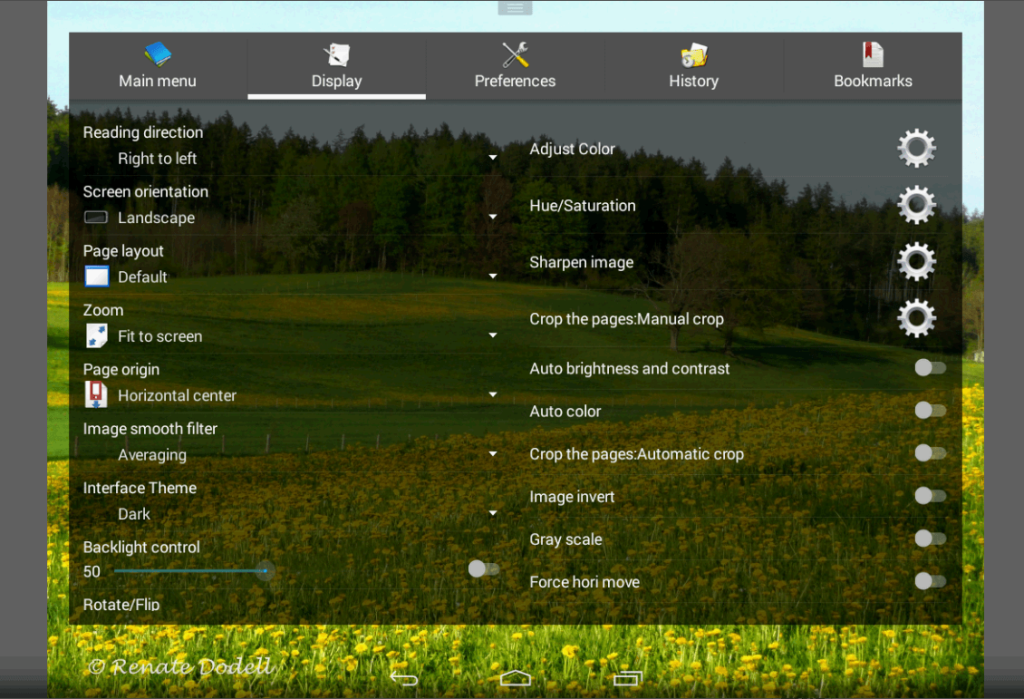
Perfect Viewer is an Android viewer for reading digital comics, images, and ebooks. It offers a variety of viewing and navigation options, making it a useful choice to read manga on Android phones and tablets. Meanwhile, it provides very fast page loading and caching of previous or next pages. What’s more, it offers a newer paid version, Perfect Viewer X, for Android, iOS, and macOS.
✨Key features:
- Supports multiple image and comic formats.
- Offers PDF reading through the appropriate plugin.
- Provides page navigation and zoom controls.
- Supports different display layouts.
- Includes file browsing and collection management options.
- Works on Android devices.
Pros
- Designed for digital comic reading.
- Provides flexible viewing options.
- Suitable for Android phones and tablets.
Cons
- PDF functionality requires an additional plugin.
🥇Best for: Android users who want a customizable manga and comic reader with support for multiple file formats.
#8. Adobe Acrobat Reader – Best General-Purpose PDF Reader for Manga
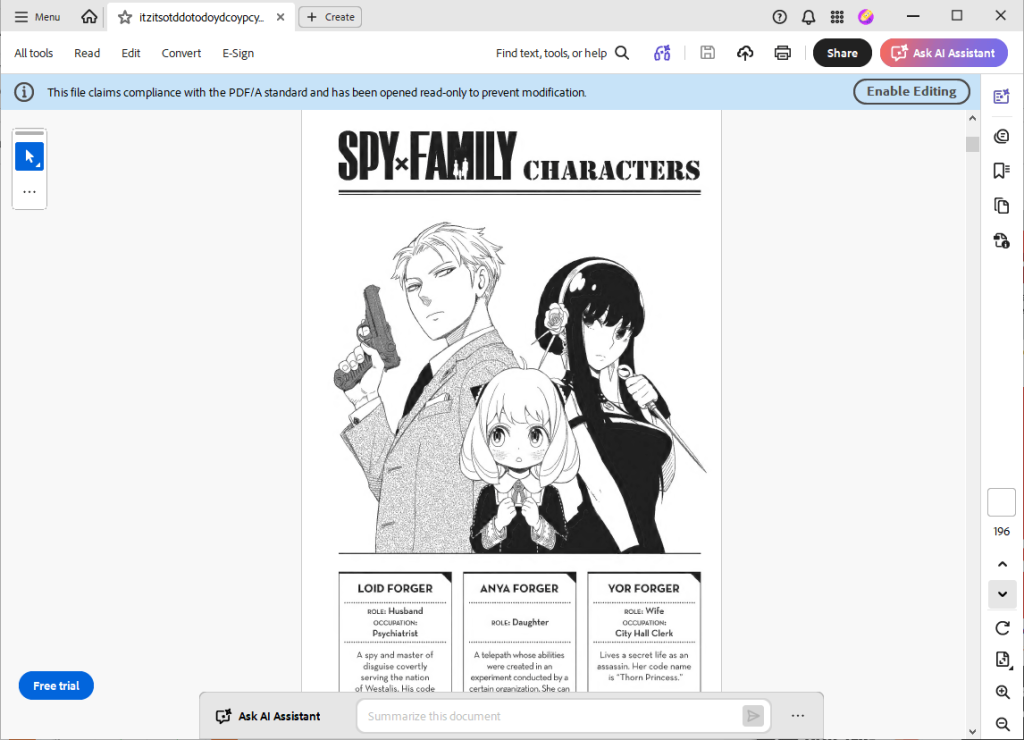
Adobe Acrobat Reader is a widely used PDF viewing application available for Windows, macOS, Android, and iOS. Although it is not specifically designed for manga, it provides essential PDF reading features that make opening and viewing manga files straightforward.
✨Key features:
- Opens and displays PDF manga files.
- Provides zoom and page navigation controls.
- Offers single-page and two-page viewing options.
- Supports full-screen reading.
- Includes search and document navigation features.
- Supports PDF annotations and comments.
Pros
- Reliable general-purpose PDF viewing.
- Available across desktop and mobile platforms.
- Provides useful navigation and annotation tools.
Cons
- Does not provide a dedicated manga-reading mode.
- Lacks specialized comic collection management features.
- Some advanced PDF functions require a paid subscription.
🥇Best for: Users who want a familiar PDF reader for opening manga files and reading other PDF documents without installing a dedicated comic application.
How to Choose the Best Manga PDF Viewer
With so many PDF viewers and comic-reading applications available, selecting the right one can be difficult. But don’t worry! You can consider the following factors before installing a manga PDF viewer.
- Check PDF and comic file format compatibility
- Look for right-to-left reading mode
- Consider zooming and image quality
- Check offline reading and cross-device compatibility
Tips to Improve Your Manga Reading Experience
Below are some useful tips to improve your manga reading experience and make reading more convenient.
- Use two-page view for desktop reading
- Crop unnecessary white margins
- Rotate pages for better viewing
- Organize manga PDF into folders by series, author, or volume number
- Optimize large manga PDF files
Conclusion
Once you download a manga PDF for free, using a good manga PDF reader can give you an excellent reading experience. In the content above, I introduced you to 8 wonderful tools to read manga PDF books. While some applications provide dedicated features such as right-to-left reading, double-page viewing, and comic collection management, general-purpose PDF readers can also handle manga files effectively. Hopefully, this article can help you select the right manga PDF viewer.
FAQs
Table of Contents

Your Best Free PDF Expert in PDF editing, compressing, converting, annotating, protect, organizing, and more.
Free DownloadWindows · macOS · Linux

Olivia
“Olivia is an editor at JOPDF, where she writes practical guides and insightful articles on managing PDFs—covering topics like editing, annotating, converting, and organizing files efficiently. Passionate about clear communication and digital productivity, Olivia enjoys spending her free time cooking, watching movies, and hiking to unwind and find inspiration for her writing.”