Introduction
This guide will show you how to write on a PDF for free. Whether you want to edit the existing text or add new text, you can find the method here. We will outline the specific steps, pros, and cons to help you determine the one that best suits your needs.
🟡 Quick Start
If you are in a hurry or a beginner, the following questions and answers may be helpful to you.
🔸 Why Need to Write on PDF?
Writing on a PDF allows you to fill forms, add comments, insert notes, sign documents, or make corrections directly on the document.
🔸 Can You Write on PDF?
Yes, many desktop and online PDF editors allow you to do so. You can type text, use a stylus or mouse for handwriting, or even add annotations or drawings, depending on the capabilities of the software you are using.
🔸 What’s the Best Way to Write on a PDF for Free?
The best choice depends on your needs. However, a professional PDF editor will never disappoint you. If you prefer to use a free tool, then JOPDF is the best choice. This tool supports text input, handwritten drawing, and comment adding.
1. Write on PDF for Free with JOPDF [Recommended]
JOPDF is a lightweight yet comprehensive PDF editor that provides text editing, annotation, page management, encryption, and other functions. With a clean interface, you can easily find the tool and get started on your tasks. Moreover, it’s completely free.
JOPDF offers various tools to help you write on a PDF document. It lets you:
✅ Edit the existing text
✅ Add a new text box and type in
✅ Write on the PDF with the Typewriter
✅ Add sticky notes to leave a comment
✅ Directly draw on the PDF for handwriting
See how to write on a PDF for free using JOPDF:
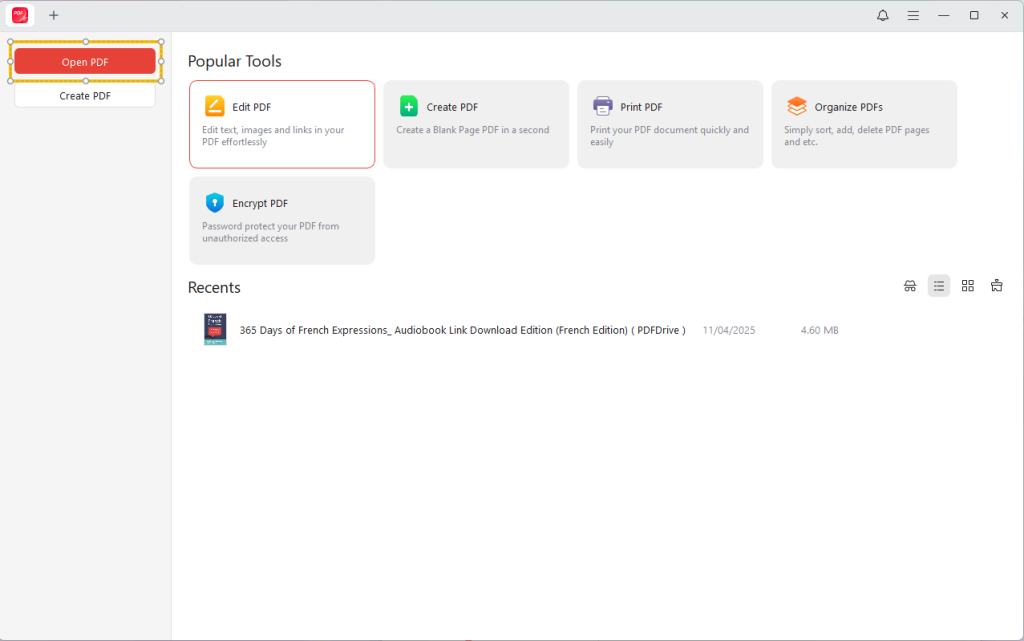
1. Download JOPDF. Install, and it. Click Open PDF and select the PDF document.
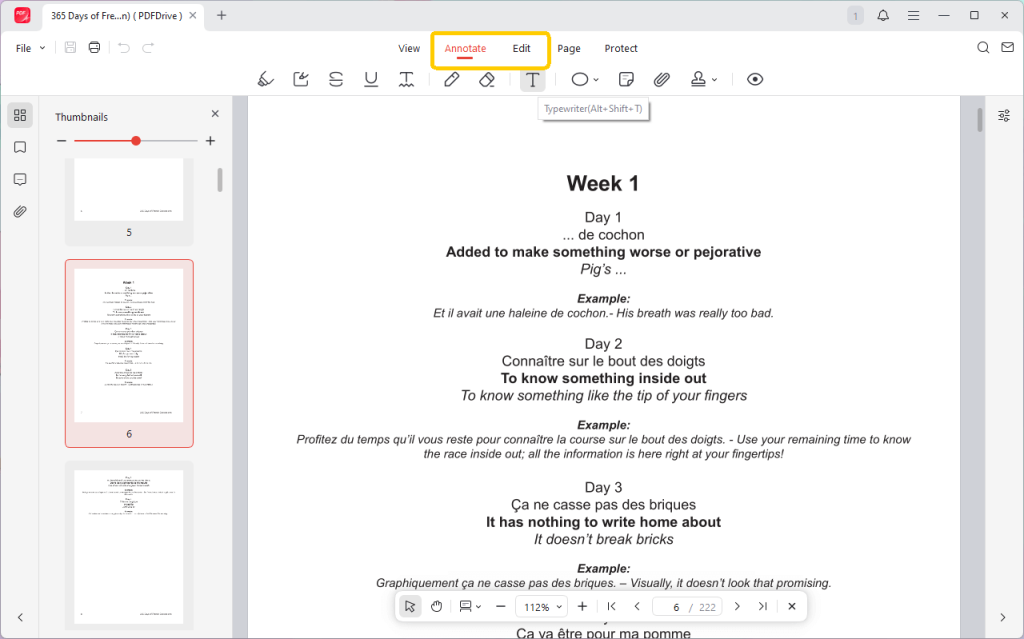
2. Then, you can go to Annotate or Edit and select the tool to write on the PDF.
- Edit the existing text: Go to Edit and select Edit Text > Click the text box to delete, modify, and add text to PDF.
- Add new text: Click the Add Text icon > Click on the PDF to place the text box > Type or paste text.
- To leave a comment or draw freehand, please go to Adnnotate and choose Typewriter or Pencil.
3. Then, you can adjust the text size, color, and style.
4. Finally, click the Save button to keep the changes.
Best For: JOPDF is ideal for users seeking powerful and free offline text editing and full feature access on Windows and macOS systems.
Pros
- Easy to use
- Powerful editing feature
- Various annotation tools
Cons
- Requires installation
2. Write on a PDF on Mac Using Preview
If you are using a Mac computer and want to add new text to a PDF, a quick way to do this is to use the Preview app. It is a built-in PDF editing tool that supports annotation, highlights, signatures, and more. You can easily add new text boxes and enter content in them.
Check to learn how to use Preview:
1. Locate the PDF document and right-click on it. Choose Open With and select Preview.
2. Click the Show Markup Toolbar button.
3. Click the T icon and type in the text.
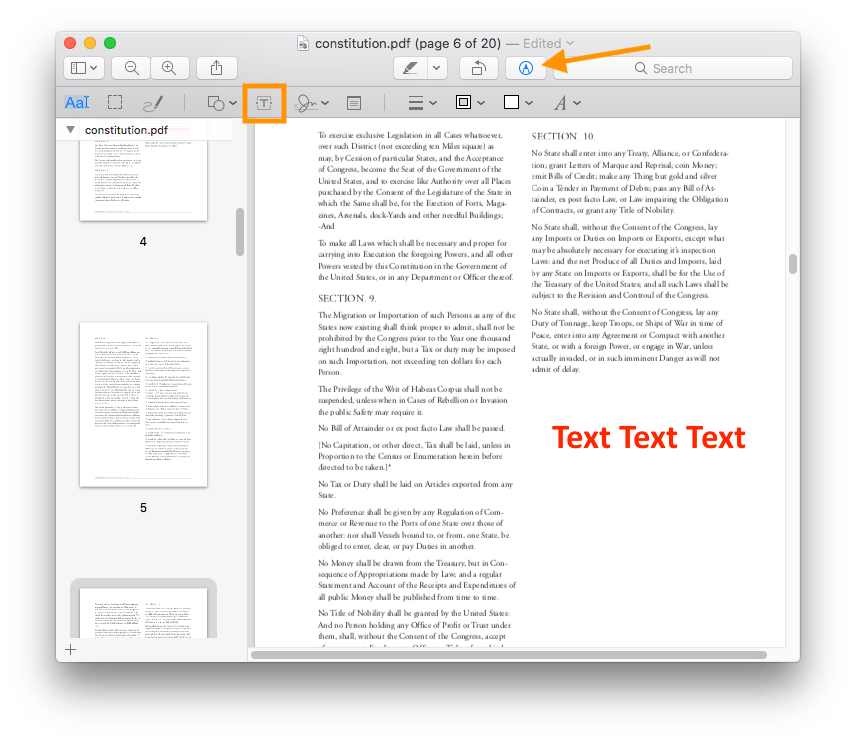
4. Drag the text box to the right position and adjust the font and color.
5. To save the changes, click File and then click Save.
Best For: Preview is a good choice for Mac users who want to add new text and want rich annotation features without installing additional tools.
Pros
- Pre-installed
- Robust markup tools
Cons
- Cannot edit existing PDF text
- macOS only
3. Write on PDF in Microsoft Edge
When you want to write on PDF online, Microsoft Edge can do you a favor. This browser not only has a built-in PDF viewer but also provides some basic annotation tools to help you type on PDFs, highlight text, and draw on PDF files. However, it cannot help you modify the existing text.
Microsoft Edge is available on Windows and macOS. As a Mac user, you can go to https://www.microsoft.com/en-us/edge/download to download it.
How to write on PDF for free using Microsoft Edge:
1. Open Microsoft Edge and drag the PDF document into it.
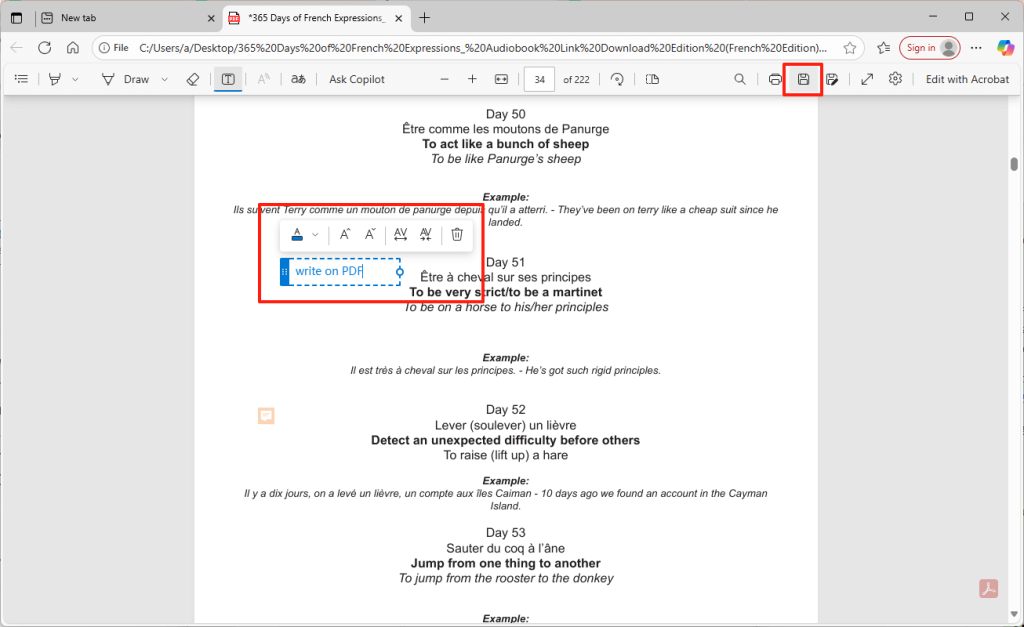
2. Click Add text from the toolbar.
3. Click on to place the text box and start typing.
4. After the addition is completed, click the Save or Save as button.
Best For: Microsoft Edge is great for Windows users who need to quickly and easily add new text and annotate PDF files.
Pros
- Fast and simple
- Adequate for simple edits
Cons
- Cannot modify existing text
4. Use an Online Tool
Another way to write on a PDF online for free is to use Canva, a graphic design platform. It offers an online PDF editor, allowing users to import and edit PDFs.
With Canva, you can edit the existing text and add a new text box. However, Canva has restrictions on file size, which is typically around 15 MB, and supports 15–300 pages.
How to write on PDF via an online PDF editor:
1. Navigate to Canva online PDF editor and sign in.
2. Upload your PDF.
3. Now, you can edit the text in PDF or click Add a text box for new text.
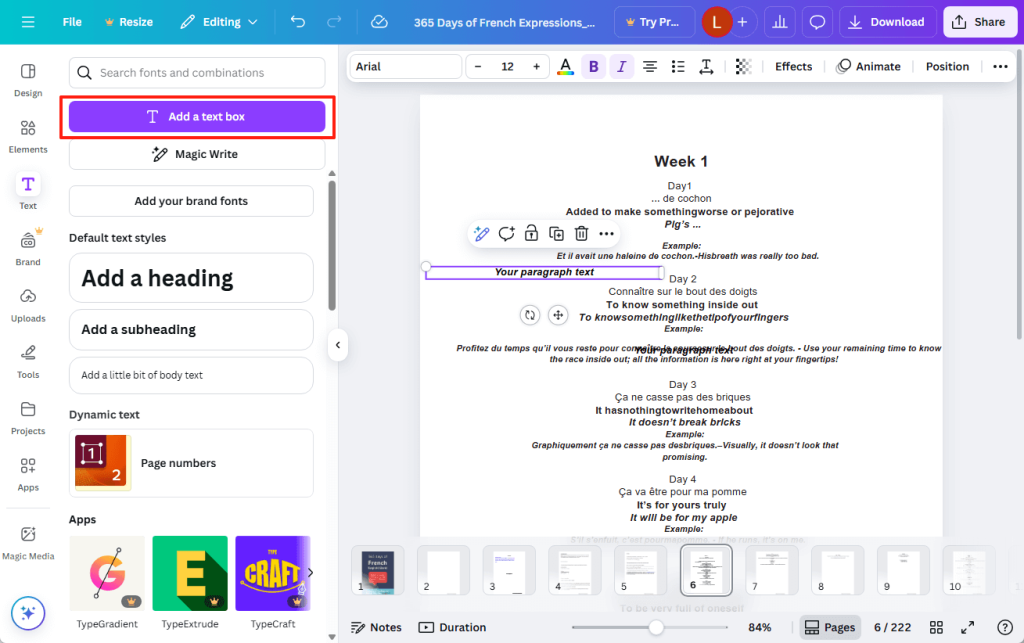
4. Adjust font, size, and color as needed.
5. Finally, download the document.
Best For: Online tools such as Canva are ideal for one-off tasks. They require no download and offer a wide range of features.
Pros
- Highly visual editor
- No install needed
- Rich design elements
Cons
- File size/page limits
- Requires internet
Conclusion
That’s all about how to write on a PDF document. You can refer to the features, advantages, and disadvantages of each tool to choose the one that best meets your needs to complete the task.
However, if you prefer a professional solution, JOPDF is the best choice. This tool enables you to insert and edit text easily anywhere in a PDF file. Try it now!
FAQs
Table of Contents

Your Best Free PDF Expert in PDF editing, compressing, converting, annotating, protect, organizing, and more.
Free DownloadWindows · macOS · Linux

Queena
Editor
“As a staff editor for JOPDF, Queena excels at guiding users to the optimal tools and solutions. When she's not analyzing the latest PDF solutions, she enjoys spending her free time playing with her four cats.”
![How to Combine PDFs in Preview in 2026 [2 Best Ways]](https://b.jopdf.com/wp-content/uploads/2026/03/how-to-combine-pdfs-in-preview.png)
![How to Compress a PDF on Mac [4 Best Ways and Practical Tips]](https://b.jopdf.com/wp-content/uploads/2026/03/how-to-compress-a-pdf-on-mac.png)