Introduction :
Studocu is a popular website that hosts millions of study resources uploaded by students and educators. Students can search and find reliable study materials like lecture notes, summaries, or exam guides from Studocu. Can you download Studocu PDFs for free? How to download Studocu to PDF for free? In this JOPDF article, let’s discover 4 easy, practical methods to download Studocu PDFs without paying.
Can You Download Studocu PDFs for Free?
The answer is positive. In some cases, you can download Studocu PDFs for free. But it depends on the access level. You can download unlimited documents if you have a paid Premium subscription. If you are a free user, you can upload your own documents to earn temporary unlocks.
Are there other ways to save study notes without uploading files or paying for a subscription? Fortunately, there are ways that can help you download or convert Studocu documents into PDFs. Here, let’s dive into.
Note
You need to always prioritize legal and ethical access. We advise you to download Studocu documents using official methods. Downloading copyrighted material without permission can violate the terms of service or laws. Meanwhile, use downloaded Studocu documents for personal study only.
Method 1. Official Way to Get Studocu Documents for Free
First, I’d like to introduce the most legitimate way to download Studocu documents for free. You only need to contribute and upload your own study material. How can you do that? Below are the exact steps for your reference.
Step 1. Open your browser and visit the Studocu website.
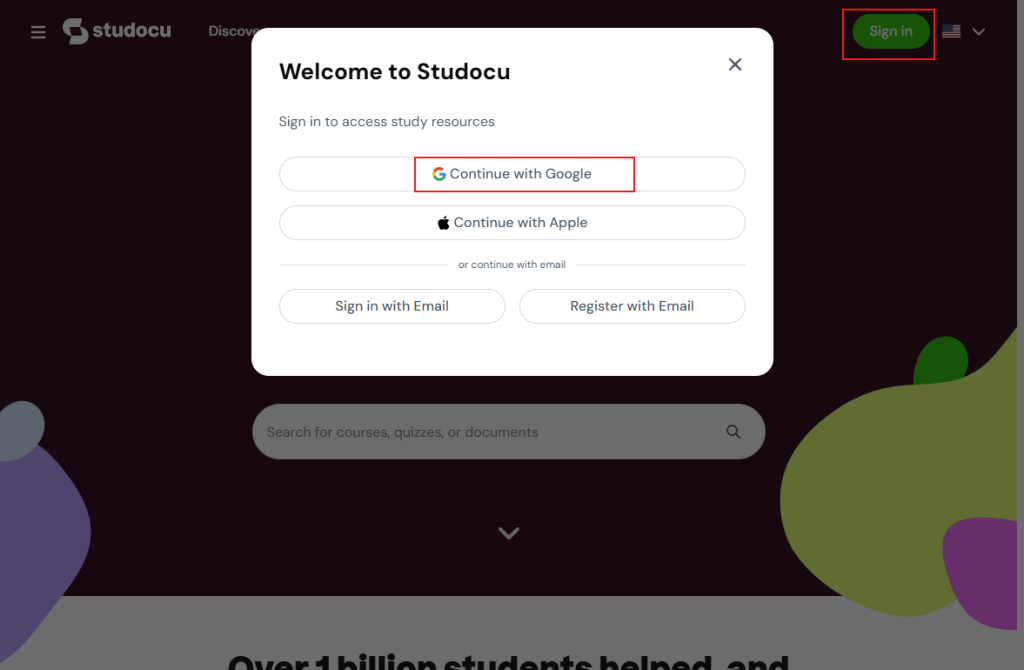
Step 2. Click the Sign in button and choose one account to sign in. For instance, click Continue with Google and follow the on-screen prompt to sign in to Studocu.
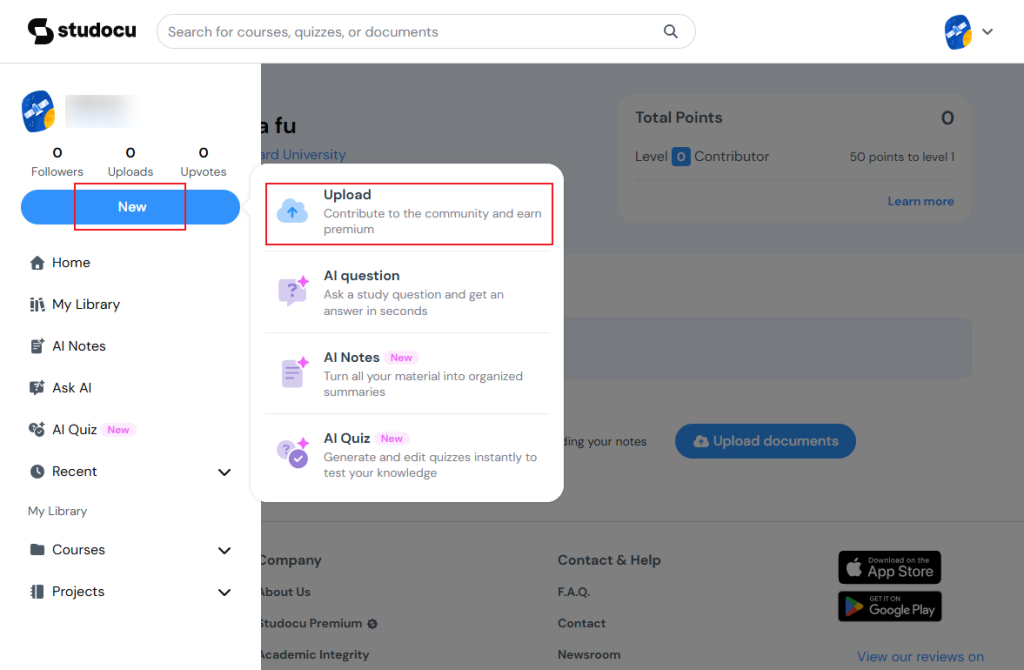
Step 3. Click New and select the Upload option.
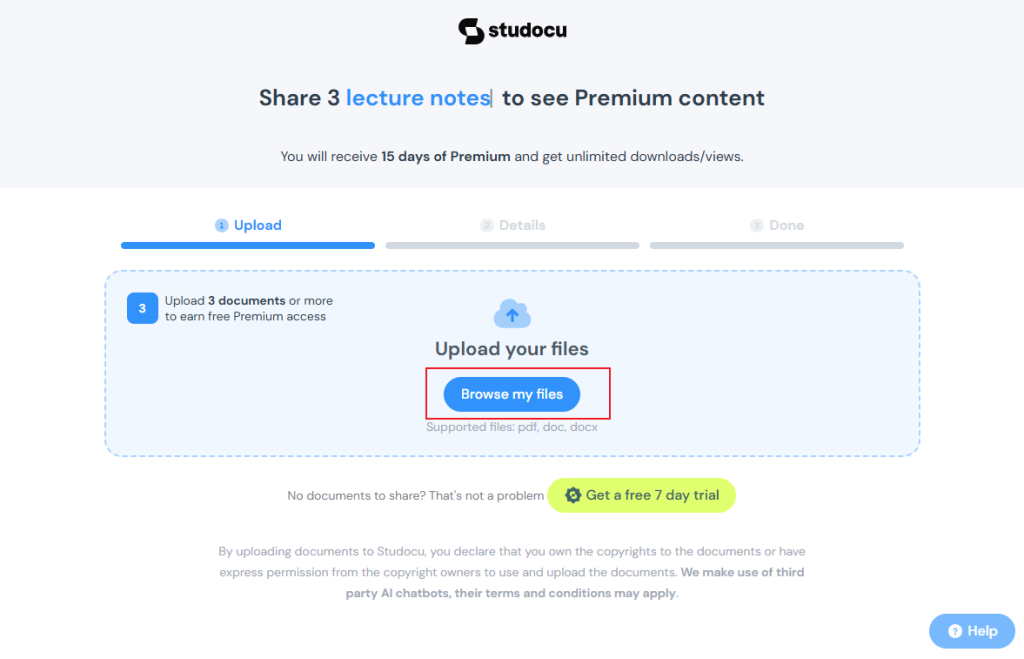
Next, click the Browse my files button to locate and upload your study materials for sharing. You need to upload 3 documents. By this, you can get free Premium access.
Step 4. Click Submit documents to upload them. Then, Studocu will check the uploaded study material. Once approved, you can receive download credits. Later, you can use the earned credits to download desired PDFs legally.
Through uploading your own useful study materials to share in Studocu, you can get free Premium access. However, the approval may take time. If you don’t have useful class materials or don’t have the time to wait for approval, try the following methods.
Method 2. Take Screenshots and Convert Them to PDF
If Studocu does not approve of the learning materials you uploaded and does not grant you download credits, you can capture screenshots and convert them into a PDF document. To take screenshots, both Windows and Mac offer built-in screenshot features. Instead of viewing screenshots, it’s better to combine them into a single PDF for viewing and editing. Below are some reliable image to PDF converters for your choice.
- JOPDF
- SwifDoo PDF
- Preview
- Adobe Acrobat Pro
- Smallpdf
JOPDF is one of the best free PDF converters that can work on Windows, Mac, and Linux. It enables you to combine screenshots into one PDF without any hidden costs. You can import images in PNG, JPG, TIFF, or HEIC formats and combine them into a single PDF file.
In addition, JOPDF provides useful features for editing, annotating, organizing, and protecting PDFs. Hence, you can use it to edit your downloaded Studocu files as needed. How to convert Studocu screenshots into a PDF in JOPDF? Follow the steps below.
Step 1. Download and install this Studocu screenshots to PDF converter on your device. Then, launch JOPDF to get to its main interface.
Step 2. Click the Batch Process option from Popular Tools and click the Image to PDF option.
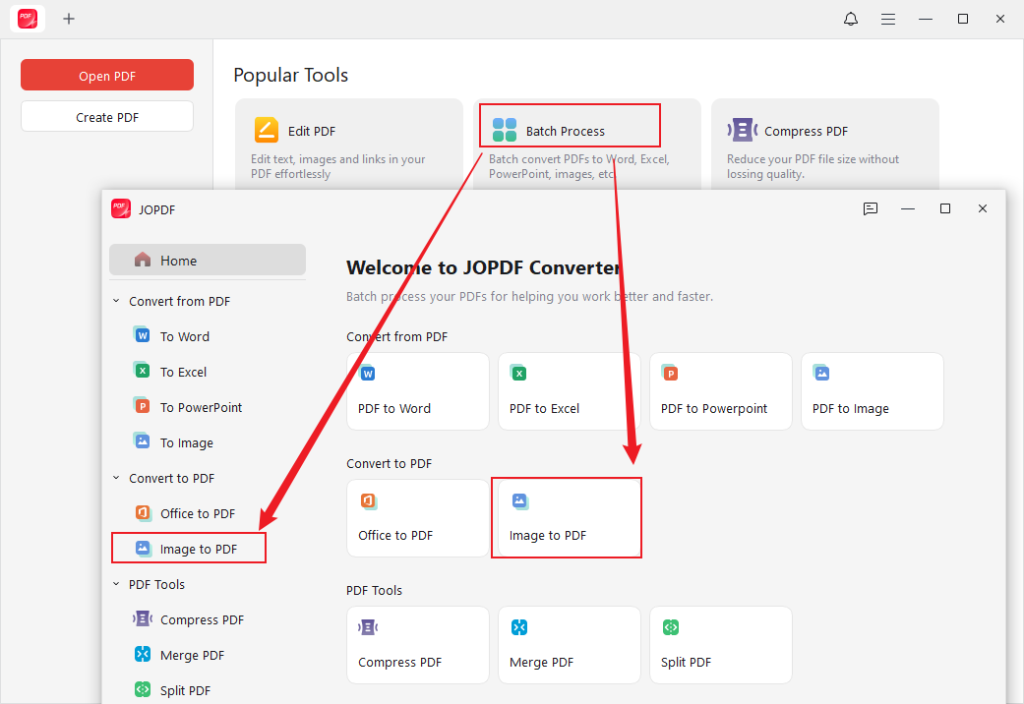
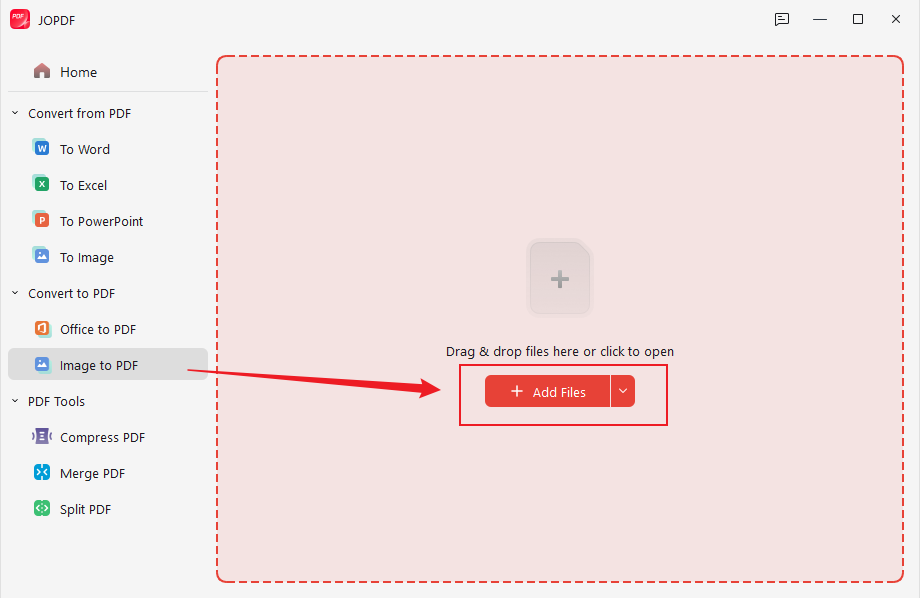
Step 3. Click Add Files to import your Studocu screenshots into JOPDF.
Expand the Method list and choose All Images as One PDF. Meanwhile, keep the Original Page Size or customize it as needed. Meanwhile, choose a folder to save the file.
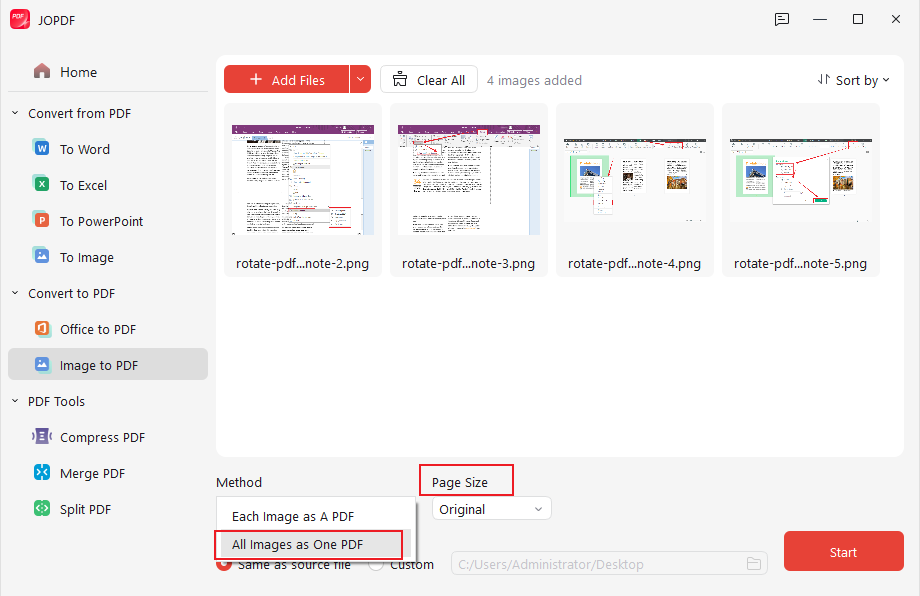
Step 4. Click Start to turn Studocu screenshots into a single PDF file. When the conversion process is finished, the PDF file will be opened in JOPDF automatically.
Method 3. Download Studocu to PDF for Free with Studocu Downloaders
Some of you are looking for online “Studocu download PDF free” tools to get documents from Studocu easily. Most online Studocu downloaders claim to bypass previews by processing document URLs. Here, I have tested and picked up the following reliable online Studocu downloaders.
- Studocu Downloader
- LightPDF
- DLSTUDOCU.COM
- FreePDFDownloader.com
Among them, Studocu Downloader is highly recommended. It enables you to paste the Studocu document link into this downloader and then save the downloaded document in PDF or other document formats. With its intuitive interface and ease of use, you can master how to use it to download PDFs from Studocu for free. Here, let’s learn how to get a Studocu PDF for free.
Step 1. Open your browser and visit the official Studocu Downloader website.
Step 2. Go to the Studocu website, open the study material you want to save, and copy the user-provided Studocu link.
Step 3. Next, go back to Studocu Downloader and paste the copied Studocu document link into the URL box.
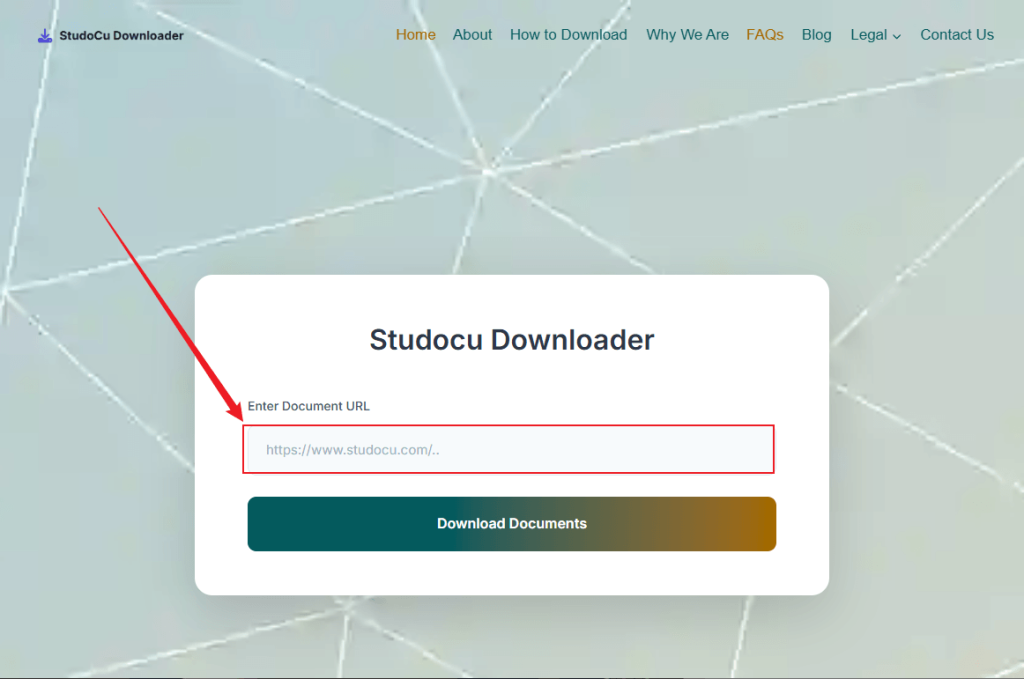
Step 4. Click the Download Documents button. Then, the downloader will analyze the URL. Once it is processed, download the Studocu file and save it locally.
Method 4. Use the Browser Print-to-PDF Feature
In addition to the above three methods to get Studocu PDFs for free, another simple solution is to save the preview pages of a Studocu document as a PDF using the browser’s built-in function. This way works in any browser and requires no extra tools. When the document preview includes most of the content you need, you can use this method to save Studocu as a PDF for free. Here’s how:
Step 1. Open the Studocu document preview and scroll through the pages so they fully load.
Step 2. Press Ctrl + P (for Windows) or Cmd + P (for Mac) to access the Print dialog.
Step 3. Open Destination and select the Save as PDF option. Meanwhile, adjust other settings as needed. Finally, click Save.
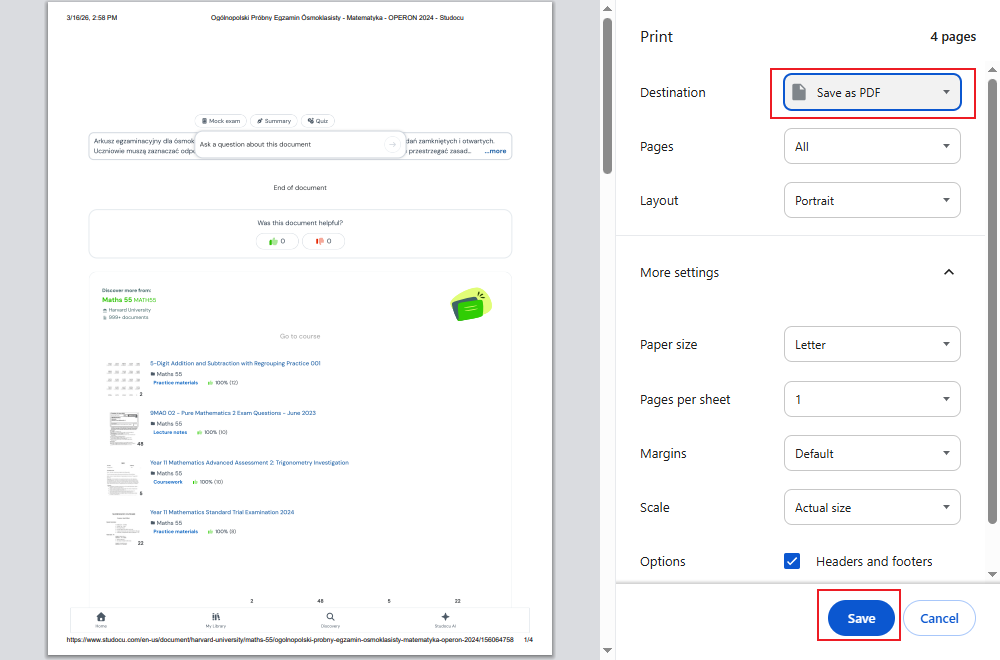
Please note that this way can only save visible pages, and some pages may be blurred.
BONUS: Read and Edit Downloaded Studocu PDFs in JOPDF
A professional PDF tool can streamline your Studocu PDFs reading and editing workflow. Additionally, it can help you study and collaborate with others effectively. JOPDF is a free, useful PDF viewer and editor. You can use it to enjoy an enhanced viewing experience. Additionally, it enables you to edit PDFs for free, such as commenting, adding annotations, writing reviews, and taking other notes on downloaded Studocu PDFs.
What’s more, JOPDF is one of the best PDF converters that enables you to convert PDFs to and from Word, PPT, Excel, or other image formats. You can use it to convert Studocu PDFs with ease. All in all, it is a trustworthy tool for Studocu PDF files.
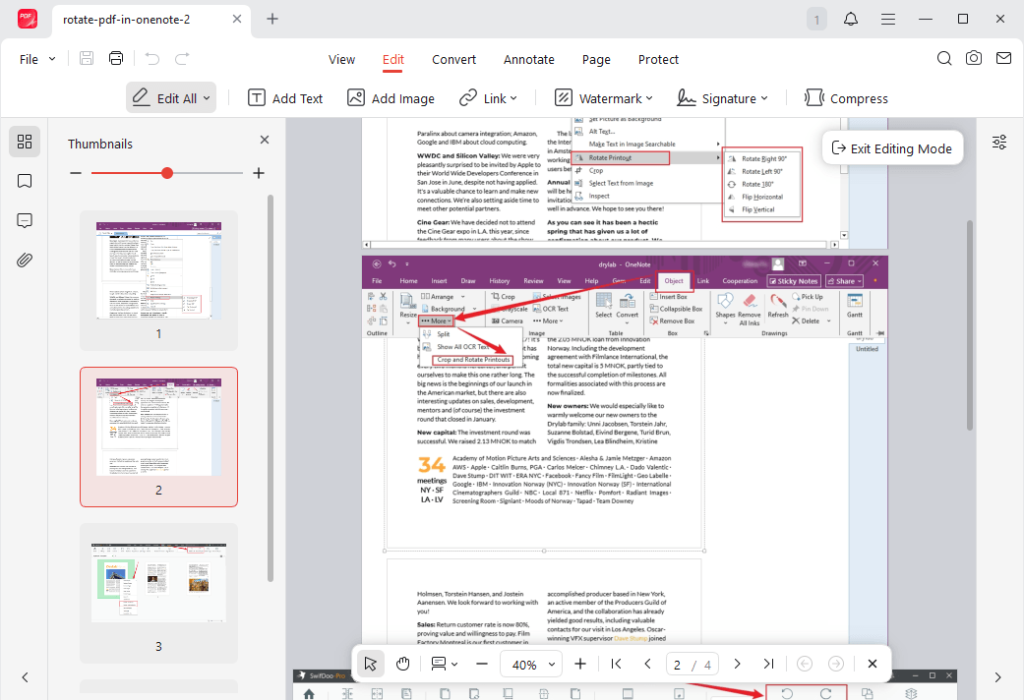
Best Alternatives to Studocu for Free Study PDFs
In addition to finding and getting study materials from Studocu, here are other Studocu alternatives that can help you.
- Course Hero: It is regarded as the best alternative to Studocu, offering a wide range of study guides, notes, flashcards, and other study materials.
- Quizlet: It’s a good Studocu alternative focusing on flashcards, quizzes, and study sets.
- Chegg: Ideal for textbook solutions, step-by-step answers, and study resources, working as a cost-effective Studocu alternative.
- Studypool: It’s a great alternative to Studocu, offering tutors, help, and shared materials.
- Knowt: It is an AI-enhanced flashcard tool that can convert uploads into study aids.
Final Thoughts
How to download Studocu to PDF for free? Generally, downloading documents directly from Studocu may require a subscription sometimes. The most recommended and legal way to get a Studocu PDF is to pay for the Premium subscription or upload at least 3 study materials to earn download credits. In addition, you can screenshot on Studocu and use JOPDF to convert screenshots to a PDF file. Also, you can try online Studocu downloaders or use the browser’s Print to PDF feature.
FAQs
Table of Contents

Your Best Free PDF Expert in PDF editing, compressing, converting, annotating, protect, organizing, and more.
Free DownloadWindows · macOS · Linux

Olivia
“Olivia is an editor at JOPDF, where she writes practical guides and insightful articles on managing PDFs—covering topics like editing, annotating, converting, and organizing files efficiently. Passionate about clear communication and digital productivity, Olivia enjoys spending her free time cooking, watching movies, and hiking to unwind and find inspiration for her writing.”
![How to Add an Image to a PDF in Preview [Quick Guide]](https://b.jopdf.com/wp-content/uploads/2026/03/add-image-to-pdf-in-preview.png)
