![3 Ways to Link to a Specific Page in a PDF [Complete Guide]](https://b.jopdf.com/wp-content/uploads/2025/11/link-to-specific-page-in-pdf.png)
Summary :
When you have a lengthy document, you can create links in the PDF for quick navigation. You can add hyperlinks to the table of contents to take users directly to specific sections in the PDF. Sometimes, you even hope to have a PDF link to a page in another PDF. How do you achieve this result since there is no built-in feature on computers to do so? ). Based on our tests, we’ve found 3 effective workarounds. Learn how to link to a specific page in a PDF from this JOPDF post.
Link to a Specific Page in a PDF with JOPDF
JOPDF for Windows and Mac is designed to handle various PDF document tasks for free. It allows you to link to a page in a PDF for multiple purposes. You can create the PDF link to jump to a page within the file, to a web page (URL), or to another file on your device. You can edit and remove the links at any time. JOPDF can highlight, modify, delete, insert text and add images to PDFs.
Look at how to link to a specific page in a PDF for free.
Step 1: Download and open JOPDF on your computer, then click “Open PDF“.
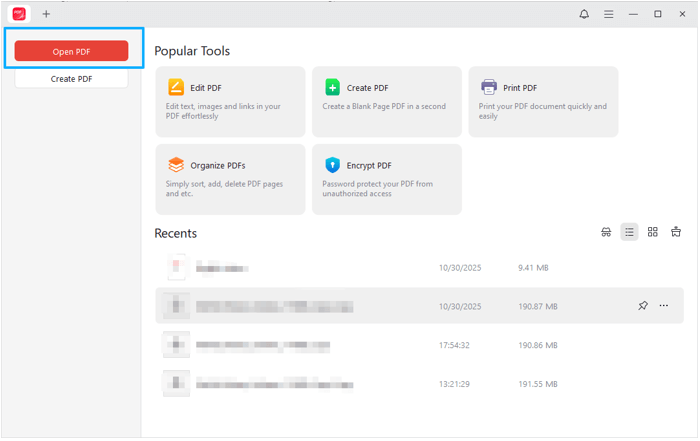
Step 2: Select the PDF you plan to link to a page and import it into the software.
Step 3: Choose Edit > Link and select Add Link in the drop-down menu.
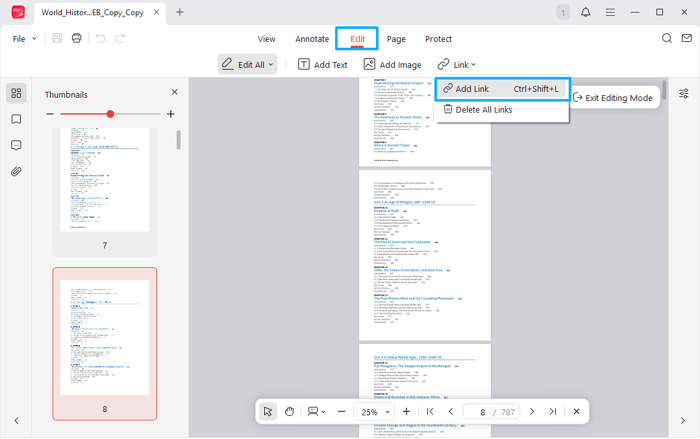
Step 4: Draw the link area over the specific text you will click, and then select “Go to a Page View” in the pop-up window.
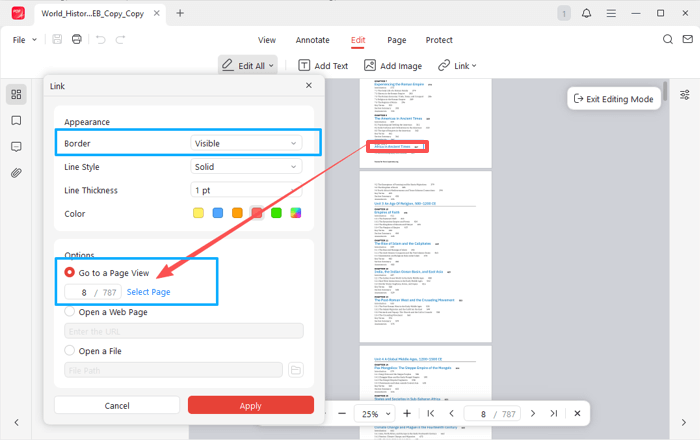
Step 5: Set the link border to be invisible or visible, and other appearance options.
Step 6: Click Select Page, scroll down the page view to select the page you want to link to, and click Apply.
JOPDF is one of the best free PDF editors, requiring no sign-up and offering no restrictions. Download it now!
Link to a Page in a PDF in Adobe Acrobat
Adobe Acrobat premium versions allow you to add a hyperlink to a PDF, just like you can in JOPDF. You can link to a specific page in a PDF, to a website, a custom link, and a whole document in Adobe Acrobat. It can also add videos to a PDF and insert attachments from your PC or Mac. When you’re done, you can seamlessly share the document with others.
Delve into the steps to link to a page of a PDF within the same document.
Step 1: Open the PDF you are trying to link to a specific page in Acrobat.
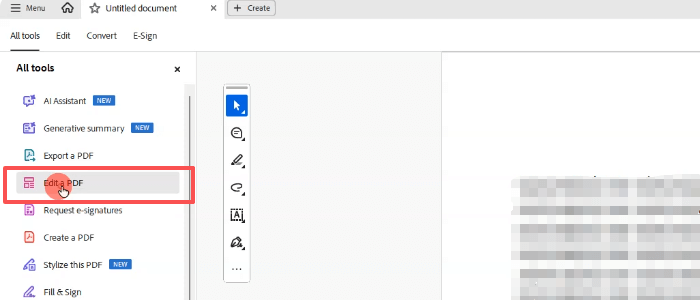
Step 2: Select the Edit a PDF tool from the side tools pane.
Step 3: Click More in the Edit panel to expand the full ADD CONTENT list, and choose Link > Add or edit a link.
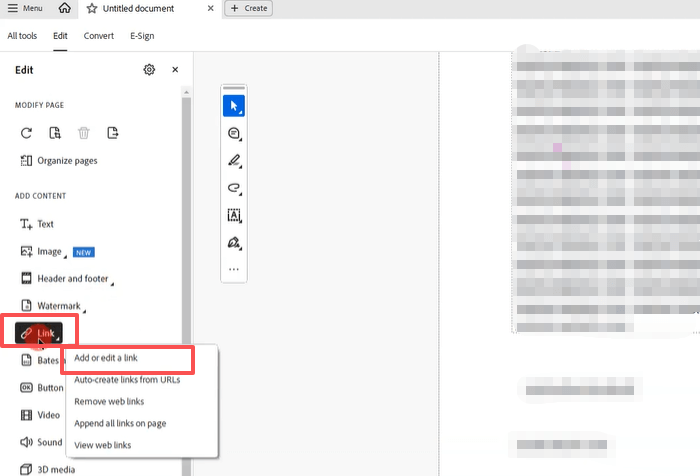
Step 4: Draw a rectangle to place the link where you like, and then select ‘Go to a page view‘.
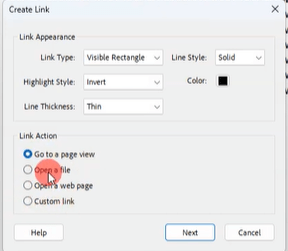
Step 5: Select the PDF page you need to add a hyperlink to, and apply the settings to hyperlink to a specific page in the PDF.
Link to A PDF Page Using a URL Fragment
Adding a fragment identifier at the end of your PDF address is another way to link directly to a PDF page. This trick can be applied to PDFs and other documents. This approach lets you hyperlink a particular page from another document outside the one you’re editing.
Hyperlink to a specified PDF page from your document: add “filename.pdf#page=3” after the URL of your PDF. When you click on the PDF link, you can jump to page 3 of the PDF from your current file.
Make a link to open to a specific part of a page: use “filename.pdf#[destination name]” (no white spaces) at the end of your PDF URL. The full link directs you to the destination section in the named PDF when you click it within a document. A named destination can be accessed and managed through a so-called “Destinations” panel in Adobe Acrobat or similar software.
You can enable the editing mode, choose the link adding option, select the “Open a web page” link type, enter the URL of a PDF with a URL fragment above, and then add the hyperlink to another page in Adobe Acrobat.
Conclusion
Do you have a PDF that you need to add a hyperlink to a page in for click-and-jump functionality? You can link the contents page or index to another page in your PDF to instantly view details or explanations without having to scroll through multiple pages.
The first two PDF editing software and methods both allow you to add a link to another page within the same PDF. Don’t miss out on JOPDF, as it is freeware. In case you need to link to a specific part of a page or a page from another PDF, the third method has you covered.
FAQs
Table of Contents

Your Best Free PDF Expert in PDF editing, compressing, converting, annotating, protect, organizing, and more.
Free DownloadWindows · macOS · Linux

Selena
Staff Editor
“Selena is a staff editor working for JOPDF, passionate and committed to providing how-to and round-up articles. Over 8 years of specialized skills and experience in PDF solutions, hoping to help users ease their lives and solve whatever they encounter. "Work smarter, not just harder!"”