Introduction :
Have you ever encountered the problem of failing to send a large PDF via email owing to hitting the dreaded email attachment size limit? You’re not alone. Wonder how to make a PDF smaller to email? Congratulations! You are in the right place! In the guide, let’s learn effective ways to reduce the PDF file size for email.
Most email service providers have an attachment size cap of around 20-25 MB. If your PDF file contains high-resolution images, scanned pages, or embedded fonts, it can quickly exceed what email services allow. How do you make a PDF file smaller to email? How to send large PDF files via email? All you want to know is included in this comprehensive article. Now, let’s get started!
How to Make a PDF Smaller to Email for Free via JOPDF
The straightforward way to reduce the PDF file size is to compress it. How to compress a PDF file to reduce its file size for free? JOPDF is highly recommended. JOPDF is not only a free PDF editor but also a free PDF compressor and converter available on Windows, Mac, and Linux. With its compression feature, you can easily reduce the size of your PDF. Additionally, you can use it to reduce file size by removing PDF pages or converting PDF to JPG or other smaller file formats.
How to compress a PDF file to shrink file size for free using JOPDF? Below are detailed steps for your reference.
Step 1. Click the button below to download JOPDF, a free PDF compressor, and then install it on your Windows or Mac PC. Launch it without a registration requirement.
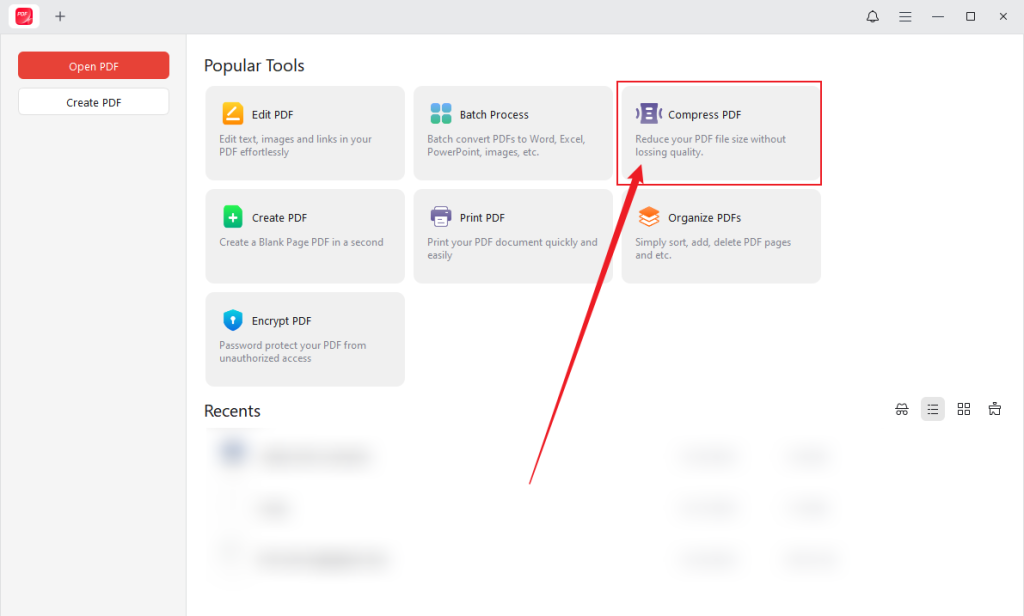
Step 2. Click the Compress PDF option from the main interface.
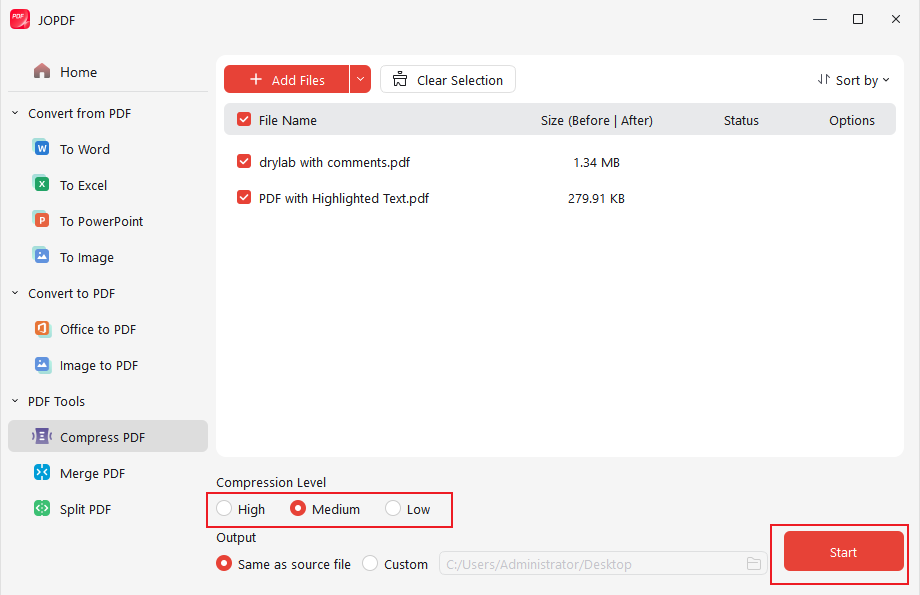
Step 3. Click the + Add Files button to locate your large PDF file and click Open to import it. Alternatively, you can upload the target PDF file by dragging and dropping it into JOPDF.

Step 4. Under Compression Level, select the desired compression level, like Medium. Meanwhile, you can specify the saving path. At last, click the Start button.
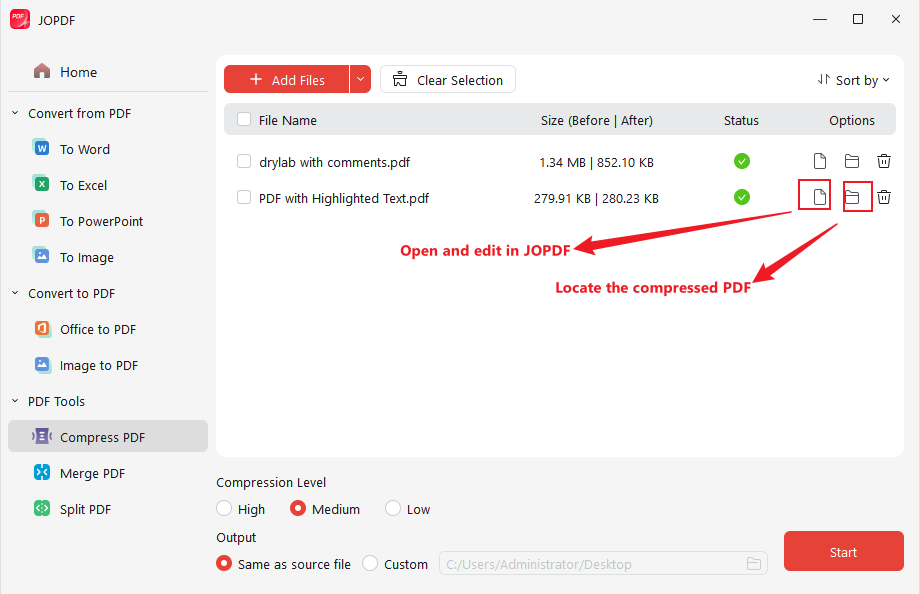
Once the compression process is complete, you can click the folder icon to locate the compressed PDF, or click the file icon to open and edit it in JOPDF.
How to Reduce PDF File Size for Email in Adobe Acrobat
As a professional, feature-rich PDF program, Adobe Acrobat enables you to compress PDF files to email or for quick uploading. With this secure PDF compressor, you can handle sensitive documents with no worry. How to reduce PDF file size in Adobe Acrobat? You can check the exact steps below.
Before learning the exact steps, you need to know that the compression feature is only available in Adobe Acrobat Pro. If you need to use Adobe Acrobat to compress PDFs, you need to pay for its subscription. If you are limited in budget, try JOPDF, a free alternative to Adobe Acrobat.
Step 1. Launch Adobe Acrobat PDF Compressor to get to its main interface.
Step 2. Navigate to the Tools pane, locate Optimize PDF, expand the dropdown menu, and click Open to import your large PDF file into Adobe Acrobat.
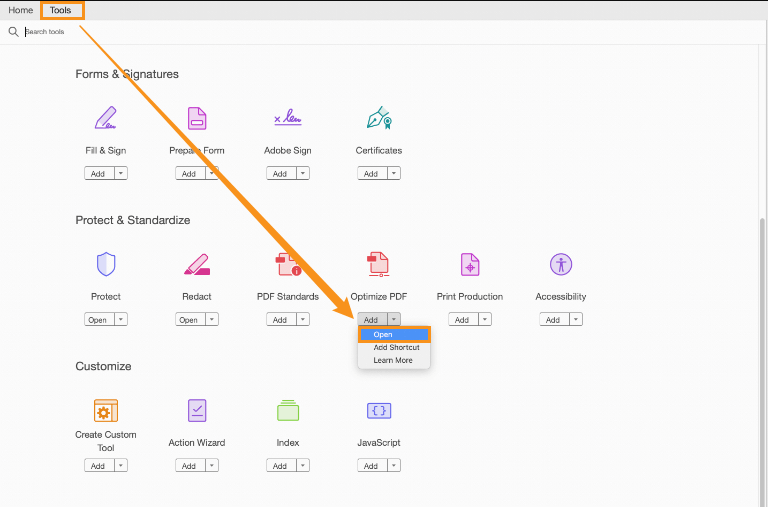
Step 3. Click the Reduce File Size button at the top. Then, a window will pop up to notify you to set compatibility. Generally, select the Retain Existing option. Next, click OK to confirm the operation.
Step 4. Name the compressed PDF file, choose the final folder to save it, and click the Save button.
How to Make PDFs Smaller to Email Online with Smallpdf
How do I make a PDF smaller to email online? Considering the security and practicality, I picked Smallpdf among various online PDF compressors. This online compressor can reduce your PDF file size effortlessly and quickly. Moreover, it can work on all major platforms, including Mac, Windows, Linux, Android, and iOS. Additionally, Smallpdf comes up with features to flatten PDFs, delete PDF pages, annotate PDFs, and more. Now, let’s learn how to make a PDF smaller to email online using Smallpdf.
Step 1. Visit Smallpdf’s PDF Compressor website in your browser.
Step 2. Click CHOOSE FILES to upload your large PDF stored locally. Meanwhile, you can choose to upload a PDF file from Dropbox, Google Drive, or OneDrive.
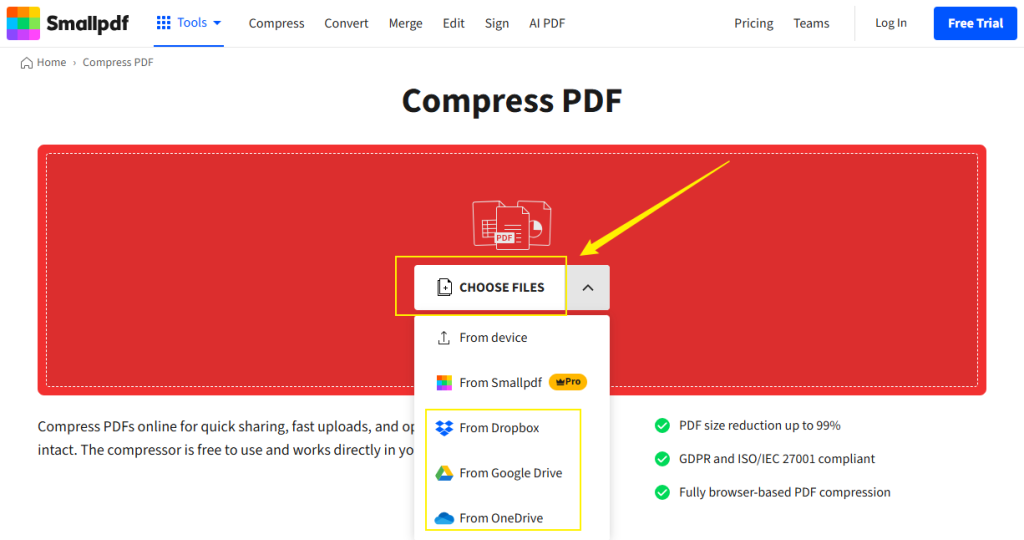
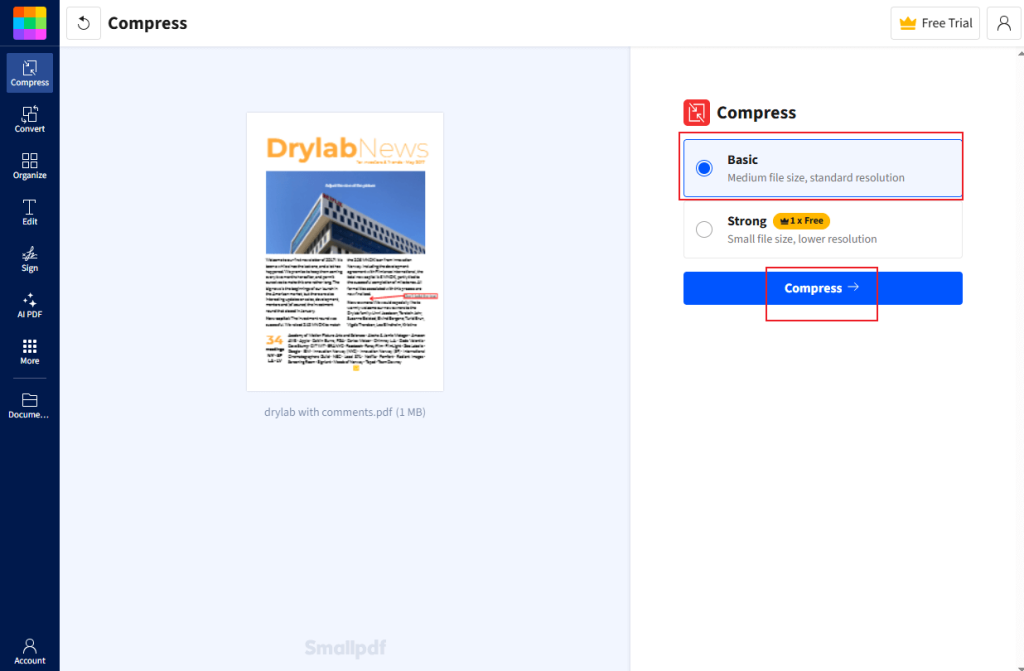
Step 3. The Basic compression level is chosen by default. If you need to use the Strong compression level, you need to pay for it. Next, click the Compress button. Once the process is over, download the PDF file with a smaller file size.
How to ZIP a PDF File for Email
Zipping a PDF file into a .zip file can slightly reduce its file size and make it easier to attach if you are sending multiple files. However, its effect is minimal. In most cases, I suggest using a PDF compressor first. If compression alone isn’t enough, try zipping a PDF to reduce its size further. How to ZIP a PDF on Windows and Mac? Here’s how:
#How to ZIP a PDF File on Windows
Step 1. Locate your large PDF file and right-click on it.
Step 2. Move to Send to and click the Compressed (zipped) folder option.
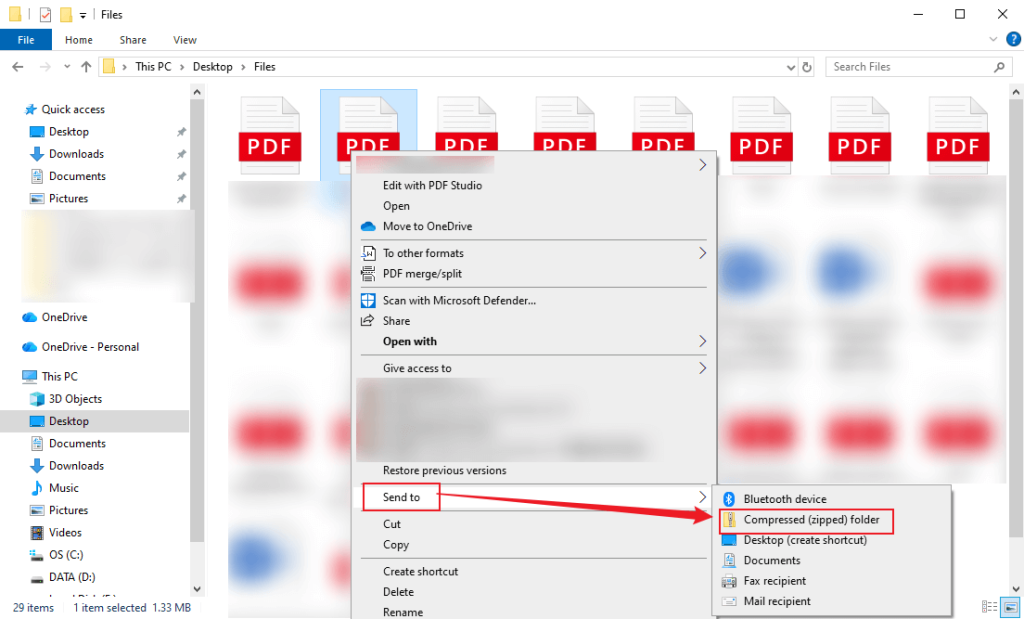
Step 3. Then, a new .zip file will be created and saved in the same folder.
#How to ZIP a PDF File on Mac
Step 1. Find your target PDF file in Finder and right-click on the file.
Step 2. Click the Compress “[file name]” option.
Step 3. Next, you can find a new .zip file saved in the same folder.
How to Send Large PDF Files via Email
How large a file can I email? How to send large PDF files via email? Most email providers have strict attachment size limits. Just as follows:
- Gmail: 25 MB total per email
- Outlook: 20 MB for personal accounts; up to 150 MB for Microsoft 365 business accounts
- Yahoo Mail: 25 MB per email
From the above, we know that compressing PDFs is a good way to reduce their size. In addition to compressing PDFs, how can we send large PDFs via email?
Method 1. Use Built-in Cloud Integration
Some email providers, like Gmail and Outlook, integrate with cloud storage services, allowing them to handle large files automatically via cloud storage. For instance, if you upload a PDF or Word file attachment larger than 25 MB to Gmail, Gmail will upload it to Google Drive and insert a shareable link.
Method 2. Upload PDFs to Cloud Storage and Share Links
If the email provider you use doesn’t have integration with the cloud, you can upload your large PDF files to cloud storage, like Google Drive, OneDrive, Dropbox, or iCloud. Then generate a shareable link and paste it into the email body. Also, it is necessary to learn about the free storage space of different cloud services. You can refer to the list below:
- Google Drive: up to 15 GB free storage
- Dropbox: 2 GB free
- OneDrive: 5 GB free
Method 3. Use File Transfer Services
What’s more, you can use file transfer services to send large PDF files for email, such as WeTransfer, TransferNow, or Filemail.
To Wrap Things Up
How to make a PDF smaller to email? The most direct way is to use a PDF compressor to reduce file size. If you need a free and fast way, you can’t miss JOPDF. If you have a sufficient budget and want the best quality control, use the Adobe Acrobat PDF compressor. Additionally, you can use online tools to reduce PDF file size without installing extra software. Also, you can zip PDF files. What’s more, I show how to send a large PDF file via email. Hopefully, this article is helpful to you.
FAQs
Table of Contents

Your Best Free PDF Expert in PDF editing, compressing, converting, annotating, protect, organizing, and more.
Free DownloadWindows · macOS · Linux

Olivia
“Olivia is an editor at JOPDF, where she writes practical guides and insightful articles on managing PDFs—covering topics like editing, annotating, converting, and organizing files efficiently. Passionate about clear communication and digital productivity, Olivia enjoys spending her free time cooking, watching movies, and hiking to unwind and find inspiration for her writing.”
![Find Ways to Download Manga as PDF for Free [5 Proven Ways]](https://b.jopdf.com/wp-content/uploads/2026/04/download-manga-pdf.png)
![5 Best Free PDF Compressors in 2026 [Desktop and Online]](https://b.jopdf.com/wp-content/uploads/2026/04/best-free-pdf-compressor.png)
