Introduction :
Docsity is a well-known platform where students access shared notes, lectures, and academic PDFs, but many files are behind paywalls or require a login. This can be frustrating for learners seeking quick study help. If your goal is to download Docsity PDF for free, consider checking out alternative tools and techniques. Through this post from JOPDF, you can discover practical ways to reach valuable study materials with ease.
What Is Docsity
Docsity is an online learning platform where students and teachers share academic materials, including lecture notes, study guides, summaries, assignments, and past exam papers across different subjects. It allows students to access helpful resources to strengthen their knowledge and prepare better.
However, most high-quality files require credits or a premium subscription, limiting easy access for many users. Because of this, students attempt to download Docsity documents as PDF for free, turning to other ways to access materials freely.
Method 1. Download Free Docsity Documents Officially
Docsity offers a built-in download feature that lets users access both free and premium study materials directly from its platform. By creating an account and earning or purchasing credits, you can easily unlock files. If you’re exploring how to download Docsity files for free, this official method is the safest and most reliable starting point.
Let us see how to freely download a Docsity document for free using the official way.
Step 1. Go to the Docsity website. And create a free account or log in.
Next, use the top search bar to find the document you wish to access and download.
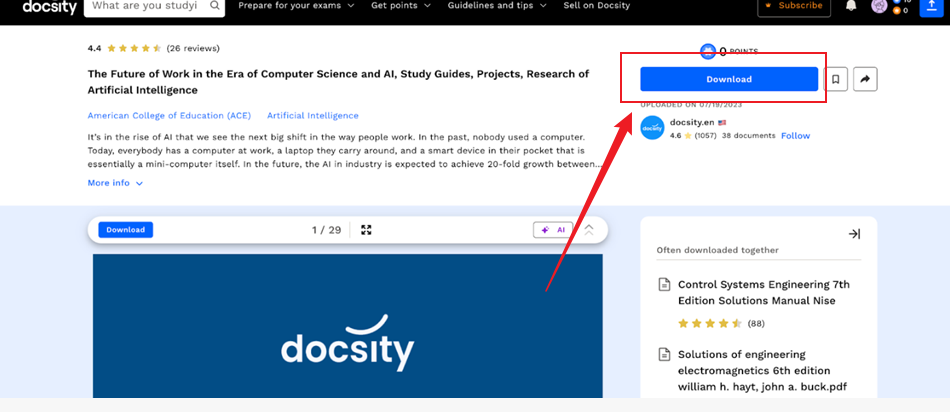
Step 2. After locating the file, open it and check whether it is marked as free.
Step 3. Press the Download button shown on the page.
Tips
If needed, users can gain free credits by sharing documents or participating in simple tasks.
Step 4. When you reach the required credits, click confirm to download and save the PDF.
Overall, although using Docsity’s official method is the most secure, it frequently comes with restrictions due to credits. That’s why many users look for alternative ways to download Docsity documents as PDFs for free more easily. Moving ahead, we’ll look at free third-party tools that can bypass these limits and ease the download process.
Method 2. Use Free Docsity Downloaders
When faced with limits, many learners prefer free Docsity downloaders to unlock study materials without credits. In the following section, we will review some of the best Docsity downloader tools to simplify and speed up downloading.
#1. FreePDFDownloader
FreePDFDownloader is a convenient online tool that enables users to view study materials by bypassing common platform restrictions. It’s frequently used by learners trying to download Docsity PDF without subscription, making access smooth and convenient.
Let us walk through how to download Docsity PDF without a subscription using FreePDFDownloader.
Step 1. Go to the Docsity website. And locate the document you need to download.
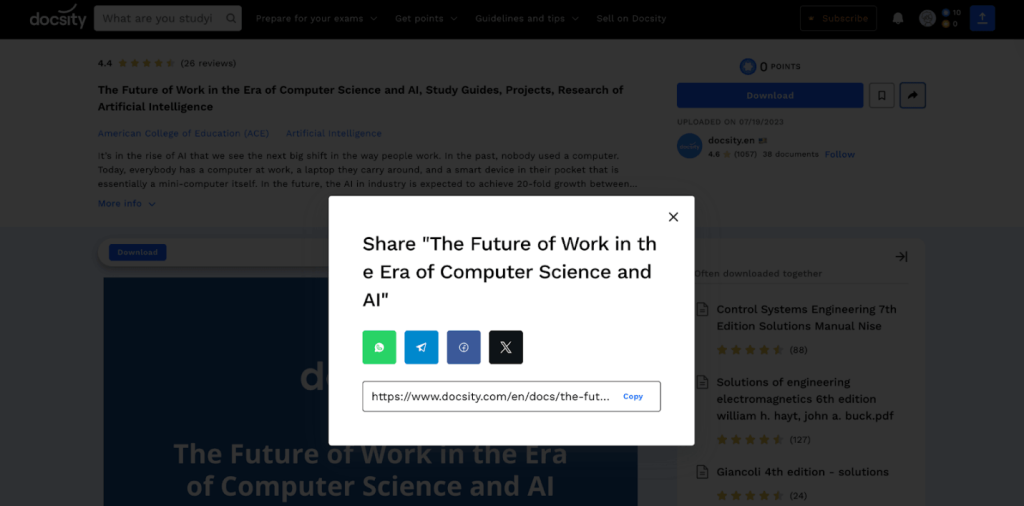
Next, tap the Share Document icon at the top. And click Copy to copy the URL of the document.
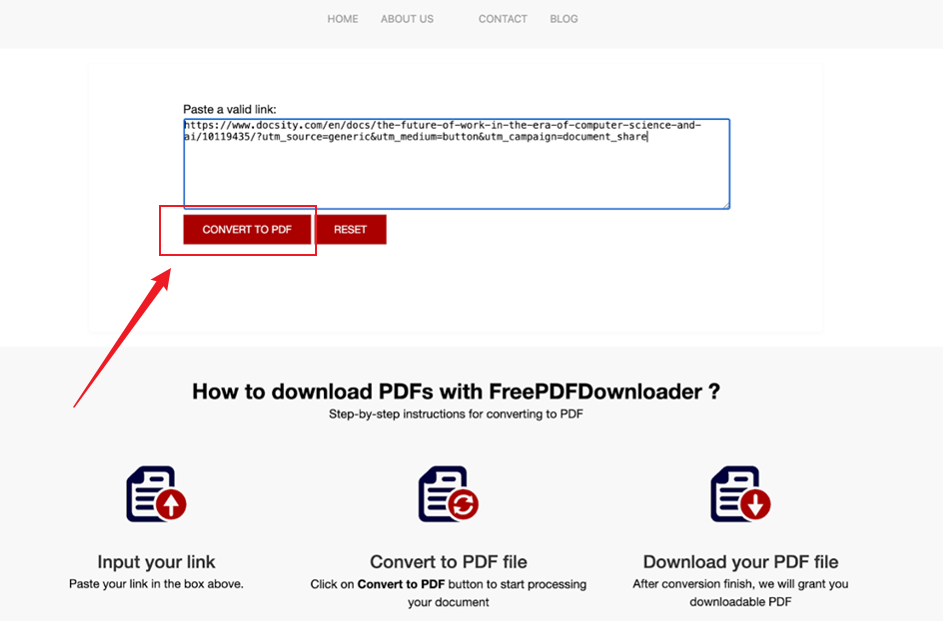
Step 2. Next, launch FreePDFDownloader in your browser. And paste the copied Docsity link into the input box.
Step 3. Tap Convert to PDF to continue. Now, wait briefly while the tool completes processing the file.
Step 4. Lastly, press Download to store the PDF on your device.
Pros
- Easy to use with a simple interface; no technical skills required.
- Completely free and works across devices via browser.
- No need to create an account.
- Quick processing for standard documents.
Cons
- Using these tools to get around paywalls is unethical, violates Docsity’s terms of service, and may be treated as intellectual property theft.
- Possible security or privacy risks, including malware infections or tracking.
- Download quality or formatting may vary.
#2. Docsity.vpdfs.com
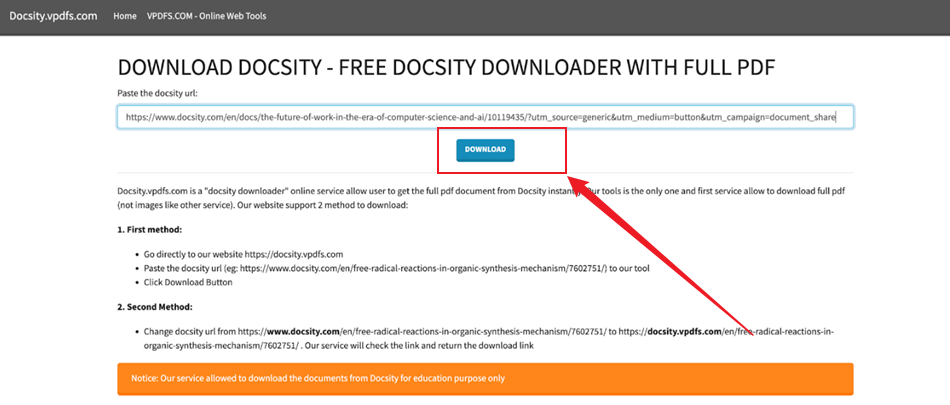
Docsity.vpdfs.com is an online tool that allows users to quickly access and download Docsity documents by turning shared links into downloadable PDFs. It gives users a simple method to access materials without relying on the platform’s credits.
Here’s how to download Docsity PDFs for free using Docsity.vpdfs.com.
Step 1. Go to the Docsity website and open the document you need to download.
Step 2. Click the Share Document icon at the top and click Copy to copy the URL of the document.
Step 3. Now, open Docsity.vpdfs.com in your browser. And paste the copied Docsity URL in the search bar.
Step 4. Click Download, then wait a few moments while the tool processes the file.
Pros
- Does not require account registration or credits to access files.
- Helps download study materials (notes, summaries, exams) without earning points by uploading their own documents or purchasing a premium plan.
- Provide the full PDF document, unlike some other services that might only show image previews.
- Offers quick, instant downloads after pasting the Docsity URL.
- Provides access to Docsity’s extensive library of study materials, including exam prep materials and subject-specific notes.
Cons
- May fail to download documents that are heavily encrypted or restricted only to paid premium users.
- Minimal traffic and a small community may reflect limited reliability or assistance.
- Employs iframe technology, which can at times appear suspicious.
Is It Legal to Download Docsity PDFs for Free
Many users may wonder, “Is it legal to download Docsity files?” The answer depends on how the content is accessed and used. Numerous documents on Docsity are protected by copyright, meaning that downloading them without permission, credits, or a subscription could breach the platform’s terms and intellectual property laws.
Some content may be considered fair use, like for personal study or research, yet this doesn’t always bypass access limitations. To remain secure, use approved methods or check that the content is legally shared.
BONUS: Best PDF Editor to Edit and Manage Downloaded Docsity PDFs
After learning various ways to download Docsity documents, it’s time to handle them more effectively. Once downloaded, you may need to organize, edit, or manage downloaded Docsity PDFs more effectively—and that’s where JOPDF can help.
JOPDF is a convenient tool designed to help users edit PDFs for free without any hassle or technical knowledge. Additionally, it functions as the best PDF converter to convert files to and from PDFs, allowing smooth and quick format changes. Whether you need to merge notes, split pages, or modify content, it works smoothly. You can even convert Docsity to PDF for free, making it ideal for efficiently managing downloaded Docsity PDFs.
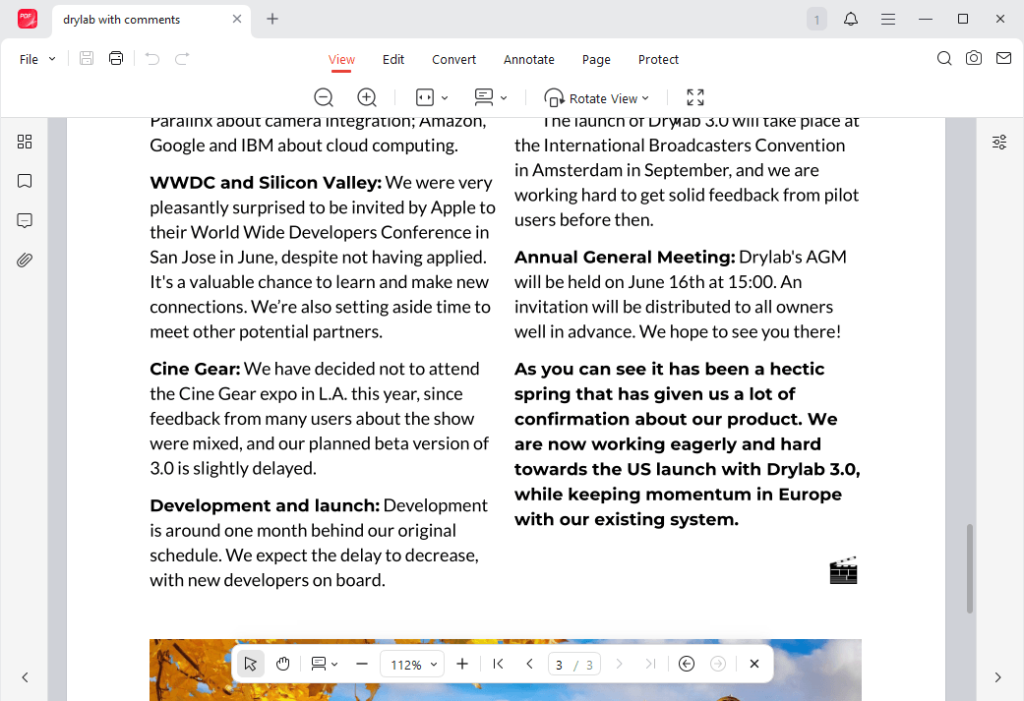
Other outstanding features of JOPDF
- Easily redline a PDF to track changes and edits directly within your documents.
- Merge, split, compress, and organize PDF pages to efficiently manage downloaded Docsity PDFs.
- Add comments, highlights, and notes seamlessly as you annotate a PDF to improve study organization.
- Offers a modern, clean, yet intuitive and simple, user-friendly interface for editing PDFs and handling all documents smoothly.
- Beyond Docsity, it can convert downloaded Studocu to PDFs fast, making study materials easy to edit and share.
Final Thoughts
That’s all. Academic content shouldn’t be locked behind paywalls or subscription barriers. By applying these methods and tools, you can download Docsity PDF for free and access essential study resources with ease. Whether through official downloads, free Docsity downloaders, or JOPDF, these tools support smoother workflows and better learning efficiency.
FAQs
#Uploading documents (20 points each).
#Completing your profile/registration (10 points).
#Reviewing documents (5 points each).
#Answering questions (5 points per answer, 1 per day).
#Having your answer voted best (10 points).
#Reviewing your university (5 points, one-time).
Table of Contents

Your Best Free PDF Expert in PDF editing, compressing, converting, annotating, protect, organizing, and more.
Free DownloadWindows · macOS · Linux

Olivia
“Olivia is an editor at JOPDF, where she writes practical guides and insightful articles on managing PDFs—covering topics like editing, annotating, converting, and organizing files efficiently. Passionate about clear communication and digital productivity, Olivia enjoys spending her free time cooking, watching movies, and hiking to unwind and find inspiration for her writing.”
![Find Ways to Download Manga as PDF for Free [5 Proven Ways]](https://b.jopdf.com/wp-content/uploads/2026/04/download-manga-pdf.png)
![5 Best Free PDF Compressors in 2026 [Desktop and Online]](https://b.jopdf.com/wp-content/uploads/2026/04/best-free-pdf-compressor.png)
![4 Best Methods on How to Edit a Signed PDF [Includes Tips]](https://b.jopdf.com/wp-content/uploads/2026/04/how-to-edit-a-signed-pdf.png)
