Summary :
Are you looking for the best PDF editor for Windows to handle documents for free? You may need a replacement for the software you’re using, or you want to save money. Many known PDF applications often require expensive subscriptions and include unnecessary features. For those seeking daily use of comprehensive functionalities, this post offers excellent choices. Learn about the 5 best free PDF editors for Windows that you may love.
1. JOPDF
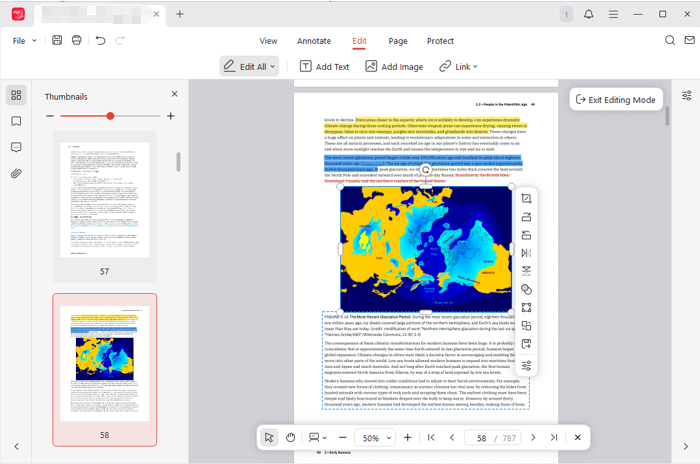
JOPDF matches all the important editing features from premium software while being completely free. The free PDF editor for Windows lets you view, edit, annotate, secure, and page-organize PDF documents all for free. It can make existing text and images editable, allowing you to change fonts, replace pictures, add content, and do much more. The is fast and lightweight on your device, offering an intuitive UI.
The best free PDF editor for Windows 11/10/8.1/8/7 is available for download and use without any restrictions. No need to sign up, and no limitations either.
What makes JOPDF a good Windows PDF editor:
- It has all the essential tools you need to work on PDF files for free, like inserting text, creating hyperlinks, and adding images to a PDF.
- Mark up, draw, type on, rearrange pages, password-protect, unlock, and directly edit existing text in a PDF.
- Full block of text recognition and changing, as well as image cropping, resizing, etc.
- Save changes without a watermark or hidden subscription.
2. PDF24 Creator
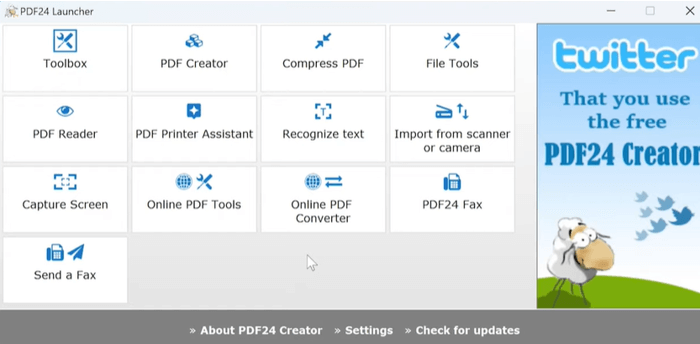
PDF24 Creator is the second-best free PDF editor for Windows. The toolkit offers a wide set of features to make your editing work easy. The desktop Windows version brings all online PDF24 tools offline. Released under a freeware license, it has no paid version, upgrade, or hidden fees. The software to edit PDFs is installed as a PDF printer and converter. The PDF editor is free to download for Windows 10/11 and older Windows 8/7.
Best for:
- Entirely free to use for individuals or businesses.
- Tools for merging, splitting, compressing, encrypting, and removing passwords from PDF files.
- Create PDFs from various programs and documents.
- Multi-language user interface.
3. LibreOffice Draw
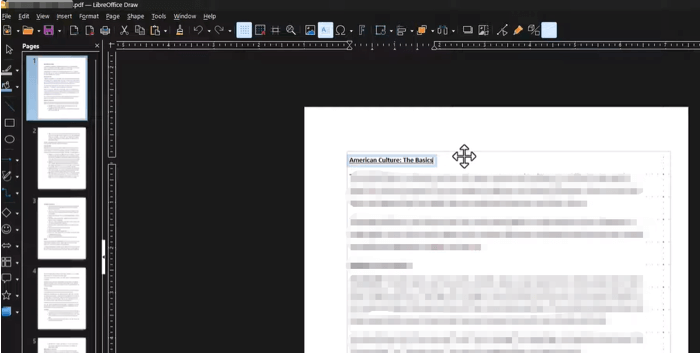
If you have no other option, give LibreOffice Draw a go. It is a free, open-source, offline PDF editor software for Windows 10 and 11, allowing you to edit text and objects. It is included in the LibreOffice office suite, supported by a non-profit organization, and designed as a vector graphic editor. It’s also available on macOS and Linux. This is one of the best apps to edit PDFs, but it is not as user-friendly or powerful as a dedicated PDF app.
Best for:
- You can download the best free PDF reader and editor for Windows 10 and 11.
- Allow editing text and images, and adding text boxes.
- Insert shapes, lines, arrows, and other annotations.
4. Sejda
Sejda is an easy-to-access free PDF editor for Windows laptops/PCs, as well as other operating systems. The online PDF toolkit combines PDF viewing, splitting, converting, editing, and protection all for free. Although there is a certain file size limit or page limit, it is still a decent choice. You can use it without registration on the go at any time. The PDF editor allows users to process files 3 times per hour for free.
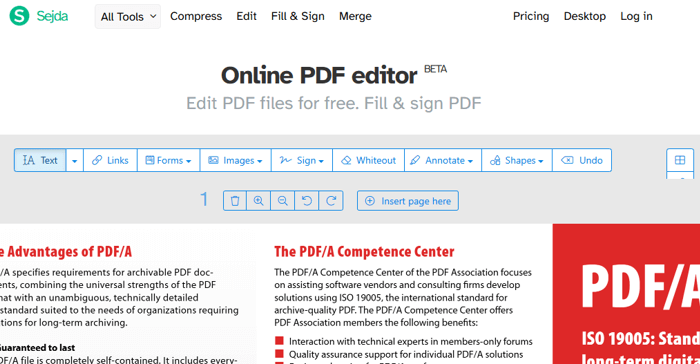
Best for:
- Web-based, free PDF editing software for Windows with no download hassle.
- Reorder, delete, merge, and add pages to a PDF.
- Fill, sign, watermark, and crop PDF pages.
- Clean website interface.
5. PDFescape
PDFescape is worth mentioning as a free PDF editor for Windows. It works great for many of your needs without creating an account for a free trial. It limits the file to 10 MB/100 pages, and file storage to up to 10 files a week. However, the availability of adequate editing tools and the ease of file download make it absolutely worth considering. The PDF highlighter in the web app needs to be improved.

Best for:
- Cross-platform free PDF viewer and editor for Windows 11 and older versions and other devices.
- Add form fields, links, whiteout, and text.
- Move, resize, and rotate images, and edit original text in PDFs.
Free Windows PDF Editors for Basic Editing Tasks
In addition to the five free PDF editor apps for Windows mentioned above, there are some other programs to edit a PDF. If you only need to make simple text additions, comments, and signatures, this section lists several top-tier alternatives.
Firefox PDF Editor: add text, drawings, highlights, comments, and images.
Adobe Reader: take notes, comments, drawings, stamp, sign, and fill out PDFs.
PDFsam Basic: free PDF editor on Windows for merging, separating, rotating, and extracting PDF pages.
What to Look for in a Free PDF Editor for Windows
Among all these options, which is the better pick overall? To know what your go-to personal editor is, dig into your actual needs.
Edit ability: Determine whether you want the free tool to perform real editing on the source text or its elements. If so, JOPDF is ideal, as it doesn’t require you to subscribe or upgrade to a higher version. If not, Adobe Reader, PDF24 Creator, and some other software are enough.
Annotate capability: while most of the free PDF editors have this power, you should select those that are the most feature-rich. Typical annotating options include sticky notes, text typing, shapes, and line markup.
Organize pages: come into play when you need to remove, rotate, or reorder the pages due to scanning mistakes.
Straightforward and handy to use, painless navigation and workflows are crucial for both novice and experienced users. You can save minutes and effort.
Conclusion
What are the best PDF editor recommendations for free download on Windows that allow for free document manipulation? After months of testing and trial, yes, and the five software solutions in this post are the answer. Thanks to the PDF technology, there is no need to recreate a file from Word or other programs to edit and export as a new PDF.
FAQs
Table of Contents

Your Best Free PDF Expert in PDF editing, compressing, converting, annotating, protect, organizing, and more.
Free DownloadWindows · macOS · Linux

Selena
Staff Editor
“Selena is a staff editor working for JOPDF, passionate and committed to providing how-to and round-up articles. Over 8 years of specialized skills and experience in PDF solutions, hoping to help users ease their lives and solve whatever they encounter. "Work smarter, not just harder!"”
![Find Ways to Download Manga as PDF for Free [5 Proven Ways]](https://b.jopdf.com/wp-content/uploads/2026/04/download-manga-pdf.png)
![5 Best Free PDF Compressors in 2026 [Desktop and Online]](https://b.jopdf.com/wp-content/uploads/2026/04/best-free-pdf-compressor.png)
